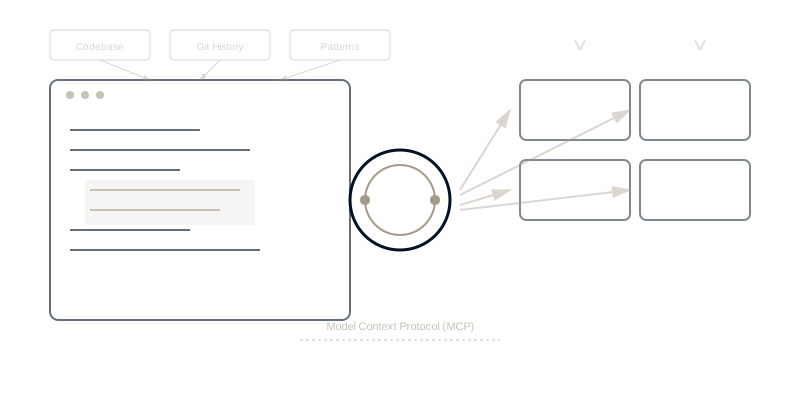
"Vibe coding" became a meme in developer communities—the idea that you can just describe what you want and AI writes the code. It sounds ridiculous. But it's actually happening, and the reason it works has nothing to do with vibes. It's context engineering.
When developers use Cursor or Windsurf to build complex features in minutes instead of hours, they're not experiencing magic. They're experiencing what happens when AI has deep contextual awareness of your codebase, architecture patterns, existing APIs, and organizational conventions. This is context engineering applied to software development.
Research from GitHub on Copilot effectiveness shows that AI coding assistants work best when they have comprehensive context about the project—not just the current file. The difference between "occasionally helpful" and "transformatively powerful" AI coding comes down to context architecture.
What Makes AI Coding Actually Work
Most developers' first experience with AI coding goes like this:
Attempt 1: Ask ChatGPT to write a feature
- AI generates plausible-looking code
- Code doesn't compile (wrong dependencies)
- Doesn't match project architecture
- Ignores existing conventions
- Result: Faster to write it yourself
Attempt 2: Try GitHub Copilot
- Better than ChatGPT (has some file context)
- Suggestions occasionally useful
- Still requires heavy editing
- Doesn't understand broader architecture
- Result: Modest productivity boost
Attempt 3: Use Cursor or Windsurf with full codebase context
- AI understands entire project structure
- Suggestions match existing patterns
- Respects architectural conventions
- Integrates with existing APIs correctly
- Result: 3-10x productivity improvement
The difference isn't AI capability—it's context availability.
The Four Layers of Coding Context
Using the Context Compass framework for software development reveals why modern AI coding tools are so effective:
Layer 1: Working Memory - Current Development Context
What it is: Current file, recent changes, active feature development, immediate code context
Traditional AI coding (ChatGPT, basic Copilot):
- Sees only current file
- No awareness of recent changes
- Doesn't know what feature you're building
- Suggestions often contradict recent work
Context-aware AI coding (Cursor, Windsurf):
- Reads entire file tree
- Knows your recent git commits
- Understands active feature branch
- Suggests code that builds on recent work
Example: Building a new API endpoint
Without working memory context:
// AI suggests generic Express route
app.get('/api/users', (req, res) => {
  // Generic handler - doesn't match your patterns
});
With working memory context:
// AI knows you use tRPC, reads existing patterns
export const userRouter = createTRPCRouter({
  getAll: publicProcedure.query(async ({ ctx }) => {
    // Matches your auth patterns, error handling, DB access
    return await ctx.db.user.findMany();
  }),
});
The AI didn't "get smarter"—it had access to your working memory (recent code, existing patterns).
Layer 2: Episodic Memory - Development History
What it is: Past decisions, refactorings, bug fixes, "what we tried before"
Traditional AI: No memory of project history
- Suggests approaches you already tried and abandoned
- Recommends patterns you deliberately refactored away from
- Doesn't know why certain approaches don't work in your codebase
Context-aware AI: Reads git history and commit messages
- Knows what was tried before
- Understands why certain patterns exist
- Avoids suggesting discarded approaches
Example: Database abstraction layer
Developer searches git history: "Why did we remove Prisma?"
AI reads commit message from 8 months ago:
feat: migrate from Prisma to Drizzle ORM

Prisma's migration system caused production issues:
- Auto-migrations too aggressive for our DB size
- Lock timeouts on tables >10M rows
- Rollback complexity unacceptable

Drizzle gives us explicit migration control.
Do not revert without addressing migration safety.
Now when AI suggests code, it uses Drizzle patterns—doesn't recommend "switching to Prisma" like generic AI would.
The value: AI learns from your project's history, doesn't repeat past mistakes.
Layer 3: Semantic Memory - Architectural Conventions
What it is: Code architecture, design patterns, organizational standards, "how we build things"
Traditional AI: Uses generic best practices
- Suggests industry-standard patterns that may not fit your architecture
- Doesn't understand your specific design decisions
- Code works but doesn't "feel like" your codebase
Context-aware AI: Learns your architectural conventions
- Matches your file organization
- Follows your naming patterns
- Respects your error handling approach
- Uses your state management patterns
Example: State management patterns
Your architecture: You use Zustand for global state, React Context for feature-scoped state, local state for components.
Generic AI suggestion:
// Suggests Redux (industry standard)
import { useDispatch, useSelector } from 'react-redux';
// Code that doesn't match your state patterns
Context-aware AI:
// Reads your existing code, sees Zustand pattern
import { create } from 'zustand';

export const useUserStore = create<UserState>((set) => ({
  // Matches your exact Zustand patterns
}));
The value: Generated code feels like you wrote it, matches team conventions.
Layer 4: Procedural Memory - Development Workflows
What it is: How development actually happens—git workflow, testing patterns, deployment processes
Traditional AI: Doesn't know your procedures
- Suggests code without tests (but your team requires tests)
- Doesn't follow your git branch naming
- Ignores your pre-commit hooks
- Creates files in wrong locations
Context-aware AI with MCP: Reads your development procedures
- Knows your testing requirements
- Follows git workflows
- Respects file organization rules
- Generates code that passes linting/formatting
Example: Feature development workflow
Your workflow (documented in .github/workflows.md):
- Create branch:
feature/TICKET-description - Write tests first (TDD)
- Implement feature
- Update documentation
- Run
npm run validatebefore commit
Context-aware AI:
# AI knows your workflow, suggests proper sequence
git checkout -b feature/WAY-123-user-preferences

# Creates test file first (knows your TDD requirement)
# apps/web/src/features/preferences/__tests__/usePreferences.test.ts

# Then implementation
# apps/web/src/features/preferences/usePreferences.ts

# Updates docs (knows your documentation standard)
# docs/features/user-preferences.md

# Runs validation (knows your pre-commit requirements)
npm run validate
The value: AI doesn't just write code, it follows your development procedures.
Cursor vs Windsurf vs VS Code: Context Architecture Comparison
Cursor: Codebase-Wide Context
Context approach: Index entire codebase, provide AI with comprehensive file tree awareness
Strengths:
- Deep codebase understanding
- Excellent multi-file refactoring
- Strong architecture pattern matching
- Fast codebase search integration
Context layers:
- ✅ Working memory (current files + recent changes)
- ✅ Episodic memory (git history integration)
- ✅ Semantic memory (learns architectural patterns)
- ⚠️ Procedural memory (some workflow awareness)
Best for: Teams with established codebases, complex refactoring, architectural consistency
Windsurf: Multi-Tool Context Orchestration
Context approach: Orchestrate context across multiple development tools and services
Strengths:
- Broader context beyond just code (issues, docs, discussions)
- Team collaboration context
- Integration with project management tools
- Organizational workflow awareness
Context layers:
- ✅ Working memory (code + active issues + recent discussions)
- ✅ Episodic memory (full project history across tools)
- ✅ Semantic memory (architectural patterns + team conventions)
- ✅ Procedural memory (full workflow awareness)
Best for: Teams wanting context across entire development workflow, not just code
VS Code + Copilot: File-Level Context
Context approach: Primarily current file context, some multi-file awareness
Strengths:
- Lightweight, fast
- Excellent inline suggestions
- Good for individual file work
- Wide language support
Context layers:
- ✅ Working memory (current file + imports)
- ⚠️ Episodic memory (limited history awareness)
- ⚠️ Semantic memory (learns some patterns)
- ❌ Procedural memory (no workflow awareness)
Best for: Individual developers, smaller projects, general coding assistance
The MCP Revolution in AI Coding
The Model Context Protocol (MCP) announcement changes AI coding fundamentally. Before MCP, each coding tool had proprietary context systems. With MCP, context becomes portable.
What this means for developers:
Before MCP: Context locked in tools
- Cursor's codebase index only works in Cursor
- Switching tools means losing context investment
- Can't share context across different AI coding assistants
After MCP: Context becomes infrastructure
- Build context architecture once
- Works across MCP-compatible coding tools
- Share organizational coding context across team's tool choices
- Future-proof context investment
Example: Team context architecture
# Team Coding Context (MCP-Compatible)

## Architecture Patterns (.mcp/architecture.md)
- Next.js 15 App Router (not Pages Router)
- Tailwind CSS 4 (not CSS modules)
- Zustand for global state
- React Hook Form + Zod for forms

## Testing Standards (.mcp/testing.md)
- Vitest for unit tests
- Playwright for E2E
- 80%+ coverage required
- Tests co-located with components

## Git Workflow (.mcp/workflow.md)
- Branch: feature/TICKET-description
- TDD required (tests before implementation)
- PR requires 2 approvals
- Squash merge to main
Any MCP-compatible coding assistant reads this context, follows team patterns—whether using Cursor, Windsurf, VS Code, or future tools.
Real-World Impact: The Economics of Context-Aware Coding
Let's examine a 10-person development team:
Traditional AI Coding (Limited Context)
Development velocity:
- AI suggestions: 30% helpful, 70% require heavy editing
- Time savings: ~15% on routine coding tasks
- Architectural mismatches require refactoring: 8 hours/week team-wide
- Pattern inconsistency creates tech debt
Annual impact:
- Modest productivity boost: ~$120K value
- Tech debt from inconsistent patterns: -$80K
- Net value: $40K/year
Context-Aware AI Coding (Full Context)
Development velocity:
- AI suggestions: 75% helpful, 25% require editing
- Time savings: ~40% on routine coding + complex refactoring
- Architectural consistency: AI matches patterns
- Reduced code review time (consistent patterns)
Annual impact:
- Major productivity boost: ~$380K value
- Tech debt reduction: +$60K (better consistency)
- Faster onboarding: +$40K (new devs learn from AI using team patterns)
- Net value: $480K/year
ROI comparison: Context-aware coding delivers 12x more value than basic AI coding assistance.
Implementing Context-Aware Coding: Practical Guide
Week 1: Context Audit
Map existing development context:
- What architectural patterns do you use?
- What coding conventions exist (written/unwritten)?
- What development workflows are standard?
- What historical decisions shaped current codebase?
Document high-value context:
- Architecture decision records (ADRs)
- Coding standards and conventions
- Testing requirements
- Deployment procedures
Week 2: Tool Selection
Evaluate based on context needs:
- Cursor if codebase-wide context is priority
- Windsurf if multi-tool orchestration needed
- VS Code + Copilot if lightweight approach preferred
Consider MCP compatibility:
- Will this work with future tools?
- Can context be shared across team?
- Is context architecture portable?
Week 3-4: Implementation
Create context architecture:
- Document architectural patterns
- Capture coding conventions
- Define development workflows
- Make context AI-readable (Markdown, structured formats)
Team training:
- How to leverage full context
- When to provide additional context
- How to maintain context accuracy
The Future: AI Coding as Context Engineering
The evolution of AI coding isn't about better models—it's about better context:
2023: AI coding = autocomplete+
- Helpful for routine tasks
- Limited architectural awareness
- Developers still write most code
2024: AI coding = context-aware suggestions
- Understands codebase patterns
- Matches architectural conventions
- Developers guide, AI implements
2025-2026: AI coding = context engineering
- Full organizational memory
- Procedural workflow awareness
- Cross-tool context sharing (MCP)
- Developers architect, AI builds
The teams winning with AI coding aren't those using the newest models—they're those with the best context engineering.
Experience Context-Aware Development
Want to see how organizational memory transforms development? The C² Method puts the Context Compass into your repo—architectural decisions, development workflows and gotchas, kept as files Cursor, Windsurf, VS Code and Claude Code all read. Connect the Waymaker MCP server and the same agent can reach your business context in Commander.
The result: AI coding assistants that actually understand your organization's development culture, not just generic programming patterns.
Register for the beta and experience context-aware AI coding.
AI coding effectiveness is constrained by context availability, not AI capability. Learn more about context engineering fundamentals and discover the complete Context Compass framework.
Frequently asked questions
- Why do AI coding assistants lose context between sessions?
- Because each session starts empty. The assistant sees the files you open and the conversation you are having, and nothing of the decisions, constraints or history that shaped the codebase. Every session re-derives context that already existed somewhere, which is why the same explanations get typed repeatedly.
- What is the difference between Cursor, Windsurf and VS Code with Copilot?
- Mostly how much of the codebase the assistant sees and how it is fed. Cursor and Windsurf are built around indexing a project so the model has broader context; VS Code with an extension is closer to completion within the file you are in. The gap is context depth rather than model quality.
- How do you give an AI coding tool business context?
- Put it somewhere the tool can read. Constraints, decisions and the reasoning behind them have to live in files or a system the assistant can reach, not in someone's memory or a chat thread. That is a documentation problem before it is a tooling one.
- Does more context always make AI coding better?
- No. Irrelevant context crowds out relevant context and degrades the answer. What helps is the right context — the constraints that apply to this change — rather than the maximum amount of it, which is why indexing a whole repository is not automatically an improvement.
About the Author

Waymaker Editorial
Stuart Leo founded Waymaker to solve a problem he kept seeing: businesses losing critical knowledge as they grow. He wrote Resolute to help leaders navigate change, lead with purpose, and build indestructible organizations. When he's not building software, he's enjoying the sand, surf, and open spaces of Australia.