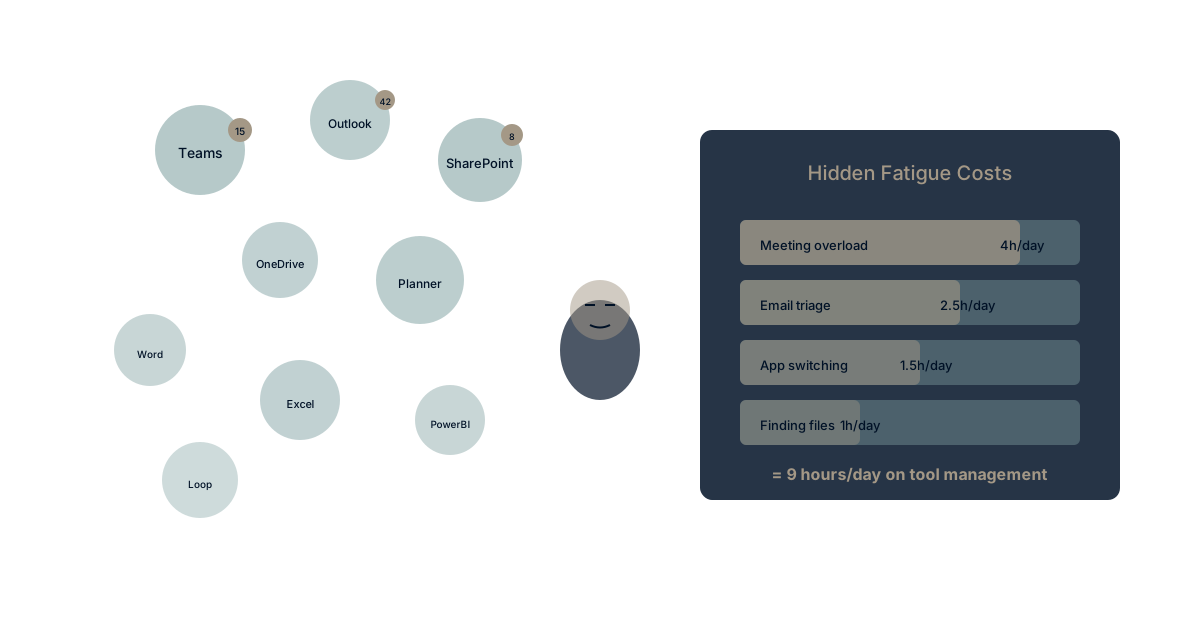
Another Teams meeting. Another SharePoint site you can't navigate. Another Outlook inbox overflowing with messages you'll never read. Another day of Microsoft 365 fatigue.
You're not alone. Microsoft's own research shows that time spent in Teams meetings has increased 252% since February 2020. The same tools designed to boost productivity have become the primary source of workplace exhaustion.
The hidden cost of Microsoft 365 isn't the license fee—it's the productivity drain nobody measures.
Here's what that fatigue actually costs, and what to do about it.
The Five Faces of M365 Fatigue
Face 1: Teams Meeting Overload
The symptom: Your calendar is a wall of blue. Back-to-back Teams meetings leave no time for actual work. "Quick sync" calls multiply until they consume entire days.
The numbers: According to Atlassian research, the average employee spends 31 hours per month in unproductive meetings. With Teams making meetings frictionless to schedule, that number is climbing.
The hidden cost: Meeting culture crowds out deep work. Knowledge workers need 2-4 hour blocks for creative and analytical work. When meetings fragment every day into 30-minute chunks, that deep work never happens.
The math: If 40% of scheduled meetings are unnecessary (Microsoft's own estimate), and you attend 20 meetings weekly, that's 8 hours per week—a full workday—lost to meetings that shouldn't exist. It's the same drain documented in the research on context switching costs across the economy.
This is the context switching cost in its most visible form. Every meeting requires mental context loading and unloading. Stack enough meetings together, and you're spending more energy switching than working.
Face 2: SharePoint Labyrinth
The symptom: "Where's that document?" becomes the most common question. Team sites multiply. Folder structures contradict each other. Search returns everything except what you need.
The reality: SharePoint was designed in an era of intranets and content management. It's been retrofitted repeatedly for modern collaboration needs, and the seams show. The permission model alone requires specialized expertise to manage properly. It's no accident that teams keep leaving SharePoint in 2026.
The hidden cost: Studies show knowledge workers spend 1.8 hours per day searching for information. In SharePoint-heavy organizations, that number skews higher because the system's complexity creates more places to lose things.
The symptom disguised as solution: Organizations hire SharePoint administrators, create governance committees, build elaborate folder structures—all to manage a tool that should make finding information simpler, not harder.
The knowledge silo problem intensifies when your document management system becomes a document hiding system.
Face 3: Outlook Inbox Despair
The symptom: 200+ unread emails. Thread piled on thread. Important messages buried under newsletter subscriptions and reply-all storms. The inbox as to-do list—except it's a to-do list you can never complete.
The pattern: Email was designed for asynchronous communication. Microsoft has bolted on tasks, calendaring, file sharing, and quasi-chat features. The result is a tool trying to do everything, excelling at nothing—which is exactly why Outlook search fails when you treat email as a database.
The hidden cost: Research from the University of California, Irvine found that it takes an average of 25 minutes to resume a task after an email interruption. If you check email 15 times per day (below average for most workers), that's potentially 6+ hours of lost productivity daily.
The symptom disguised as discipline: Inbox zero methodologies, email management courses, Outlook rules and folders—all treating the symptom rather than questioning why email became the center of work in the first place.
Face 4: The App Switching Tax
The symptom: Teams for chat. Outlook for email. SharePoint for documents. Planner for tasks. OneNote for notes. Loop for collaboration. Each app has its own context, notifications, and mental model.
The numbers: The average Microsoft 365 user switches between apps every 40 seconds. Each switch carries cognitive overhead—remembering where you were, what you were doing, and how this app works differently from the last one.
The hidden cost: Microsoft positions app variety as "the right tool for the job." In practice, it means fragmenting context across a half-dozen interfaces. Information that should flow seamlessly requires copy-paste, searching in multiple places, and manual synthesis.
The math: At 40-second intervals over an 8-hour day, that's roughly 720 app switches daily. If each switch costs just 10 seconds of cognitive reorientation, you lose 2 hours per day just navigating Microsoft's app ecosystem.
This is the tool sprawl problem contained within a single vendor. Microsoft 365 isn't one tool—it's a dozen tools loosely connected by single sign-on.
Face 5: Copilot Promise vs. Reality
The symptom: Copilot can summarize a document or draft an email. But it doesn't know your projects, your priorities, or your organizational context. It's AI that helps with tasks while missing the bigger picture.
The reality: Microsoft Copilot operates at the document level, not the organizational level. It can assist with what's in front of you but can't connect your work to strategic goals, team context, or organizational history. That gap is the whole story behind Copilot versus real AI memory.
The hidden cost: Organizations paying $30/user/month for Copilot licenses often find it's useful for drafting and summarizing but silent on the strategic questions that matter most. It's AI that makes you faster at tasks without making you smarter about priorities.
What's missing: Context engineering—AI that understands organizational memory, not just document contents. Copilot helps you write; it can't help you think strategically because it doesn't understand your strategy.
The Compounding Cost
Calculating Your M365 Fatigue Tax
Let's quantify the hidden costs for a 100-person organization:
Meeting overload: 8 hours/person/week × 100 people × $50/hour = $40,000/week
SharePoint searching: 1.8 hours/person/day × 100 people × $50/hour × 5 days = $45,000/week
Email interruptions: 2 hours/person/day × 100 people × $50/hour × 5 days = $50,000/week
App switching: 2 hours/person/day × 100 people × $50/hour × 5 days = $50,000/week
Total weekly productivity drain: $185,000
Annual cost: $9.6 million
These numbers seem shocking until you recognize they're measuring time that simply evaporates—time that could go toward strategic work, customer engagement, or innovation.
And that's before counting the harder-to-measure costs:
- Decision latency: When information is hard to find, decisions get delayed
- Onboarding drag: New employees take months to learn where everything lives
- Knowledge loss: Context trapped in email threads and SharePoint folders disappears when people leave
- Strategic disconnect: Daily work loses connection to organizational goals
The License Fee Comparison
Microsoft 365 E3 costs roughly $36/user/month. For 100 users, that's $43,200/year.
The hidden productivity costs? $9.6 million/year.
You're spending 220x more on the hidden costs than on the software itself.
The license fee isn't the problem. The way the tools fragment your organization's attention and context is the problem. For the costs that never even reach the invoice, see what your Microsoft 365 bill doesn't show.
Why This Keeps Getting Worse
Microsoft's Incentive Structure
Microsoft benefits from adding features, adding apps, adding complexity. Every new app is a new checkbox on the enterprise sales sheet. Integration happens through acquisition and bolted-on connectors rather than fundamental architectural unity.
The result: Each year brings new apps (Loop, Viva, Lists) that further fragment the experience rather than unifying it. The solution to M365 complexity is often... more M365.
The Sunk Cost Trap
Organizations invested heavily in M365 deployment feel committed to making it work. Training programs, governance structures, SharePoint architectures—all represent sunk costs that create resistance to change.
The trap: "We've invested too much to switch" becomes the justification for absorbing ever-higher hidden costs. The sunk costs are real, but they shouldn't determine future strategy.
The Network Effect Lock-In
Everyone uses M365. Partners expect SharePoint links. Clients use Teams. The ecosystem creates switching costs that aren't about the technology—they're about coordination.
The reality: Network effects are real but often overstated. Document sharing works across platforms. Video calls work across platforms. The actual lock-in is usually about habit, not necessity.
What to Do About It
Option 1: Optimize Within M365
Approach: Ruthless meeting hygiene, SharePoint governance, Outlook training, app rationalization.
Actions:
- Implement "no-meeting days" and default 25-minute meetings
- Consolidate SharePoint sites with clear ownership
- Train teams on Outlook rules and task extraction
- Choose specific apps and discourage the rest
Honest assessment: This can reduce fatigue by 20-30% but doesn't address the fundamental architecture. You're optimizing a fragmented system rather than unifying it.
Option 2: Add a Strategy Layer
Approach: Keep M365 for communication and documents. Add a strategic execution platform for goals, projects, and context.
Actions:
- Maintain Outlook and Teams for what they do well
- Add a platform that connects strategy to execution
- Use context engineering to unify organizational memory
- Reduce reliance on SharePoint for knowledge management
Honest assessment: Reduces M365's role to communication while gaining strategic visibility. Adds another platform but with purpose rather than fragmentation.
Option 3: Strategic Migration
Approach: Evaluate platforms designed for unified work rather than accumulated acquisitions.
Actions:
- Audit actual M365 usage versus available features
- Calculate true cost including productivity drain
- Evaluate platforms built for integration, not accumulation
- Plan phased migration with clear success metrics
Honest assessment: Biggest change, biggest potential gain. Requires executive sponsorship and change management commitment.
The AI Inflection Point
Here's why this decision matters more now than ever: AI effectiveness depends on data unity.
Context engineering requires AI to access your organizational memory—goals, decisions, context, history. When that memory is fragmented across Teams channels, SharePoint sites, Outlook folders, and Planner boards, AI can only work with fragments.
Microsoft's answer: Copilot, which helps with individual tasks in individual apps.
What's actually needed: AI that understands organizational context across all your work—not just the document you have open.
The organizations that unify their work data now will have AI capabilities in 2027 that fragmented organizations simply cannot achieve. M365's architecture makes that unification structurally difficult.
Experience Unified Work
Want to see what post-fatigue productivity looks like? Waymaker Commander brings strategy, execution, and AI together in one platform—not a dozen apps with different interfaces and disconnected contexts.
The result: One place for goals, projects, tasks, and documents. AI that knows your organizational context. Time spent working, not switching.
Register for the beta and experience the difference between accumulated features and integrated design.
Microsoft 365 fatigue is real, measurable, and expensive. The hidden productivity costs dwarf the license fees. Recognizing this isn't about blaming the tools—it's about honestly assessing whether accumulated complexity serves your organization's needs. Learn more about our Context Compass framework and explore how context engineering creates unified organizational intelligence.
Frequently asked questions
Q: What is Microsoft 365 fatigue? It's the productivity drain that builds up across Teams meeting overload, the SharePoint labyrinth, Outlook inbox despair, the app switching tax, and the gap between Copilot's promise and reality. The hidden cost isn't the license fee—it's the time and context that evaporate as the tools fragment your attention.
Q: Why does switching between Microsoft 365 apps cost so much? The average Microsoft 365 user switches between apps every 40 seconds, and each switch carries cognitive overhead—remembering where you were and how this app works differently from the last. Microsoft 365 isn't one tool; it's a dozen tools loosely connected by single sign-on, which is the tool sprawl problem contained within a single vendor.
Q: Can Microsoft Copilot fix this? Copilot operates at the document level, not the organizational level. It can summarize a document or draft an email, but it doesn't know your projects, priorities, or organizational context—so it makes you faster at tasks without making you smarter about priorities.
Q: What can I do about Microsoft 365 fatigue? There are three honest options: optimize within M365 (meeting hygiene, SharePoint governance, app rationalization), add a strategy layer alongside M365 for goals and context, or pursue a strategic migration to a platform built for integration rather than accumulation. Each carries a different size of change and potential gain.
Q: Why does this matter more now? Because AI effectiveness depends on data unity. When organizational memory is fragmented across Teams channels, SharePoint sites, and Outlook folders, AI can only work with fragments—and M365's architecture makes that unification structurally difficult.
Stuart Leo has consulted with Fortune 500 companies on productivity platform strategy. He's the author of Resolute and founder of Waymaker, designed for organizations seeking clarity over complexity.
Part of our guide to leaving microsoft 365.
Frequently asked questions
- What is Microsoft 365 fatigue?
- It's the productivity drain that builds up across Teams meeting overload, the SharePoint labyrinth, Outlook inbox despair, the app switching tax, and the gap between Copilot's promise and reality. The hidden cost isn't the license fee—it's the time and context that evaporate as the tools fragment your attention.
- Why does switching between Microsoft 365 apps cost so much?
- The average Microsoft 365 user switches between apps every 40 seconds, and each switch carries cognitive overhead—remembering where you were and how this app works differently from the last. Microsoft 365 isn't one tool; it's a dozen tools loosely connected by single sign-on, which is the tool sprawl problem contained within a single vendor.
- Can Microsoft Copilot fix this?
- Copilot operates at the document level, not the organizational level. It can summarize a document or draft an email, but it doesn't know your projects, priorities, or organizational context—so it makes you faster at tasks without making you smarter about priorities.
- What can I do about Microsoft 365 fatigue?
- There are three honest options: optimize within M365 (meeting hygiene, SharePoint governance, app rationalization), add a strategy layer alongside M365 for goals and context, or pursue a strategic migration to a platform built for integration rather than accumulation. Each carries a different size of change and potential gain.
- Why does this matter more now?
- Because AI effectiveness depends on data unity. When organizational memory is fragmented across Teams channels, SharePoint sites, and Outlook folders, AI can only work with fragments—and M365's architecture makes that unification structurally difficult.
About the Author

Stuart Leo
Stuart Leo founded Waymaker to solve a problem he kept seeing: businesses losing critical knowledge as they grow. He wrote Resolute to help leaders navigate change, lead with purpose, and build indestructible organizations. When he's not building software, he's enjoying the sand, surf, and open spaces of Australia.