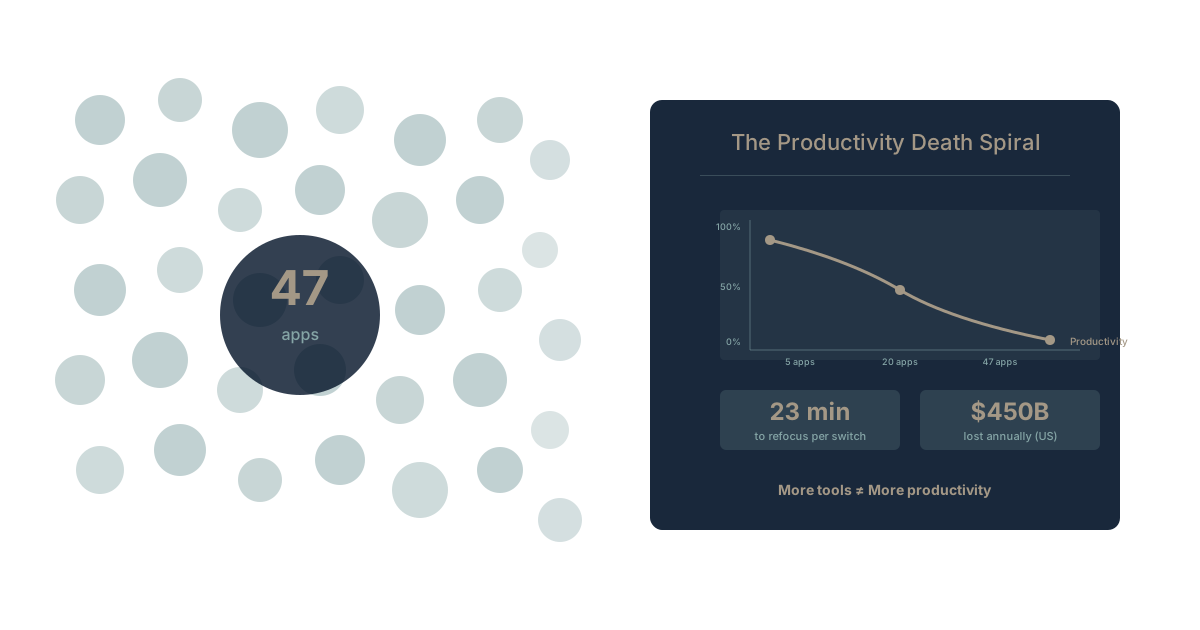
How many apps does your company use?
Go ahead, guess. Most people say 15-20.
The actual number: The average company uses 89 apps. Mid-market companies use 137. Enterprises use over 200. And those are just the officially sanctioned ones—shadow IT adds another 30-50% on top.
Every one of those apps promised to make you more productive. Together, they've done the opposite.
This is tool sprawl—the silent productivity killer that costs organizations millions while masquerading as digital transformation.
The Anatomy of Tool Sprawl
How It Happens
Nobody wakes up and decides, "Let's fragment our organization's work across 100 different applications." Tool sprawl happens gradually, rationally, one justified decision at a time.
Year 1: You start with the basics. Google Workspace or Microsoft 365 for email and documents. Maybe Slack for chat. A project management tool. 5-7 apps total.
Year 2: Marketing needs HubSpot. Sales wants Salesforce. Engineering adds Jira. Each team optimizes for their specific needs. 15-20 apps.
Year 3: The first integrations appear. Zapier connects what doesn't naturally talk. Someone builds a spreadsheet tracking who uses what. 30-40 apps.
Year 4: Shadow IT flourishes. Teams add tools without IT approval because the procurement process takes too long. Someone discovers there are three different expense reporting apps being used simultaneously. 60-80 apps.
Year 5+: Consolidation attempts fail because nobody knows everything that's in use. Mergers add duplicate tool sets. The "app rationalization project" gets funded, discovers the scope is enormous, and gets quietly shelved. 100+ apps.
The Rationality Trap
Here's what makes tool sprawl insidious: every individual app decision made sense at the time.
Marketing needed better campaign tracking. HubSpot was the obvious choice. Sales needed pipeline visibility. Salesforce was the industry standard. Engineering needed issue tracking. Jira was what developers expected. HR needed applicant tracking. Greenhouse had great reviews. Finance needed better forecasting. Adaptive Insights solved that specific problem.
Each decision was rational in isolation. Each team optimized for their own needs. And each optimization created another data silo, another login, another context switch, another piece of organizational memory trapped in a system that doesn't talk to the others.
This is the business amnesia problem in its structural form. Your organization's knowledge isn't in one place—it's scattered across 89 different databases that don't share context.
The Hidden Costs Nobody Counts
The Context Switching Tax
According to research from RescueTime, knowledge workers switch between applications every 40 seconds on average. That's roughly 720 switches in an 8-hour day.
Gloria Mark's research at UC Irvine found it takes an average of 23 minutes to fully return to a task after a context switch. Not every switch triggers a full 23-minute recovery—but the cumulative effect is devastating.
Conservative estimate: If app switching costs just 2 minutes of cognitive overhead per switch, that's 24 hours of lost productivity per person per week. That can't be right, can it?
Let's be more conservative. Say only 10% of switches trigger meaningful cognitive cost. That's still 2.4 hours per person per week—or 125 hours per person per year lost to tool fragmentation. We dig deeper into the hidden cost of context switching when even eight tools are in play.
For a 100-person company at $75/hour fully loaded cost: $937,500/year evaporating into context switches.
The Integration Tax
Tools that don't talk to each other require integration. Integration requires one of three things:
- Native integrations that rarely cover all use cases and often break after updates
- Middleware platforms like Zapier, Workato, or custom APIs that add cost and maintenance
- Manual data entry where humans become the integration layer
Cleo research found that enterprises spend an average of $1.3 million annually on integration. Mid-market companies spend $300-500K. This is the integration tax—the real price of connecting 47 apps that were never designed to talk to each other.
But the visible cost understates the real cost:
- Time spent building integrations that need rebuilding when either tool updates
- Time spent debugging failed syncs that silently corrupt data
- Time spent training people on which data lives where
- Decisions made on partial data because integrations don't capture everything
The Learning Tax
Each new tool requires learning: interface, conventions, shortcuts, quirks. According to TechSmith research, employees spend an average of 52 hours per year learning new software.
With 89 apps in play, even minor updates across the portfolio create significant learning overhead. And that's before counting:
- Onboarding new employees who must learn the entire tool ecosystem
- Vendor changes when a tool gets acquired or sunset
- Feature additions that change workflows
- Cross-training so people can cover for each other
The onboarding cost alone is substantial. When a new employee must learn 30+ tools and understand where information lives across all of them, "time to productivity" stretches from weeks to months.
The Security and Governance Tax
Each app is an attack surface. Each app stores credentials. Each app has permission settings that may or may not align with your security policies.
Verizon's Data Breach Report consistently identifies misconfigured cloud services as a leading breach vector. The more apps, the more configurations, the more places for something to go wrong.
The governance overhead includes:
- Access reviews across dozens of systems
- Compliance documentation that must cover each tool
- Vendor risk assessments for each SaaS provider
- Data retention policies that vary by tool
- Exit procedures when employees leave (did you remember to revoke access to all 47 apps?)
The Vendor Management Tax
Each app means another contract, another renewal negotiation, another vendor relationship, another support channel when something breaks.
Gartner research found that organizations waste 25-30% of SaaS spend on:
- Unused licenses for employees who left or never used the tool
- Duplicate functionality across overlapping tools
- Shelfware that was purchased but never implemented
- Premium tiers when basic features would suffice
For a company spending $500K/year on SaaS, that's $125-150K wasted—before counting the hidden productivity costs.
The Data Fragmentation Problem
Where Your Organizational Knowledge Lives
Think about a critical customer relationship. Where does the knowledge about that customer live?
- Sales history: In Salesforce
- Support tickets: In Zendesk
- Email correspondence: In Outlook or Gmail
- Contract terms: In DocuSign or a PDF somewhere
- Meeting notes: In Notion or OneNote
- Feature requests: In Jira or Productboard
- Usage data: In Amplitude or Mixpanel
- Communication threads: In Slack
To truly understand that customer, someone must mentally synthesize information from 8+ systems. The "complete picture" doesn't exist anywhere except inside individual brains—brains that might leave the company, taking that synthesis with them.
This is the context engineering problem in its starkest form. AI could help synthesize this information, but only if the data were unified. Fragmented across 8 systems with different schemas, access controls, and data formats? No AI can solve that without massive integration work.
The AI Readiness Gap
Here's why tool sprawl matters urgently in 2026: AI effectiveness depends on data accessibility.
Organizations with unified data can deploy AI that understands context across all their work. Organizations with 89 fragmented apps can only deploy AI that works within individual silos.
The math: If AI could deliver 20% productivity improvement with unified data, but only 5% improvement per silo, a company with unified data gets 4x the AI benefit of a fragmented company.
The gap will only widen. Every month spent in fragmentation is a month of compounding AI disadvantage.
What Consolidation Actually Looks Like
The Audit Phase
Before consolidation comes clarity. Most organizations don't even know their complete app inventory.
Step 1: Discover everything
- SSO logs show what's actively accessed
- Expense reports reveal subscriptions
- IT procurement shows official purchases
- Employee surveys surface shadow IT
Step 2: Map the data landscape
- Where does each type of information live?
- What integrations exist between tools?
- What's the source of truth for each domain?
Step 3: Calculate the real cost
- License fees (visible cost)
- Integration maintenance (partially visible)
- Context switching (hidden but estimable)
- Knowledge fragmentation (hardest to quantify, often largest)
The Consolidation Strategy
Not all tools should be consolidated. Some specialization is warranted. The question is: what deserves to be a point solution versus what should be unified?
Consolidate when:
- Multiple tools serve similar functions
- Data fragmentation creates knowledge silos
- Integration maintenance exceeds platform cost
- Strategic visibility requires unified data
Keep separate when:
- Deep specialization is genuinely necessary
- Regulatory requirements demand specific tools
- Network effects lock in particular solutions
- Switching costs exceed consolidation benefits
The platform play: Instead of 15 separate work management tools, one platform that handles projects, tasks, documents, and goals with unified context. Instead of separate tools for each function, platforms designed for integration from the ground up. This is the case for consolidating your SaaS stack—deliberately, not all at once.
The Migration Reality
Tool consolidation isn't a weekend project. It requires:
- Executive sponsorship that survives budget cycles
- Change management for people attached to current tools
- Data migration that preserves historical context
- Parallel running during transition
- Training on new systems
- Governance to prevent re-fragmentation
Timeline: 6-18 months depending on organizational complexity. But every month of delay means another month of productivity drain and AI capability gap.
The Path Forward
Immediate Actions
Audit your tool landscape. You can't optimize what you can't see. Most organizations are shocked by their actual tool count. A SaaS audit checklist turns that blind spot into a list of tools you can cut.
Calculate the hidden costs. Context switching, integration maintenance, knowledge fragmentation. Make the invisible visible.
Identify consolidation candidates. Where do you have 3 tools that could become 1? Where is integration overhead highest?
Strategic Decisions
Choose platform over point solutions where possible. Each point solution adds to fragmentation. Platforms designed for unity reduce it.
Prioritize AI readiness. Unified data is prerequisite for effective organizational AI. Every consolidation step improves future AI capability.
Build governance into the architecture. It's easier to prevent sprawl than to reverse it. Make "add a new tool" harder than "use what we have."
Experience Unified Work
Want to see what post-sprawl productivity looks like? Waymaker Commander brings strategy, projects, tasks, and documents together in one platform—with AI that understands context across all your work.
The result: One source of truth. One interface. One AI that knows your organizational context.
Register for the beta and experience the difference between 47 fragmented tools and one unified platform.
Tool sprawl isn't inevitable—it's a choice. The accumulation happened gradually; the consolidation can happen deliberately. Every tool that doesn't earn its place costs more than its license fee suggests. Learn more about our Context Compass framework and explore how context engineering creates unified organizational intelligence.
Frequently asked questions
Q: How many apps does the average company use? The average company uses 89 apps. Mid-market companies use 137, and enterprises use over 200—and that's before shadow IT adds another 30-50% on top.
Q: What is tool sprawl? Tool sprawl is the gradual accumulation of disconnected applications across an organization, each adopted for a rational reason but together fragmenting work, scattering data, and quietly draining productivity.
Q: Why does tool sprawl hurt productivity? It taxes you in five places: context switching, integration maintenance, learning new software, security and governance, and vendor management. Each app means another login, another silo, and another context switch—the hidden costs nobody counts.
Q: How do I fix tool sprawl? Start by auditing your tool landscape so you can see what you actually have, calculate the hidden costs, then identify where three tools could become one. Consolidation is a 6-18 month effort, not a weekend project.
Q: Why does tool sprawl matter for AI? AI effectiveness depends on data accessibility. Organizations with unified data can deploy AI that understands context across all their work, while fragmented companies only get AI that works within individual silos—a gap that compounds every month.
Stuart Leo has audited tool landscapes for 500+ organizations. He's the author of Resolute and founder of Waymaker, designed for teams ready to escape the sprawl trap.
Part of our guide to all-in-one business platforms.
Frequently asked questions
- How many apps does the average company use?
- The average company uses 89 apps. Mid-market companies use 137, and enterprises use over 200—and that's before shadow IT adds another 30-50% on top.
- What is tool sprawl?
- Tool sprawl is the gradual accumulation of disconnected applications across an organization, each adopted for a rational reason but together fragmenting work, scattering data, and quietly draining productivity.
- Why does tool sprawl hurt productivity?
- It taxes you in five places: context switching, integration maintenance, learning new software, security and governance, and vendor management. Each app means another login, another silo, and another context switch—the hidden costs nobody counts.
- How do I fix tool sprawl?
- Start by auditing your tool landscape so you can see what you actually have, calculate the hidden costs, then identify where three tools could become one. Consolidation is a 6-18 month effort, not a weekend project.
- Why does tool sprawl matter for AI?
- AI effectiveness depends on data accessibility. Organizations with unified data can deploy AI that understands context across all their work, while fragmented companies only get AI that works within individual silos—a gap that compounds every month.
About the Author

Stuart Leo
Stuart Leo founded Waymaker to solve a problem he kept seeing: businesses losing critical knowledge as they grow. He wrote Resolute to help leaders navigate change, lead with purpose, and build indestructible organizations. When he's not building software, he's enjoying the sand, surf, and open spaces of Australia.