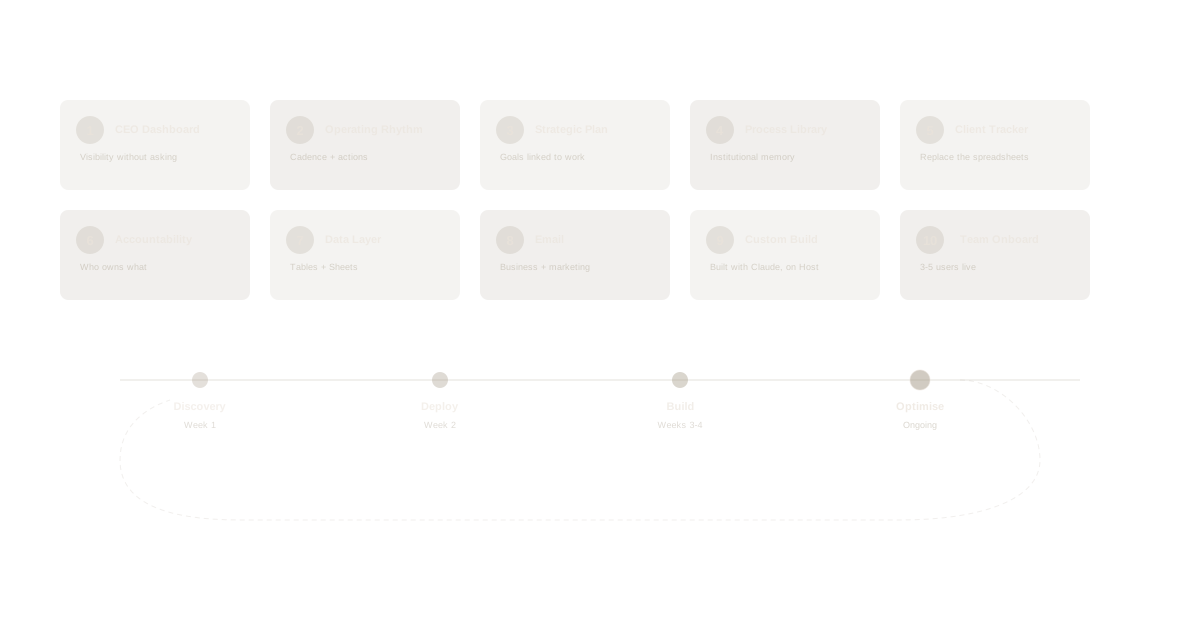
Forget starter prompts. These are real deliverables you build for your client in the first week — things they can see, use, and show their team. Each one takes 15-60 minutes.
The 10 First-Week Builds
Build 1: The CEO Dashboard
What you build: A workspace with their top 3-5 projects, each with a taskboard showing real work in progress.
Why it matters: The CEO stops being the bottleneck. Instead of asking "what's happening with X?" they open Waymaker and see it. This is usually the single most valuable deliverable in week one.
How AI extends it: The CEO asks Claude each morning: "Give me a summary of what changed across my projects yesterday." Claude reads the task updates, new comments, and completed items across all projects and delivers a 30-second briefing.
Build 2: The Team Operating Rhythm
What you build: A project called "Weekly Operations" with a recurring meeting structure, a document template for weekly updates, and a taskboard for action items.
Why it matters: Most teams have no consistent operating rhythm. Work gets discussed in meetings and then forgotten. This build creates the cadence — meeting notes saved as documents, action items tracked as tasks, everything visible.
How AI extends it: After a team meeting, someone tells Claude: "Create tasks from today's ops meeting — Sarah to finalise the budget by Tuesday, Marcus to call the contractor tomorrow, Lisa to update the client proposal by Friday." Three tasks created, assigned, and due-dated in 10 seconds.
Build 3: The Strategic Plan
What you build: Goals with measurable key results, connected to the projects and tasks that deliver them.
Why it matters: Strategy becomes visible. Instead of a PowerPoint gathering dust, the client's goals live in the same system as their daily work. They can see whether what they're doing every day is connected to where they're trying to go.
How AI extends it: The client asks Claude: "How are we tracking against our Q3 goals?" Claude reads the goals, key results, and connected project status — and gives an honest assessment. Not a dashboard. A conversation.
Build 4: The Process Document Library
What you build: A folder structure with 3-5 core process documents — client onboarding, new hire setup, monthly reporting, whatever they do repeatedly.
Why it matters: Most businesses have zero documented processes. Everything lives in someone's head. When that person is sick, on leave, or quits, the process disappears. This build creates institutional memory.
How AI extends it: A team member asks Claude: "How do we onboard a new client?" Claude finds the process document and walks them through it step by step. No searching. No asking the boss.
Build 5: The Client or Job Tracker
What you build: A project per active client or job, with tasks for deliverables, documents for correspondence, and status columns that match their workflow.
Why it matters: Replaces the spreadsheet-and-email chaos that most service businesses run on. Every client interaction, deliverable, and deadline is in one place.
How AI extends it: The client gets a call from a customer asking about their job status. They ask Claude: "What's the latest on the Henderson job?" Claude pulls the project, lists completed and outstanding tasks, and surfaces the last document update. The client answers the call with full context in 5 seconds.
Build 6: The Accountability Matrix
What you build: Roles for every team member with clear responsibilities, connected to the goals and projects they own.
Why it matters: "Who owns this?" is the most common question in every business. This build answers it permanently. When someone is unclear about their role, they check Waymaker. When the CEO wants to know who's responsible for a goal, they see it in the system.
How AI extends it: The CEO asks Claude: "Who owns our customer retention goal and what are they doing about it?" Claude finds the goal, identifies the owner via their role, and lists their active tasks and key results.
Build 7: The Data Layer
What you build: Structured tables and sheets for the data they currently scatter across spreadsheets, CRMs, and sticky notes — supplier databases, customer lists, product catalogues, pricing tables, inventory, financial models.
Why it matters: Tables in Waymaker are typed, structured, and queryable — not just a grid of cells. They're the data layer that everything else connects to. When Claude answers a question about suppliers, pricing, or inventory, it's pulling from real, structured data — not guessing from a chat transcript. Sheets handle financial models and calculations. Together, they replace the 15 spreadsheets your client emails around every week.
How AI extends it: This is where tables become a superpower. The client asks Claude: "Which products have less than 50 units in stock?" Claude queries the inventory table and gives a filtered answer. "What's our average order value this quarter?" Claude reads the orders table and calculates it. "Add a new supplier — Davies Supply, contact Sarah Chen, payment terms net 30." Claude inserts the row. The data is always live, always accurate, and always accessible through conversation.
Build 8: Email That Lives in the System
What you build: Business email, shared inboxes, and marketing email — all inside Waymaker. Set up team inboxes for client enquiries, support, or sales. Configure business email for every team member. Create marketing lists for campaigns and announcements.
Why it matters: Most businesses run email separately from everything else. Customer emails live in Gmail, follow-ups get lost, marketing campaigns go through Mailchimp, and nobody knows who replied to what. Waymaker's built-in email means customer communication, team inboxes, and marketing campaigns live in the same platform as projects, tasks, and data. One system instead of three.
How AI extends it: The client asks Claude: "Are there any unanswered client emails from today?" Claude checks the shared inbox and flags what's sitting without a response. "Draft a follow-up email to Henderson about the delayed shipment — reference their order from the orders table and apologise for the delay." Claude pulls the order data, drafts the email with real details, and queues it. Context from the data layer flows directly into communication — no copy-pasting between systems.
Build 9: The First Custom Build
What you build: A landing page, internal tool, or serverless agent — built with Claude and deployed to Waymaker Host. This could be a product launch page for their website, a client-facing status portal, a weekly summary email agent, or a custom calculator their team uses daily.
Why it matters: This is the "wow" moment. The client watches you describe what they need to Claude, Claude builds it, and you deploy it to Host — live on their domain in minutes. No developer. No agency. No three-week turnaround. It proves that Waymaker isn't just another project management tool — it's a platform they can build on. And it shows what's possible for every other process they've been doing manually.
How AI extends it: Claude Desktop or GitHub Copilot builds the app. Waymaker Host deploys and runs it. The client says "We need a page where customers can check their order status" — and it exists before the meeting is over.
Build 10: The Team Onboarding
What you build: Invite the first 3-5 team members. Walk each one through their role in Waymaker — their tasks, their projects, their goals.
Why it matters: A system with one user is a toy. A system with five users is infrastructure. This build transforms Waymaker from "the boss's new tool" to "how we work."
How AI extends it: Each team member connects Claude to their Waymaker account. Now they can ask Claude about their tasks, their projects, and their deadlines from anywhere — their desk, their phone, their car.
The AI Transformation Engagement Model
This is how you structure a client engagement using Waymaker as your delivery platform.
Phase 1: Discovery (Week 1)
Never set up tools before you understand the business.
The single most important question: "What takes you too long every week?"
But don't stop there. Spend time with the team. Watch how work actually flows. Find the gaps between what the CEO thinks is happening and what's actually happening.
What you're looking for:
- Manual processes that drain 5-15 hours per week
- Information trapped in people's heads instead of systems
- Tools that don't talk to each other (the average SMB runs 10-20+ disconnected tools)
- The CEO acting as the bottleneck for decisions, status updates, and approvals
- Processes too custom for off-the-shelf software, too small to justify a developer, too important to leave manual
Deliverable: A findings report that reframes the client's priorities based on what you observed, not what they told you they needed. Present this to the CEO. It's the moment they realise you understand their business better than they expected.
Phase 2: Deploy (Week 2)
Set up the platform and build the first 5 deliverables from the First-Week Builds above. Focus on what will give the CEO immediate visibility and the team immediate structure.
Sequence:
- Create the organisation and workspace
- Build the CEO Dashboard (Build 1)
- Set up the operating rhythm (Build 2)
- Document 2-3 core processes (Build 4)
- Create the client/job tracker (Build 5)
- Invite the first 3-5 team members (Build 10)
Deliverable: A working system with real data, real team members, and real visibility. The CEO opens Waymaker on Monday morning and sees their business.
Phase 3: Build (Weeks 3-4)
Now that the foundation is running, build what's custom. This is where you move from Commander (the foundation) into Host (the build layer).
- Automate the manual processes you identified in discovery
- Build custom apps and landing pages with Claude, deploy to Waymaker Host
- Deploy serverless agents (Ambassadors) that run automations 24/7
- Connect their AI assistants via MCP so Claude reads and writes to their data
- Set up strategic goals and link them to operational work
- Train the team on using Claude/ChatGPT with their Waymaker data
Deliverable: 5-10 operational processes running in Waymaker, AI connected and working, team using the platform daily.
Phase 4: Optimise (Ongoing)
This is where the engagement becomes a retainer. Every quarter:
- Run a planning session using the goals and key results in Waymaker
- Identify new processes to automate
- Build new custom tools as the business evolves
- Review what's working and what needs adjustment
- Help the client use AI more effectively
Each build makes the platform stickier. After 10-20 builds, Waymaker IS their operating system. The client can't go back to the old way. Your advisory relationship is anchored in a system that keeps growing.
The Partner Economics
- Platform license: starts at $19/seat/month (all 20 operational tools, app hosting, agent hosting, and AI intelligence included at every tier)
- Your implementation fee: $15,000-$50,000 per engagement (discovery, setup, build, training)
- Your ongoing advisory: $2,000-$5,000/month (quarterly planning, new builds, optimisation)
- Trailing referrals: recurring revenue share on every seat you bring to the platform
One consultant with Waymaker and AI tools can deliver what used to require a team of 5-10 people. That's the leverage.
Common Objections and How to Handle Them
"We already use [Asana/Monday/Notion/Jira]."
"Those are great tools for task management. But can you build a custom app on top of Asana? Can your AI pull data from Monday and create a document in the same system? Waymaker gives you the 20 operational tools AND the platform to build what's missing. You're not replacing one tool — you're replacing the gap between all of them."
"We're already using AI — we have ChatGPT."
"That's great — you're ahead of most businesses. But right now your AI is disconnected from your actual work. It can write you an email, but it can't check your project status. It can draft a plan, but it can't create the tasks. Waymaker connects your AI to your operations through MCP. Same ChatGPT or Claude, but now it reads and writes to your real business data."
"Our team won't adopt another tool."
"That's why we deploy it with real work in it from day one. Your team won't see an empty dashboard and a list of features. They'll see their projects, their tasks, their deadlines — already there, already organised. And they can interact with it through Claude or ChatGPT, which they're already comfortable with. The adoption barrier isn't the tool. It's whether the tool has their work in it."
"How is this different from what Microsoft/Google offer?"
"Microsoft and Google give you a bundle of tools and let you figure out the rest. Waymaker gives you the operational foundation — strategic frameworks, goal tracking, role clarity, process documentation — AND lets you build custom software on top. Plus, your AI connects to one unified system instead of trying to stitch together Teams, SharePoint, Planner, Power Automate, and six other products that barely talk to each other."
"$19/seat sounds cheap. What's the catch?"
"There isn't one. Every tier includes all 20 operational tools, app hosting, agent hosting, and AI intelligence. Higher tiers give you more AI credits, storage, and compute. We price by consumption, not by features. The value isn't in the license — it's in what you build on the platform."
This article is part of The AI Transformation Playbook — a guide for advisors, consultants, and MSPs who deploy AI transformation for their clients.
Part of our guide to all-in-one business platforms.
About the Author

Stuart Leo
Stuart Leo founded Waymaker to solve a problem he kept seeing: businesses losing critical knowledge as they grow. He wrote Resolute to help leaders navigate change, lead with purpose, and build indestructible organizations. When he's not building software, he's enjoying the sand, surf, and open spaces of Australia.