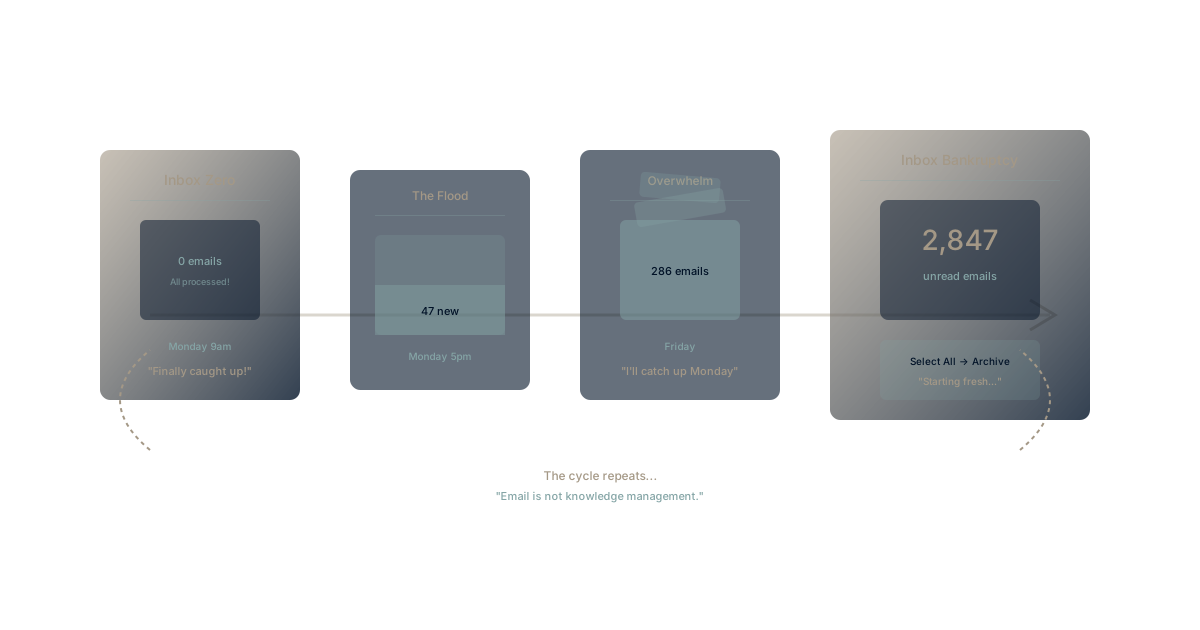
Monday morning. You achieved it—inbox zero. Every email processed. Every message in its place. A clean slate for the week ahead.
Friday afternoon. 286 unread emails. Weekend work to catch up. The fleeting victory of Monday seems absurd. By next month, you'll declare inbox bankruptcy—select all, archive, start fresh, pretend it didn't happen.
The inbox zero aspiration reveals a fundamental truth: email doesn't scale, and no productivity technique can make it scale.
The Inbox Zero Dream
What Inbox Zero Promises
Merlin Mann's inbox zero concept promised:
- Empty inbox as default state: Email processed, not accumulated
- Systematic processing: Each message gets one of five actions
- Reduced anxiety: Nothing lurking, nothing forgotten
- Increased focus: Email as defined activity, not constant interruption
For manageable email volumes, it works. The problem is that email volumes are no longer manageable.
Why It Fails at Scale
The average knowledge worker receives 121 emails per day. Let's do math:
121 emails × 2 minutes average processing = 4+ hours daily on email
That's before writing any emails, attending meetings, or doing actual work. Inbox zero becomes mathematically impossible for anyone with meaningful responsibilities.
According to research from McKinsey, professionals spend 28% of their workweek on email. That's not a productivity problem to solve—it's a system problem to redesign.
The Escalation Trap
Email volumes don't stay constant. They escalate:
CC culture: Better safe than sorry, add everyone Reply-all conventions: Can't be seen as ignoring messages Thread sprawl: Conversations that never end External volume: Customers, partners, vendors, newsletters
Each year, volume increases. Processing time increases. The gap between inbox zero and reality widens.
The Bankruptcy Cycle
Stage 1: Diligent Management
You're committed. Every morning:
- Process overnight emails
- Respond to urgent items
- File what needs filing
- Delete what's deletable
It takes time, but you stay on top.
Stage 2: Falling Behind
The balance tips:
- One busy day creates backlog
- Backlog makes next day harder
- Important emails get missed
- "I'll catch up this weekend"
The weekend catch-up becomes the new normal.
Stage 3: Triage Mode
You stop processing systematically:
- Scan for urgent only
- Ignore anything that looks optional
- Hope important things get escalated
- Guilt about unread messages
Email becomes a source of anxiety rather than communication.
Stage 4: Bankruptcy
The dam breaks:
- Thousands of unread messages
- No realistic path to processing
- Select all → Archive (or mark as read)
- "If it's important, they'll email again"
Inbox bankruptcy. The cycle restarts.
Why Email Is Structurally Broken
Email as Knowledge Management
Organizations use email for:
- Decisions: Discussed and agreed in threads
- Information: Shared as attachments and summaries
- Actions: Requested and tracked in messages
- History: Referenced when questions arise
But email wasn't designed for any of these. It's a messaging protocol pressed into service as an organizational memory system.
This is why email search fails—you're searching a communication tool for knowledge management needs it was never built to serve.
The Notification Problem
Email started as asynchronous communication. It's become:
- Real-time expectation (respond within hours)
- Always-on presence (check constantly)
- Attention interrupter (notifications every few minutes)
The context switching cost of email interruptions destroys the deep work email management is supposed to enable.
The Duplication Problem
The same information appears in email multiple times:
- Original message
- Reply with full quote
- Forward with additional context
- Reply-all responses
- Separate thread when topic drifts
Finding anything requires searching through duplicates, versions, and fragments. Information entropy increases with every exchange.
The Access Problem
Email is private by default:
- Information in your inbox invisible to colleagues
- Knowledge trapped in individual mailboxes
- Context lost when people leave
- No organizational memory accumulation
Email creates knowledge silos at the individual level—the most fragmented silo possible.
Beyond Email
What Email Should Be
Email works for:
- External communication: Messages from outside the organization
- Formal notification: Official communications requiring record
- Asynchronous contact: When other channels aren't available
Email fails for:
- Internal collaboration (use shared workspace)
- Decision making (use decision logs)
- Project coordination (use project tools)
- Knowledge management (use knowledge systems)
The Shift to Structured Communication
Organizations reducing email dependence use:
Real-time chat for quick conversations (Slack, Teams) Shared documents for collaborative content (Google Docs, Notion) Project management for work coordination (Asana, Linear) Knowledge bases for organizational memory (Confluence, Waymaker)
Each channel handles communication it's designed for. Email becomes one channel among many—not the default for everything.
Building Organizational Memory
The real problem isn't email volume—it's that organizations route knowledge through email that should live in organizational memory.
When decisions live in connected systems, you don't email about them. When projects live in visible platforms, you don't email status updates. When knowledge lives in searchable bases, you don't email questions.
Email volume reflects organizational memory gaps. Fix the memory problem, email volume decreases naturally.
Making the Transition
Reduce Internal Email
Start with what you control:
Redirect status updates: Use project tools instead Move discussions: Use chat or shared documents Document decisions: Use decision logs instead of email agreements Share knowledge: Use wikis instead of forwarded threads
Each redirect removes hundreds of emails annually.
Create Email Alternatives
Give people better options:
Clear channel guidance: What goes where Accessible tools: Easy to use alternatives Cultural permission: It's okay not to email Leadership modeling: Executives use alternatives visibly
Without alternatives, people default to email. With better options, they naturally shift.
Accept Selective Attention
Inbox zero is unrealistic. Selective attention is viable:
Priority filtering: Important senders surface automatically Time boxing: Email at designated times, not constantly Batch processing: Handle similar emails together Ruthless unsubscribing: Remove what doesn't matter
You won't read everything. Accept that reality and optimize for what matters.
Experience Communication That Works with Waymaker
Want to see what happens when organizational communication doesn't route through email? Waymaker Commander connects strategy, projects, and knowledge in one workspace—reducing the need to email about any of them.
Decisions documented. Progress visible. Knowledge accessible. Email reduced to what it's actually good for.
Register for the beta and experience work that doesn't depend on inbox management.
Inbox zero treats a symptom. The disease is organizational communication architecture. When knowledge, decisions, and coordination live in connected systems, email becomes a small channel for external communication—not the backbone of organizational memory it was never designed to be. Learn more about why email search fails and explore knowledge silo costs.
This analysis draws from productivity research consistently showing email volume as a symptom of missing organizational infrastructure, not a problem solvable through individual technique.
Part of our guide to business email on your own terms.
About the Author

Waymaker Editorial
Stuart Leo founded Waymaker to solve a problem he kept seeing: businesses losing critical knowledge as they grow. He wrote Resolute to help leaders navigate change, lead with purpose, and build indestructible organizations. When he's not building software, he's enjoying the sand, surf, and open spaces of Australia.