Most people use AI coding tools wrong.
They open their AI agent. Type a vague prompt. Get a wall of code. Paste it somewhere. Break something. Start over.
Sound familiar?
The problem isn't the AI. It's the method.
AI agents are powerful builders. But they need structure — the same way a skilled contractor needs blueprints, not just "build me a house."
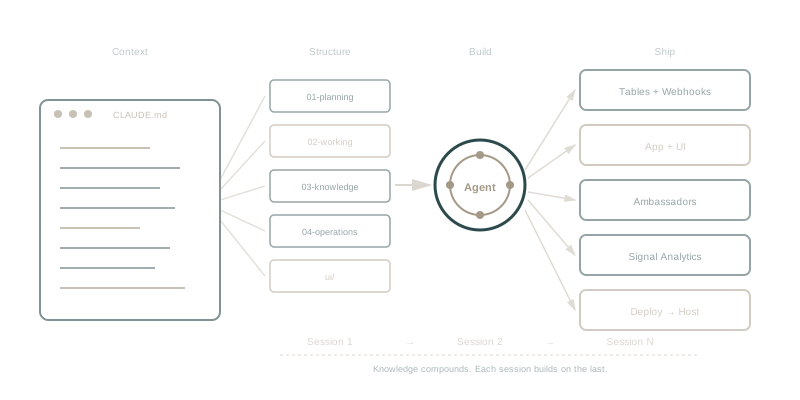
This article gives you that structure. A repeatable methodology for building websites, custom apps, and AI agents — session by session, feature by feature — using Claude Code in VS Code and WaymakerOS.
We'll use Claude Code as our primary tool throughout this guide. The methodology works with Cursor, Windsurf, Copilot, and other AI coding tools — but Claude Code's architecture makes it the ideal fit. Claude Code automatically reads project files, supports persistent instructions via CLAUDE.md, has a built-in skills system, and connects to external tools through MCP (Model Context Protocol). These aren't nice-to-haves. They're what make the methodology possible.
By the end, you'll understand:
- CLAUDE.md as a router — not a readme, but an instruction router that loads your entire project context
- The project docs framework — planning, working, knowledge, and operations folders
- Session briefs that eliminate re-explaining between sessions
- Phased prompts that keep builds on track
- How PRDs, prompt briefs, and task briefs map to agile — and why the PRD is a living document
- The macro/micro split — kanban planning in Commander, agent direction in your IDE
- UI folders that replace Figma for AI-driven design
- Tables — your app's database, with built-in webhooks and APIs
- Ambassadors — serverless AI agents and automations that run 24/7
- Signal — built-in analytics, no cookie banners required
- CLI and MCP tools for creating, managing, and deploying from your terminal
- Agentic end-to-end development — why "frontend" and "backend" are dead categories
The Two Problems Nobody Talks About
Problem 1: AI Amnesia
Every time you start a new Claude Code session, it forgets everything.
Yesterday's decisions. The architecture you agreed on. The bug you fixed at 2am. Gone.
You spend the first 20 minutes of every session re-explaining context. The AI makes the same mistakes. You fix the same bugs. Progress stalls.
This is AI amnesia. And it kills velocity.
Problem 2: No Build Sequence
Even with perfect memory, most people don't know what to build next.
They jump between features. Half-finish things. Build the login page before the data model exists. Wire up the API before the schema is designed.
The AI happily follows every tangent. Three hours later, you have 40 files, nothing works, and you can't remember what you were trying to build.
Without a build sequence, AI amplifies chaos.
The Solution: A Methodology for Agentic Development
This is the methodology we use at Waymaker to build production software with AI agents. Five components. Each one solves a specific problem.
| Component | What It Is | What It Solves |
|---|---|---|
| CLAUDE.md Router | An instruction file that loads your entire project context | AI doesn't understand the project. No architecture. No rules. |
| Project Docs | A structured folder of planning, working, and knowledge files | No memory. No compound learning. No institutional intelligence. |
| Session Briefs | Handoff documents between AI sessions | AI amnesia. Lost decisions. Repeated mistakes. |
| Phased Prompts | Step-by-step build instructions with status tracking | No build sequence. Feature sprawl. Half-finished work. |
| Repo-Connected Roadmap | A Commander taskboard that reads your repo's PRDs and briefs | Can't see the big picture. Macro planning disconnected from micro execution. |
| UI Folder | Design tokens, brand rules, and component guides in markdown | Waiting on designers. Figma-to-code translation. Inconsistent UI. |
Let's break each one down.
1. CLAUDE.md: The Router, Not the Readme
Most people treat CLAUDE.md like a readme. They dump a project description in it and move on.
That's missing the point entirely.
CLAUDE.md is a router. It's the first file Claude Code reads when it opens your project — automatically, every session, before you type a word. It doesn't just describe your project. It instructs Claude how to navigate it.
Here's what a router looks like:
# My CRM

B2B contact management app with deal tracking and lead scoring.

## Architecture
- Frontend: React + TypeScript
- Data: Waymaker Tables (contacts, companies, deals)
- Analytics: Signal
- Deployment: Waymaker Host

## Key Files
| What | Where |
|------|-------|
| PRD | docs/01-planning/product-requirements/crm-prd.md |
| Phase 1 prompt | docs/02-working/prompts/active/phase-1-data-model.md |
| Auth pattern | docs/03-knowledge/patterns/auth-update-pattern.md |
| Deploy checklist | docs/04-operations/deployment-checklist.md |
| Design system | ui/design-system.md |
| Brand tokens | ui/brand-tokens.md |

## Design Tokens
| Token | Value |
|-------|-------|
| Primary | #1E293B |
| Accent | #3B82F6 |
| Background | #FFFFFF |
| Font | Inter |

## Critical Rules
- Mobile-first responsive design
- All API calls go through the auth wrapper
- Never store secrets in frontend code
- Follow the auth update pattern in 03-knowledge
Why "Router" Matters
A readme tells humans about the project. A router tells the AI where everything is and how to behave.
When Claude Code reads this CLAUDE.md, it immediately knows:
- The project architecture and tech choices
- Where to find the PRD, build prompts, and design specs
- Which patterns to follow (and where they're documented)
- Design tokens to use consistently across every component
- Rules that must never be broken
This is persistent context. Unlike chat history (which disappears between sessions), CLAUDE.md lives in your repo. Every session, Claude reads it fresh. Every session, it starts oriented.
The Import System
CLAUDE.md supports @imports — you can pull in other files:
@docs/03-knowledge/patterns/auth-update-pattern.md
@ui/design-system.md
This means your CLAUDE.md stays concise while loading detailed instructions from other files. The router points. The imported files instruct.
Hierarchical Loading
In a monorepo, Claude Code walks up the directory tree and loads every CLAUDE.md it finds. Your root CLAUDE.md sets project-wide rules. App-level CLAUDE.md files add specific context:
my-project/
├── CLAUDE.md                    # Project-wide: architecture, rules, standards
├── apps/
│   ├── web/
│   │   └── CLAUDE.md            # Web app: routes, components, SEO rules
│   └── api/
│       └── CLAUDE.md            # API: endpoints, auth, rate limits
The deeper file adds context. The parent file sets the foundation. Claude reads both.
Every Instruction File Is a Building Block
Claude Code has a built-in skills system — markdown files in .claude/skills/ that become slash commands. But here's the practical insight: every well-structured markdown file that Claude reads becomes part of its instruction set.
Your auth pattern in 03-knowledge/patterns/auth-update-pattern.md? Once imported into CLAUDE.md, Claude follows it every time it builds auth features. Your deployment checklist in 04-operations/deployment-checklist.md? Claude references it before every deploy.
Skills are the formal mechanism. But the project docs framework means you're effectively building a library of reusable instructions — patterns, checklists, guides — that compound over time. Import them into CLAUDE.md and they become active context. Organise them in .claude/skills/ and they become invocable commands. Either way, they direct behaviour.
Every WaymakerOS Blueprint ships with a CLAUDE.md router pre-configured — pointing to the PRD, build prompts, design tokens, and session brief templates. You don't build the routing from scratch. Pick a blueprint, clone it, and Claude is oriented before you type a word.
2. Project Docs: The Knowledge Architecture
Every project — website, app, or agent — starts with a folder structure:
my-project/
├── CLAUDE.md                              # The router
├── ui/                                    # Design system + brand tokens
├── docs/
│   ├── 01-planning/
│   │   └── product-requirements/          # PRD: what you're building and why
│   ├── 02-working/
│   │   ├── prompts/active/                # Phased build prompts
│   │   └── sessions/                      # Session briefs (handoff docs)
│   ├── 03-knowledge/                      # Patterns discovered during the build
│   └── 04-operations/                     # Procedures and checklists
01-planning holds your PRD. Not a 50-page spec — a clear, concise document that describes what you're building, who it's for, and the design direction.
02-working is where active development happens. Build prompts tell the AI what to build next. Session briefs capture what happened.
03-knowledge and 04-operations are the compound intelligence engine. We'll cover these in detail in Section 5.
3. The UI Folder: Design Without Figma
Here's a personal anecdote. As a developer, I sketch a page layout in my notebook. I take a photo with my phone. I share it with Claude Code alongside my design system markdown files. In minutes, I have working UI to test — properly branded, responsive, following our component patterns.
No Figma. No design handoff. No "pixel-perfect" debates.
I'm not saying design tools are dead. If you have Figma files, use them. Share screenshots with Claude. It can read images. But for most projects — especially the kind you build with AI — a well-written UI folder replaces the need for traditional design files.
What Goes in the UI Folder
ui/
├── design-system.md          # Component patterns, spacing, typography
├── brand-tokens.md           # Colours, fonts, mood, visual direction
└── examples/                 # Screenshots, sketches, reference images
brand-tokens.md — The visual identity:
# Brand Tokens

## Colours
| Token | Value | Use |
|-------|-------|-----|
| Primary | #1E293B (Slate) | Headers, primary text |
| Accent | #3B82F6 (Blue) | Links, CTAs, active states |
| Success | #059669 (Green) | Completed, positive status |
| Background | #FFFFFF | Page background |
| Surface | #F8FAFC | Card backgrounds |

## Typography
- Font family: Inter (or system sans-serif fallback)
- Headings: Bold, tracking tight
- Body: Regular, 16px base, 1.6 line height

## Mood
Professional and clean. Generous whitespace.
Subtle shadows on cards. No heavy borders.
design-system.md — How components should look and behave:
# Design System

## Buttons
- Primary: bg-accent, white text, rounded-lg, hover darkens 10%
- Secondary: border only, accent text, transparent background
- All buttons: min-height 44px (touch target), focus ring on keyboard nav

## Cards
- White background, subtle shadow (shadow-sm), rounded-xl
- 24px padding, 16px gap between cards
- Header with title + optional action button

## Forms
- Labels above inputs, not inline
- Input height: 44px minimum
- Error messages below input, red text, small size
- Submit button full-width on mobile, auto-width on desktop

## Layout
- Max content width: 1280px, centered
- Sidebar: 280px fixed on desktop, drawer on mobile
- Page padding: 24px (desktop), 16px (mobile)
Why This Works
Claude Code reads images and markdown equally well. When it reads your brand tokens and design system, it applies them consistently across every component it builds. When you share a notebook sketch, it interprets the layout and implements it using your design system rules.
The result: Consistent, branded UI without a designer in the loop. Not because designers aren't valuable — they are — but because AI has made the gap between "sketch" and "working UI" so small that you can iterate in code instead of in design tools.
For teams with designers, this approach still works. Your designer creates the design system markdown once. Every AI session after that produces on-brand UI automatically.
4. Session Briefs: The Handoff That Changes Everything
A session brief is a 5-minute document you create at the end of every Claude Code session. It captures:
# Session: Auth Implementation — 2026-03-11

## What We Did
Built the login page with email/password authentication.
Connected to the auth provider. Protected the dashboard route.

## Files Changed
- Created: src/pages/Login.tsx — login form with validation
- Modified: src/App.tsx — added protected route wrapper
- Created: src/lib/auth.ts — auth helper functions

## Current State
**Working:** Login flow, redirect after auth, session persistence
**Not working:** Password reset flow (not started yet)

## Next Session
**Goal:** Build password reset + user profile page

**Steps:**
1. Add forgot-password route and form
2. Wire up reset email trigger
3. Build profile page with avatar upload
4. Test full auth flow end-to-end

## Key Discovery
The auth provider returns a JWT that expires in 1 hour.
Need to add token refresh logic before building any API calls.

## Knowledge & Operations Updates
- [x] Knowledge: docs/03-knowledge/patterns/auth-token-refresh.md
- [ ] Operations: not needed (no new procedure)
Why Session Briefs Work
When you start your next Claude Code session, the AI reads the last brief. Instantly:
- No re-explaining. It knows what you built yesterday.
- No repeated mistakes. The "Key Discovery" section captures gotchas.
- No lost momentum. "Next Session" tells it exactly where to pick up.
- No forgotten decisions. Every architectural choice is documented.
Session briefs turn a forgetful AI into a team member with perfect notes.
The Compound Effect
After 10 sessions, you have 10 briefs. Your 03-knowledge folder has patterns. Claude reads all of it.
Session 1: Claude knows nothing. You explain everything. Session 10: Claude reads your CLAUDE.md router, your patterns, your last three briefs — and picks up exactly where you left off.
Knowledge compounds. Every session makes the next one faster.
Connect a Commander taskboard to the repo and your team sees the same work as a roadmap: each PRD a layer, each prompt brief a card. Commander only reads the repo, so you never leave your editor to update it.
5. Phased Prompts: Build in Order, Ship in Stages
A phased prompt is a build instruction with status tracking. Instead of "build me a CRM," you break the work into phases:
---
build:
  status: todo
  phase: 1
  priority: P0
---
# Phase 1: Data Model + Core UI

## Objective
Set up the database schema and basic CRUD interface.

## Tasks
1. Create the contacts table with: name, email, company, status, notes
2. Build the contacts list view with search and filters
3. Build the contact detail page with edit form
4. Add create/delete functionality
5. Test all CRUD operations

## Acceptance Criteria
- Can create, read, update, delete contacts
- Search works across name, email, company
- Responsive on mobile and desktop
- Server-side validation on all inputs
- Access rules enforced (org isolation)
- Tests written for critical paths

## When Done
- Review AI-generated code (especially auth and data access)
- Run tests
- Update status to `review`
- Create a session brief
- Move to Phase 2
Why Phasing Works
Phase 1: Data model + core UI. Get the foundation right. Phase 2: Business logic. Workflows, automations, rules. Phase 3: Integrations. Webhooks, external data, analytics. Phase 4: Polish and deploy. Design, performance, go live.
Each phase is a complete, testable unit. You can demo Phase 1 to a stakeholder before writing a line of Phase 2 code.
Claude builds better when it has clear scope. A prompt that says "build Phase 1 of the CRM — contacts CRUD with these 5 tasks" produces dramatically better code than "build me a CRM."
Status Tracking
Every prompt file tracks its own status: todo → in-progress → review → done. Never skip statuses. This discipline prevents half-built features from piling up.
If the repo is connected to a Commander taskboard, the status in each brief is what the board shows. Mark a brief done in the same pull request that finishes the work, refresh the board, and the card moves.
6. How It Maps to Agile — and Why a Connected Roadmap Changes Everything
If you've worked in agile teams, this methodology will feel familiar. That's deliberate. The project docs framework maps directly to the concepts you already know — but adapted for a world where AI agents do the building.
The Mapping
| Waymaker Method | Traditional Agile | What's Different |
|---|---|---|
| PRD (01-planning) | Product Requirements Doc | A living document. You update it as you build, not just before. Discoveries from Session 5 change the PRD for Phase 3. |
| Prompt Briefs (02-working/prompts) | Sprint briefs / Sprint plans | Each prompt brief scopes a phase of work — like a sprint, but driven by a build prompt your AI can read and execute. |
| Task Briefs (02-working/tasks) | User stories / Tasks on a board | Individual tasks that appear as cards on a connected kanban board. Each one is a markdown file your AI reads for context. |
| Session Briefs (02-working/sessions) | Standup notes / Sprint retros | Captured after every AI session, not every morning. More frequent, more detailed, more useful. |
| 03-knowledge | Team wiki / Confluence | Patterns and decisions extracted from actual builds, not written by someone who "meant to document it." |
| 04-operations | Runbooks / Playbooks | Step-by-step procedures proven in production. Not aspirational "best practices." |
PRDs Are Living Documents
This is critical. Most teams write a PRD, get it approved, and never look at it again. By the time the product ships, the PRD describes a different product.
In this methodology, the PRD evolves as you build. When you discover in Phase 2 that the data model needs a new field, you update the PRD. When user testing in Phase 3 reveals a missing workflow, you add it to the PRD. The PRD is always the current truth about what you're building.
Claude reads the PRD at the start of every session. If it's stale, Claude builds the wrong thing. If it's current, Claude builds the right thing. The incentive to keep it updated is immediate.
Macro and Micro: Two Views of the Same Work
Here's what a repo-connected taskboard makes possible: you work at two levels simultaneously.
Macro view — Commander (the kanban board):
- See all features as cards on a board
- Organise by layers (epics) and status columns
- Plan sprints by dragging cards between columns
- Step back and see the big picture: what's done, what's in progress, what's blocked
- Track goals and key results across the whole project
Micro view — your IDE:
- Open a specific task file and direct Claude to build it
- Read the prompt brief for the current phase
- Write code, test, debug, iterate
- Create session briefs as you go
- Extract patterns into 03-knowledge
The magic: These aren't two separate systems. They're two views of the same work.
Commander reads the repo — PRDs become layers on the roadmap, prompt briefs become cards, and the status written in each brief is the status on the board. Your project manager refreshes the board and sees progress without asking. You never opened a browser.
In your IDE, you're micro — directing agents, writing code, building features line by line. In Commander, you're macro — planning sprints, reviewing progress, making strategic decisions about what to build next.
Same data. Same files. Two perspectives. Both useful.
7. Knowledge & Operations: Compound Intelligence
Most methodology articles stop at "write session briefs." That's half the system.
The other half is extracting reusable intelligence from every session into two folders that make Claude smarter over time.
03-Knowledge: "We Learned This the Hard Way"
Every time you discover a pattern, encounter a gotcha, or make an architectural decision during a build — you capture it in 03-knowledge/.
Example 1: A Pattern
You're building auth and discover that profile updates silently revert on page refresh unless you refresh the session token after saving:
# Auth Update Pattern

## The Problem
User updates their profile. It appears to save. They refresh. Changes gone.

## The Cause
The auth token caches old metadata. The database has new data,
but the frontend reads from the stale token.

## The Solution
1. Get fresh auth token
2. Call the save function
3. Refetch user data from the server
4. Verify the UI reflects the change

## Test Checklist
- [ ] Save → data persists
- [ ] Soft refresh → data persists
- [ ] Hard refresh → data persists
- [ ] Sign out / sign in → data persists
Import this into your CLAUDE.md: @docs/03-knowledge/patterns/auth-update-pattern.md. Next time Claude builds any auth feature, it implements the pattern correctly the first time. No debugging. No rediscovery.
Example 2: A Gotcha
Every new sign-up creates two database records. After an hour of debugging, you discover it's your framework's development mode double-executing side effects:
# Double Execution in Development Mode

## Symptom
Database shows 2 records created milliseconds apart on sign-up.

## Cause
React StrictMode intentionally double-invokes effects in development.

## Solution
Add a guard ref that prevents double execution.

## Important
This only happens in development mode. Production is fine.
Don't remove StrictMode — just guard the effect.
Without this, every developer on your team wastes the same hour. With it, they read the 2-minute summary and move on.
Example 3: An Architecture Decision
You decide to use one table for all customer types instead of separate tables. Document why:
# ADR: Single Customer Table

## Decision
Single `contacts` table with a `type` column.

## Reasons
- Simpler queries (no JOINs across tables)
- Contacts can change type without data migration
- One set of access rules instead of three

## Trade-offs
- `type` column needs validation
- Some fields only apply to certain types (nullable columns)
04-Operations: "Do It This Way, Every Time"
While 03-knowledge captures what you learned, 04-operations captures what to do. Step-by-step procedures. Checklists. Runbooks.
Example: Deployment Checklist
# Pre-Deployment Checklist

## Before Every Push
- [ ] Run full build locally — no errors
- [ ] Run type checking — no warnings
- [ ] Run tests — all passing
- [ ] Review AI-generated auth/API code for security
- [ ] Test auth flow — login works

## Common Failures
| Error | Fix |
|-------|-----|
| Type conflict on dependency | Pin to compatible version |
| Missing environment variable | Check .env.template |

## Post-Deploy
- [ ] Visit live URL — page loads
- [ ] Check mobile — responsive layout correct
- [ ] Verify API calls — data loads
Example: Debugging Runbook
# API Function Debugging Checklist

## Check 0: Is the function deployed? (1 min)
## Check 1: Are environment variables set? (1 min)
## Check 2: Is the auth token valid? (2 min)
## Check 3: Is the database query correct? (5 min)

## Stuck after 30 minutes?
Document what you've tried. Reassess your approach.
Sometimes the bug is real and needs deep investigation —
but more often, you're looking in the wrong place.
The checklist exists to prevent that.
The Knowledge Extraction Habit
At the end of every session, before you commit, ask two questions:
- "What pattern or concept did I discover?" → Create or update a file in
03-knowledge/ - "What exact steps would I follow next time?" → Create or update a file in
04-operations/
This takes 5-10 minutes. After a month, your AI agent and WaymakerOS together have a library of battle-tested patterns and step-by-step procedures. The agent stops making the same mistakes. It follows your team's proven approaches. It builds faster. And WaymakerOS holds the knowledge — it's the business brain that persists regardless of which AI tool you're using today.
03-knowledge = "We learned this the hard way — here's the pattern." 04-operations = "This is how we do it — every time, same sequence."
Together, they give your AI institutional memory.
8. Agentic End-to-End Development
Here's the shift: stop planning by stack layer. Start planning by feature.
In 2024, development meant specialisation. Frontend engineers built React components. Backend engineers built APIs. DevOps engineers deployed infrastructure. A single feature touched three teams and took two sprints to coordinate.
In 2026, Claude Code builds the database schema, the API layer, the frontend components, the auth flow, and the analytics tracking — in one session. It works across the entire stack in a single flow.
This is agentic end-to-end development.
You describe what you want ("a contacts page with search, connected to a table, with a lead scoring Ambassador"). Claude:
- Creates the data table with typed columns
- Builds the API endpoint for CRUD operations
- Creates the React component with search and filters
- Builds the lead scoring Ambassador
- Adds Signal analytics tracking
- Configures the deployment
All in one session. All end-to-end.
The Architecture Still Matters
To be clear: the architectural separation between frontend and backend is still critical. Trust boundaries don't disappear because one agent writes both layers. User input must be validated server-side. Auth must be verified on every API call. Access rules must be enforced at the data layer, not the UI layer. These are security fundamentals.
What changes is the workflow. You don't need a frontend team and a backend team handing off API contracts. You need a feature owner directing an AI agent to build across every layer — while ensuring the security boundaries between those layers are respected.
The human's job shifts from writing code to reviewing it. And review becomes more important, not less, when AI writes the code. AI produces plausible code that can be subtly wrong — an auth check that looks right but misses an edge case, a database query that works but exposes data it shouldn't. The human review step is the quality gate. Don't skip it.
What This Means for How You Build
Plan by feature, not by layer. Don't plan "Phase 1: Backend" and "Phase 2: Frontend." Instead:
- Phase 1: Contacts — table + API + UI + search (end-to-end)
- Phase 2: Deals — table + API + UI + pipeline view (end-to-end)
- Phase 3: Integrations — webhooks + Signal + external data (end-to-end)
Each phase delivers a complete, testable feature. The user can try it immediately. You get feedback before building the next feature.
What This Means for Teams
You need feature owners who direct AI agents to build complete features end-to-end. The human provides the judgement — what to build, how it should work, what the edge cases are, and whether the output is secure and correct. The AI provides the execution — across every layer of the stack simultaneously.
This isn't theoretical. We build WaymakerOS this way. Every feature, every sprint. One developer directing Claude Code across the full stack, session by session — reviewing every output for correctness and security before it ships.
9. Tables: Your App's Database — With Built-In Webhooks
Every app needs data. A CRM needs contacts. An invoice tool needs line items. A job tracker needs applicants.
In traditional development, setting up a database is a multi-step pain: provision a server, write migrations, configure access control, build API endpoints, set up webhooks for external data.
Waymaker Tables does all of this in one step.
What Tables Are
Think of a theatre stage. Front of house, the audience sees the performance. Back of house — behind the curtain — the crew in black t-shirts cue up new sets, drop in backgrounds, manage lights and sound. The stage itself is where both worlds meet. The actors perform on it. The crew builds on it. One surface. Two purposes.
Most databases pick a side. A backend table in DynamoDB or Aurora is pure back-of-house — powerful, but invisible to business users. They'll never touch it. An Airtable base or a Salesforce Object is front-of-house — visible, editable, but limited in what developers can build on top of it.
A Waymaker Table is the stage. Business users update it in their workspace — editing contacts, tracking deals, managing inventory. Custom apps and Ambassadors use it as their data layer — querying rows, writing records, processing webhooks. One unified table. Front and back working on the same surface.
If you've used Salesforce, think of Tables as a similar concept to Objects — a structured place for your business data. If you've used Pipedrive, think of Fields.
The difference is philosophical. Salesforce built triggers, approval workflows, and validation rules into the database layer because in 2015, that was the only way to give business users automation without writing code. The database had to be smart because nothing else was.
In 2026, your AI agent is the automation layer. You don't need the database to run triggers — you direct your AI to write the logic. You don't need built-in approval workflows — you build exactly the workflow your business needs, end-to-end, in a session. The database stays clean: structured storage with typed columns, access rules, APIs, and webhooks. The intelligence lives in your agent and your code, not in proprietary platform logic you can't see or control.
Tables live inside your workspace, connected to your tasks, documents, goals, and everything else — designed to be the stage your entire operation runs on.
Create a table from the CLI:
waymaker tables create leads \
  --columns "name:text,email:email,company:text,status:select[New,Contacted,Qualified],score:number"
That's it. You now have a leads table with typed columns, organisation-level access rules, and a REST API. Claude can immediately build a UI on top of it.
Manage Data — From Your AI, Your CLI, or External Services
# Describe a table's schema
waymaker tables describe leads
Your AI agent runs CLI commands directly from your coding session. When Claude Code needs to create a table or check a schema, it runs waymaker tables create or waymaker tables describe — right in your terminal, without you switching context. The CLI is how your AI agent's hands reach into WaymakerOS.
Incoming Webhooks: External Data Flows In Automatically
Say you use Stripe for payments and want every payment event to land in a table:
- Enable webhooks:
waymaker tables enable-webhook payments - Get a unique webhook URL with a secure token
- Paste that URL into Stripe's webhook settings
- Every Stripe event automatically creates a row in your table
No middleware. No integration code. Data flows from Stripe (or Shopify, Typeform, GitHub — any service that can send a webhook) directly into your table. The incoming data auto-maps to your columns — if Stripe sends { "customer_email": "..." } and you have a customer_email column, it maps automatically.
Note: webhooks handle inbound data flow — events arrive and create rows. If you need multi-step orchestration (receive event → send email → wait 3 days → check condition → create task), that's workflow automation, and tools like Zapier or Waymaker Ambassadors handle that. Webhooks replace the "get data in" step, not the entire automation chain.
Why This Matters for Agentic Development
When Claude builds your CRM end-to-end, it creates the data layer in one CLI command. Access rules are automatic. Webhooks work out of the box. Compare this to traditional development: provision database, write migrations, set up ORM, build API layer, implement auth middleware, write webhook handler, deploy endpoint, configure CORS...
Tables compress hours of infrastructure into minutes.
10. Ambassadors: AI Agents and Automations That Run 24/7
Data flows into Tables via webhooks. But what happens next?
In traditional development, you'd write a backend service, deploy it somewhere, manage uptime, handle retries, and wire up authentication. For a simple automation like "when a new lead arrives, score it and notify the sales rep," you'd either pay for Zapier or build infrastructure.
Ambassadors are Waymaker's serverless functions — with automatic business context.
An Ambassador is a function that runs on Waymaker's global edge network. It can be triggered by a webhook, run on a schedule, or be invoked by your AI agent. The key difference from a raw serverless function: every Ambassador automatically receives the full context of your workspace — your Tables, your Commander data, your AI credits — without you wiring any of it up.
What You Can Build
A lead qualifier — triggered when a form submission hits your leads table:
export default async function leadQualifier(req, ctx) {
  const form = await req.json()

  // Score against criteria from your tables
  const criteria = await ctx.tables.query('scoring_criteria')
  const score = calculateScore(form, criteria)

  // Hot lead? Create a task for the sales rep
  if (score > 80) {
    await ctx.commander.tasks.create({
      title: `Hot lead: ${form.name}`,
      assignee: 'sales@yourcompany.com'
    })
  }

  // Log the score
  await ctx.tables.insert('lead_scores', {
    email: form.email, score, status: score > 80 ? 'hot' : 'warm'
  })
}
A daily standup reporter — runs every morning at 8am:
// Schedule: "0 8 * * *" (8am daily)
export default async function standup(req, ctx) {
  const completed = await ctx.commander.tasks.list({ status: 'completed', since: 'yesterday' })
  const blocked = await ctx.commander.tasks.list({ status: 'blocked' })

  // AI generates the digest
  const digest = await ctx.ai.generate({
    prompt: `Standup digest:\n- Done: ${completed.map(t => t.title).join(', ')}\n- Blocked: ${blocked.map(t => t.title).join(', ')}`
  })

  // Store and email
  await ctx.tables.insert('standup_reports', { date: new Date(), digest })
}
An expense approver, a customer welcome sequence, an invoice reminder, a meeting prep agent — the Blueprints catalogue includes templates for all of these.
Four Ways to Trigger
| Trigger | Use Case | Example |
|---|---|---|
| Webhook | React to external events | Form submission, Stripe payment, GitHub push |
| Schedule | Run on a cron | Daily report, weekly cleanup, monthly invoice |
| API call | Server-to-server | Internal service calling another service |
| Manual | Test or one-off | waymaker ambassador invoke lead-qualifier |
The Context Object
This is what makes Ambassadors different from raw serverless functions. Every Ambassador receives ctx — automatic access to:
ctx.tables— Query, insert, update, delete rows in any table. Access rules enforced automatically.ctx.commander— Read goals, create tasks, list team members, check calendars.ctx.ai— Generate text, summarise, classify, extract structured data. Credits tracked automatically.ctx.storage— Upload and download files.ctx.workspace— Current workspace identity and tier.ctx.env— Environment variables you set via CLI or Host dashboard.
No API keys to manage. No auth tokens to refresh. No middleware to write. The context is injected. You write the logic.
Create and Deploy
waymaker ambassador create lead-qualifier
# Write your function
waymaker host ambassadors deploy <ambassador-id>
# Try it
waymaker ambassador invoke <ambassador-id>
Why This Matters
Ambassadors are how your AI-built app becomes an AI-powered app. Tables store the data. Webhooks bring it in. Ambassadors act on it — scoring leads, sending reminders, generating reports, approving expenses, qualifying customers. They run 24/7 on the global edge, and Claude can build them in a single session using the same phased prompt methodology.
The agent blueprints in the catalogue — lead qualifier, standup reporter, expense approver, customer service — are all Ambassadors. Clone one, direct Claude to build it, deploy with one command.
11. Signal: Built-In Analytics Without the Cookie Banner
You've built your app. It's deployed. Now you need to know if anyone's using it.
Traditional analytics means Google Analytics — Tag Manager setup, consent banners, cookie warnings, GDPR headaches. Or paying for Plausible or Fathom as yet another disconnected tool.
Signal is Waymaker's built-in analytics. Under 4KB gzipped. No cookies. No consent banners needed. GDPR and CCPA compliant by default.
What Signal Tracks Automatically
Drop one script tag on your site. Signal auto-tracks:
- Pageviews — which pages, how often, referral sources
- Outbound clicks — where visitors go when they leave
- File downloads — PDFs, ZIPs, any downloadable resource
- Form submissions — without extra configuration
- Scroll depth — how far visitors read
- Engagement time — real time on page, not just "session duration"
360-Degree Customer View
Call signal.identify() when a user logs in:
signal.identify('sarah@acme.com')
signal('deal_created', { value: 15000 })
Now Signal links that visitor's entire browsing history to their row in your contacts table. Open a contact in Commander and see their full journey: when they first visited, what pages they read, which features they use most.
Your AI-built app now has built-in customer intelligence. No analytics platform to configure. No data warehouse. No Segment subscription.
| Feature | Google Analytics | Plausible | Signal |
|---|---|---|---|
| Setup | High (Tag Manager) | Medium | One script tag |
| Cookies required | Yes | No | No |
| Connected to your business data | No | No | Yes — Tables, Tasks, Contacts |
| Cost | "Free" (you pay with data) | $9/mo+ | Included with WaymakerOS |
12. The CLI and MCP: Your AI's Hands
Everything we've covered — tables, analytics, taskboards, documents, deployment — is accessible from the Waymaker CLI. This matters because Claude Code lives in the terminal.
When Claude needs to create a table, check a task status, or deploy your app, it runs CLI commands. No browser. No context switching.
Core Commands
# Authentication & context
waymaker auth status
waymaker workspaces list
waymaker projects use my-crm

# Data & schema
waymaker tables create invoices --columns "client:text,amount:number,status:select[Draft,Sent,Paid]"
waymaker tables enable-webhook invoices
waymaker forms create --table leads --name "Contact Form"

# Work management
waymaker taskboards create "Sprint 1"
waymaker docs create "API Design Notes"
waymaker goals create "Launch CRM Beta"

# Integrations
waymaker connections create --service stripe --name "Stripe Live" --api-key <your-stripe-key>
waymaker connections webhook create --title "Shopify Orders" --workspace <workspace-id>

# Deployment
waymaker host apps create my-crm
waymaker host apps deploy <app-id>
waymaker ambassador create lead-qualifier
MCP: AI-Native Access
Through MCP, Claude Code connects directly to Waymaker's tool server. Every CLI command is available as a native function call. Claude doesn't run shell commands — it calls commander_task_create, commander_table_create, host_app_deploy directly.
Say "create a leads table and a contact form." Claude calls the MCP tools. Done. No terminal commands to remember. No IDs to copy-paste.
Putting It All Together: A Real Build
Let's build a B2B CRM — contacts, deals, lead scoring, and analytics — using this methodology. No HubSpot required.
Step 1: Pick a Blueprint
Browse the WaymakerOS Blueprints catalogue. Each blueprint ships with a CLAUDE.md router, PRD, phased build prompts, UI folder, and session brief templates. Categories include websites, custom apps, AI agents, and automated workflows.
Pick the B2B CRM blueprint.
Step 2: Clone and Orient
Clone the blueprint. Open it in VS Code with Claude Code. Claude reads the CLAUDE.md router and immediately understands the project architecture, design tokens, build phases, and rules.
Zero warm-up time.
Step 3: Build Phase 1 — End-to-End
Tell Claude: "Read the Phase 1 prompt and build it."
Claude works end-to-end:
- Creates the contacts table via CLI:
waymaker tables create contacts --columns "..." - Builds the API layer for CRUD operations
- Creates the React components — list view, detail page, create form
- Applies the brand tokens from the UI folder
- Wires everything together
Now the critical step: review the output. Read the generated code — especially auth logic, access rules, and API endpoints. AI writes plausible code that can be subtly wrong. Check that server-side validation exists, that access rules enforce organisation isolation, and that no secrets are hardcoded. Write tests for the critical paths. Then test manually: create, read, update, delete. Try to break it. Fix issues.
Step 4: Session Brief + Knowledge Extraction
Write a 5-minute session brief. Ask the two questions:
- Pattern discovered? → Save to
03-knowledge/ - Procedure to follow? → Save to
04-operations/
Step 5: Build Phase 2 — Integrations
Claude reads your last brief and knowledge patterns. It already knows your conventions.
Add a lead scoring Ambassador and analytics:
waymaker tables enable-webhook contacts
waymaker ambassador create lead-scorer
Drop Signal tracking:
signal.identify(currentUser.email)
signal('deal_created', { value: deal.amount })
Step 6: Deploy
waymaker host apps deploy <app-id>
Live on Waymaker Host. Custom domain. SSL. Global CDN.
Step 7: Repeat
Phase by phase. Session by session. Feature by feature. Each session, Claude reads your router, your briefs, your patterns. Each session builds on the last.
The Full Tool Chain
| Tool | What It Does |
|---|---|
| Blueprints | 36+ project packs with CLAUDE.md routers, PRDs, phased prompts, and UI folders. Pick one and start building. |
| Tables | Structured databases with typed columns, access rules, REST APIs, and incoming webhooks. Your app's data layer — connected to tasks, documents, and goals. |
| Signal | Under 4KB analytics. No cookies. Auto-tracks pageviews, clicks, forms, scroll depth. Links to Tables for 360-degree customer profiles. |
| CLI | Create tables, manage tasks, deploy apps, configure webhooks — all from your terminal. Claude runs these commands directly. |
| MCP | Claude Code connects directly to Waymaker. Every tool available as a native AI function call. |
| Ambassadors | Serverless functions with automatic business context. Score leads, send reminders, generate reports — triggered by webhooks, schedules, or API calls. |
| Host | Deploy apps and Ambassadors to your own domain. Global CDN. SSL included. |
| Commander | Taskboards, documents, goals, roles, sheets — 20 integrated tools. |
| Connections | Integrate 1,000+ external services. Stripe, Shopify, Typeform — data flows in via webhooks. |
Why This Methodology Matters in 2026
The gap isn't "can AI write code?" It can. The gap is methodology.
The people shipping production software with AI aren't the best programmers. They're the best directors. They give AI:
- A router (CLAUDE.md that loads the full project context)
- Clear scope (phased prompts with acceptance criteria)
- Continuity (session briefs with knowledge extraction)
- Design direction (UI folder with brand tokens and component patterns)
- Connected data (Tables with webhooks)
- Built-in analytics (Signal)
- Terminal-native tools (CLI + MCP)
And they review everything the AI produces — especially auth, access control, and data handling. The AI's job is execution. The human's job is judgement: Is this correct? Is this secure? Does this handle edge cases? The methodology makes the AI faster, but the human review is what makes the output production-ready.
This is context engineering. Not prompt engineering — where you optimise a single message. Context engineering — where you optimise the entire environment your AI works in.
When you plan by feature instead of by stack layer, the AI delivers complete, testable features end-to-end. When you review each feature for correctness and security, you ship with confidence. That's agentic development. Directed. Reviewed. Complete. Session by session.
Start Building Today
Option 1: Use the methodology anywhere. Take the CLAUDE.md router, project docs structure, UI folder, session brief template, and phased prompt approach from this article. Apply it to Claude Code in VS Code. You'll immediately see better results.
Option 2: Use WaymakerOS and get the full stack. Browse 36+ Blueprints — websites, apps, agents, and workflows — each pre-loaded with the full methodology.
Every blueprint ships with:
- CLAUDE.md router — architecture, design tokens, file routing, rules
- UI folder — brand tokens and design system for consistent, branded output
- Complete PRD — what you're building and why
- Phased build prompts — step-by-step with status tracking
- Session brief templates — capture learnings as you go
Clone one. Open it in VS Code with Claude Code. Start building.
Tables store your data. Webhooks bring in external data. Signal tracks your users. You deploy with one command. Your taskboard reads the repo. Knowledge compounds session after session.
Agentic. End-to-end. Session by session. Feature by feature.
Or start with WaymakerOS and build your first project today.
Stuart Leo is the founder of Waymaker. He built WaymakerOS — a productivity suite with 20 integrated tools and a platform for building custom apps, agents, and automations — using this exact methodology and Claude Code. Every feature, every session, every deploy. He still sketches pages in his notebook before sharing them with Claude.
Part of our guide to building and hosting what no one will build for you.
About the Author

Stuart Leo
Stuart Leo founded Waymaker to solve a problem he kept seeing: businesses losing critical knowledge as they grow. He wrote Resolute to help leaders navigate change, lead with purpose, and build indestructible organizations. When he's not building software, he's enjoying the sand, surf, and open spaces of Australia.