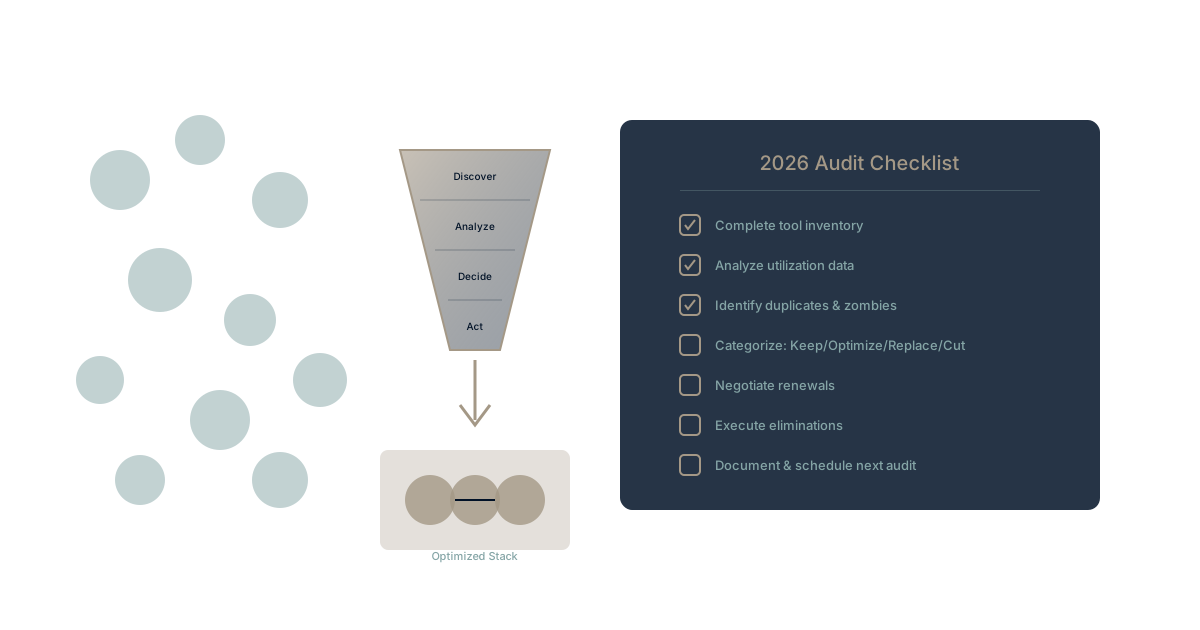
Your company's software stack grew again last year. Without anyone noticing, you added six new tools. Marketing grabbed a social scheduling platform. Sales brought in a conversation intelligence tool. Engineering adopted three new services that "just made sense at the time."
Sound familiar? According to Zylo's 2024 SaaS Management Index, the average company's SaaS portfolio grew 18% year-over-year, with most organizations now running 300+ applications. The problem isn't the tools—it's that nobody's auditing whether they're worth keeping.
This guide gives you a systematic approach to conducting your annual software audit. Not a spring cleaning exercise that gets forgotten. A strategic review that actually reduces costs and complexity.
Why Annual Audits Matter More Than Ever
The Compound Cost of Drift
Every tool you add creates ongoing costs:
Direct costs: License fees, per-seat charges, overage billing Integration costs: Zapier zaps, custom APIs, maintenance time Cognitive costs: Learning curves, context switching, scattered data Security costs: Another vendor to assess, another data location to track
These costs compound. A tool that cost $500/month at adoption might cost $2,000/month in total when you factor in integration maintenance, training time, and the productivity drain of switching between systems.
The context switching tax alone costs knowledge workers an estimated 23 minutes per interruption. Multiply that across your entire tool stack, and you begin to see the scale of the problem.
The Shadow IT Reality
Your official tool count is probably wrong. Gartner research suggests that for every sanctioned SaaS application, organizations have 3-4 unsanctioned ones in use. These shadow IT tools create:
- Untracked spending
- Security blind spots
- Duplicate functionality
- Data fragmentation
An annual audit surfaces these hidden tools before they become embedded infrastructure.
The Four-Phase Audit Framework
Phase 1: Discovery (Week 1-2)
Goal: Create a complete inventory of every tool in use across the organization.
Discovery Checklist:
- Pull finance data: All software-related invoices, subscriptions, expense reports
- Review SSO logs: Every application connected to your identity provider
- Survey departments: What tools do teams actually use daily?
- Check browser extensions: What's installed on company devices?
- Review API connections: What's integrated with your core systems?
- Audit expense reports: What's being reimbursed as "software"?
Create Your Master List:
For each tool discovered, document:
- Tool name and vendor
- Primary use case
- Department owner
- Monthly/annual cost
- Number of active users
- Integration dependencies
- Contract renewal date
Most organizations discover 20-40% more tools than they expected during this phase. That's normal—and it's exactly why you're doing this audit.
Phase 2: Analysis (Week 3-4)
Goal: Evaluate each tool against utilization, value, and strategic fit.
Utilization Analysis:
For each tool, gather usage data:
| Metric | Red Flag | Healthy |
|---|---|---|
| Active users vs. licenses | <50% | >80% |
| Login frequency | Monthly | Weekly+ |
| Feature adoption | Core only | Advanced features |
| Integration activity | Inactive | Regular data flow |
Value Assessment Questions:
- What problem does this solve? Can you articulate it clearly?
- What would happen without it? Would work actually stop?
- Is this the best tool for this job? Or just the first one adopted?
- Does it integrate with core systems? Or does it create data silos?
- Who's the champion? Does someone care about this tool, or is it orphaned?
Strategic Fit Evaluation:
Consider how each tool aligns with:
- Your organizational memory strategy
- Data accessibility requirements
- Security and compliance needs
- Future platform direction
Tools that don't fit your strategic direction—even if they work fine today—should be candidates for replacement.
Phase 3: Decision (Week 5-6)
Goal: Categorize every tool and create action plans.
The Four Categories:
1. Keep as-is ✓
- High utilization
- Clear value
- Strategic fit
- Reasonable cost
2. Optimize
- Keep but right-size licenses
- Renegotiate contracts
- Consolidate instances
- Improve adoption
3. Replace
- Valuable function, wrong tool
- Better alternatives exist
- Strategic misfit
- Integration burden
4. Eliminate
- Low utilization
- Duplicate functionality
- No clear owner
- Value doesn't justify cost
Decision Framework:
IF utilization < 50% AND no critical dependency
  → ELIMINATE or OPTIMIZE

IF strategic misfit AND alternative exists
  → REPLACE

IF high cost AND low differentiation
  → RENEGOTIATE or REPLACE

IF orphaned (no owner) AND not IT-managed
  → ELIMINATE
Phase 4: Action (Week 7-12)
Goal: Execute decisions with minimal disruption.
Elimination Protocol:
- Notify stakeholders (30 days before)
- Export critical data (if any)
- Document workarounds (if needed)
- Revoke access (scheduled date)
- Cancel subscription (billing cycle aware)
- Remove integrations (clean disconnection)
Replacement Protocol:
- Select replacement tool (involve users)
- Plan migration (data, workflows, training)
- Run parallel (2-4 weeks overlap)
- Execute cutover (coordinated switch)
- Sunset old tool (follow elimination protocol)
Optimization Protocol:
- Review license tiers (right-size)
- Contact vendor (renegotiate)
- Audit user list (remove inactive)
- Improve adoption (training, documentation)
- Track improvements (measure against baseline)
The Audit Spreadsheet Template
Create a master tracking spreadsheet with these columns:
| Column | Description |
|---|---|
| Tool Name | Official product name |
| Vendor | Company providing the tool |
| Category | Function (Communication, PM, Storage, etc.) |
| Department Owner | Who's responsible |
| Monthly Cost | Direct license fees |
| Total Cost | Including integrations, admin time |
| Active Users | Actually using regularly |
| Licensed Users | What you're paying for |
| Utilization % | Active / Licensed |
| Last Login | Most recent usage |
| Renewal Date | Contract end date |
| Decision | Keep/Optimize/Replace/Eliminate |
| Action Owner | Who's executing the decision |
| Target Date | When action completes |
| Status | Not Started/In Progress/Complete |
Common Audit Discoveries
The Duplicate Problem
Most audits reveal 3-5 tools doing essentially the same thing:
- Two project management platforms (engineering uses one, marketing another)
- Three file storage solutions (Drive, Dropbox, and OneDrive all active)
- Multiple analytics tools (each department chose their own)
- Competing documentation systems (Notion, Confluence, Google Docs all in use)
The knowledge silos created by duplicate tools often cost more than the duplicate licenses. Consolidation isn't just about saving money—it's about enabling information flow.
The Zombie Tool Problem
Zombie tools are subscriptions that auto-renew despite having no active users. Common zombies:
- Tools adopted by former employees
- Pilot programs that never scaled
- Event-specific purchases that became permanent
- "We might need it" defensive renewals
These zombies typically represent 15-25% of total SaaS spend. Killing them is pure savings with zero productivity impact.
The Shelfware Problem
Shelfware: Tools you bought but never fully deployed. Signs include:
- Implementation started but never completed
- Training scheduled but never attended
- Integrations planned but never built
- Advanced features purchased but never used
Shelfware represents a different decision: Either invest in proper adoption or admit the purchase was a mistake and eliminate it.
Negotiation Tactics for Renewals
When you've decided to keep a tool, you can still optimize the cost.
Timing Leverage:
- Start negotiations 90 days before renewal
- Q4 is often best (vendors need to hit quotas)
- Multi-year commits get better rates (but reduce flexibility)
Data Leverage:
- Show utilization data (low usage = negotiating power)
- Reference competitor pricing
- Highlight your growth potential (future seats)
Tactical Requests:
- Right-size to actual usage
- Lock in current pricing for multi-year
- Get additional features at current price
- Request payment terms (annual vs. monthly)
Average savings from active negotiation: 15-30% off standard pricing.
Building Audit Discipline
Make It Recurring
One-time audits don't work. Build a recurring practice:
Quarterly: Quick utilization review
- Pull usage data
- Flag low-adoption tools
- Review upcoming renewals
Annually: Full strategic audit
- Complete four-phase process
- Involve all departments
- Set goals for the coming year
Continuously: Governance for new additions
- Approval process for new tools
- Required business case
- Integration requirements
- Sunset plan requirement
Assign Ownership
Someone needs to own the software portfolio. Options:
- IT/Operations: Technical ownership
- Finance: Cost ownership
- Dedicated SaaS Manager: Full-time role for larger organizations
Without clear ownership, audits become one-time events instead of ongoing discipline.
From Audit to Strategy
An annual audit isn't just cost-cutting theater. Done well, it's strategic decision-making about how your organization works.
The goal isn't the smallest possible tool count. It's the right tool count—where each tool serves a clear purpose, integrates with your core systems, and supports rather than fragments your organizational memory.
Companies that audit well don't just save money. They:
- Move faster (less coordination overhead)
- Collaborate better (shared systems)
- Make better decisions (accessible data)
- Onboard faster (simpler stack to learn)
Experience Unified Work with Waymaker
Want to see what post-audit simplification looks like in practice? Waymaker Commander consolidates project management, documentation, strategic planning, and team collaboration into one integrated platform.
The result: Fewer tools, less switching, and AI that actually knows your business context.
Register for the beta and experience work without the fragmentation.
Your annual software audit is an investment in clarity. The tools you choose shape how your organization thinks, collaborates, and executes. Choose deliberately. Learn more about consolidating your SaaS stack and explore the true cost of tool sprawl.
This guide reflects audit methodologies proven across hundreds of organizations. Start your audit today—your Q1 budget will thank you.
About the Author

Waymaker Editorial
Stuart Leo founded Waymaker to solve a problem he kept seeing: businesses losing critical knowledge as they grow. He wrote Resolute to help leaders navigate change, lead with purpose, and build indestructible organizations. When he's not building software, he's enjoying the sand, surf, and open spaces of Australia.