Competitor prices below were correct when this was written and change regularly — they also vary by country and by annual versus monthly commitment. Check each vendor's own pricing page for current figures; the argument here does not depend on the exact number.
On 25 March 2026, Apple announced Apple Business. On 14 April, it goes live as a free service in more than 200 countries. For fifteen years, the two answers to "what should I run my business on?" have been Google Workspace or Microsoft 365. On 14 April, there is a third answer — and it comes from the company that makes the hardware a lot of business owners already use.
Apple Business is bigger than the press coverage suggested, and smaller. Bigger because it quietly includes professional email on your own domain — a feature most of the headline articles missed. Smaller because it stops at email, device management, and local reach. Everything above that — documents, tasks, goals, shared inboxes, CRM, custom apps — Apple did not build, and is not planning to.
This guide is for Mac business owners trying to figure out what Apple Business actually is, what it isn't, and what to do about it.
What Apple Business Actually Includes
Apple Business is the merger of Apple Business Manager (the device management console) and Apple Business Connect (the Apple Maps brand tool) into one free platform, plus several capabilities that are new on 14 April. The full feature list is on Apple's own preview page and was detailed in the 25 March press release. If you are a Mac-first business owner, you have probably already felt the limits of trying to run a business on iCloud and Apple's built-in tools — Apple Business is the company's attempt to fix some of that gap. Here is what it actually includes.
Apple Business, Business Manager, Business Connect
Three names, and searches for them are frequently the same question. Apple Business is the platform. Apple Business Manager was the device and app management console, and Apple Business Connect was the separate tool for managing how a business appeared across Apple Maps and other Apple surfaces. Both folded into Apple Business rather than continuing alongside it.
So if you are comparing Apple Business Connect against Apple Business, there is no comparison left to make — one became part of the other. What matters is whether the combined platform covers what you need, which is the rest of this article.
Device management and onboarding
Apple Business gives you mobile device management (MDM) for every Mac, iPhone, and iPad in your company. Preconfigured Blueprints let you set up new devices out of the box with the right apps, settings, and security. Employees join a group, get assigned roles, and their device comes ready to work — zero-touch deployment.
This is real, and it is valuable. It competes with Jamf, Kandji, and Microsoft Intune — tools that typically cost $4 to $10 per device per month. Apple Business includes it for free. For a 5-to-50 person Mac business that has never had dedicated IT, this alone is a meaningful upgrade — and it removes one of the last reasons a Mac-first team would reach for Microsoft 365.
Managed Apple Accounts
Apple Business enables cryptographic separation between work data and personal data on the same device. Employees keep their personal Apple Account. The business provisions a Managed Apple Account for work. The two don't mix. This is the same model Apple already uses for education, now rolled out to every business.
Critically, Apple Business integrates with existing identity providers — including Google Workspace and Microsoft Entra ID — for automated Managed Apple Account creation. Apple is explicit about this. Read the quote in the press release: you can keep your Google or Microsoft identity layer and plug Apple Business on top. Apple is not asking you to replace everything.
Professional email on your own domain (with a big caveat)
This is the feature most of the press coverage missed. Apple's own preview page at business.apple.com/preview lists it plainly: "Professional email using your domain and essential communication tools."
Apple Business includes business email on your custom domain. Not just BIMI logo branding. Real email. Your first.last@yourcompany.com. And it is included in the free tier.
Here is the caveat nobody is talking about. Apple's press release includes this footnote: "The Apple Business companion app, along with email, calendar and directory features, will require iOS 26, iPadOS 26 or macOS 26." macOS 26 has not shipped yet. Apple's annual OS release cadence puts it in autumn 2026 — six months after Apple Business launches. Until macOS 26 ships, it is unclear whether the email service itself is available or only the in-app client experience is gated.
The honest read: if you are running macOS 15 on 14 April, you probably cannot use Apple Business email yet. The MDM, Maps, Wallet, and iCloud features will work — email will not, or will be limited. We will update this article once Apple clarifies at launch. For most Mac businesses, this means the email question is still open for another six months.
When it does fully arrive, Apple Business will quietly become the fourth major business email provider alongside Google, Microsoft, and Fastmail — and the only one of the four that is free. For businesses already calculating the real total cost of Google Workspace, that is a real reason to re-evaluate. But not yet — and there are better options for Mac businesses looking for email today.
Cloud storage with iCloud
Apple Business includes automatic backup and sync of work files through iCloud. Combined with Managed Apple Accounts, this gives you a work-scoped iCloud drive that stays with the business. Think of it as Apple's answer to Google Drive or OneDrive — limited to file storage, not document collaboration.
AppleCare+ for Business
Hardware support and repair coverage is included as part of the Apple Business bundle. For Mac-first businesses that already buy AppleCare on their hardware, this consolidates support into one place.
Brand and location management
The old Apple Business Connect features roll in: brand profiles on Apple Maps, rich place cards, showcases for deals and promotions, customised actions (reserve, order), branding in Apple Mail and Wallet, and logo display on Tap to Pay payment screens. For retail, hospitality, and location-based services, this is a substantial upgrade to how your business appears across every Apple surface.
Insights and admin API
Business discovery metrics across Maps. An Admin API for large deployments. Employee management with custom roles. App distribution through the App Store. These are the capabilities that make Apple Business usable at scale, not just for a solo founder.
What Apple Business Is Not
Apple Business is genuinely ambitious. It also stops in a very specific place. Here is what Apple did not build, and is not planning to build.
It is not a productivity suite
Apple Business does not include document collaboration, spreadsheets with shared editing, task management, kanban boards, goal tracking, and documents in one place, OKRs, shared inboxes, CRM, project boards, or any of the tools a team actually uses to run day-to-day work. Apple makes Pages, Numbers, and Keynote, and they ship with every Mac — but they are not collaboration tools. They are single-author documents with iCloud sync bolted on.
Apple did not ship a Google Docs competitor. Apple did not ship a Notion competitor. Apple did not ship an Asana or Monday or ClickUp competitor. Apple did not ship a shared inbox, a CRM, or a goals platform. Apple Business covers email, devices, and local reach. Everything above that layer is still yours to solve.
It is not a platform for building custom apps
Apple Business has no story for custom business software. If your team needs a lightweight inventory tracker, a client portal you could build in a day, an approval workflow, or any of the thousand small tools a growing business ends up needing, Apple Business has no answer. Apple will sell you Xcode and let you build a native macOS app, but that is a developer's job, not a business owner's — which is exactly why generic SaaS never fits and building is the better answer.
It is not a replacement for Google Workspace or Microsoft 365 as a whole
This is the part the press coverage got wrong. Apple replaces the email and device layers of Google Workspace and Microsoft 365 — but not the documents, sheets, slides, shared drives, or collaboration features. A business that moves from Google Workspace to Apple Business alone will lose Google Docs, Google Sheets, Google Drive's collaboration model, and the connective tissue that makes Google Workspace feel like a suite.
The question is whether those features matter to you, or whether there is a better place to get them.
It is not cross-platform
This one is obvious once you say it out loud, but it needs saying. Apple Business only manages Apple devices. The moment you have one Windows laptop, one Chromebook, or one Linux machine in your organisation, Apple Business cannot see it. Employees on those devices cannot receive managed accounts, cannot be onboarded through Blueprints, and cannot access the companion Apple Business app in the same way.
For a team that is 100% on Apple hardware, this is not a problem. For most businesses in the real world — where a designer on a MacBook Pro sits next to a bookkeeper on a Windows laptop, or a new hire brings their own Dell — it means Apple Business is half the story. You still need a productivity platform that works for everyone on every operating system. And that platform cannot come from Apple.
What This Means for Mac Businesses
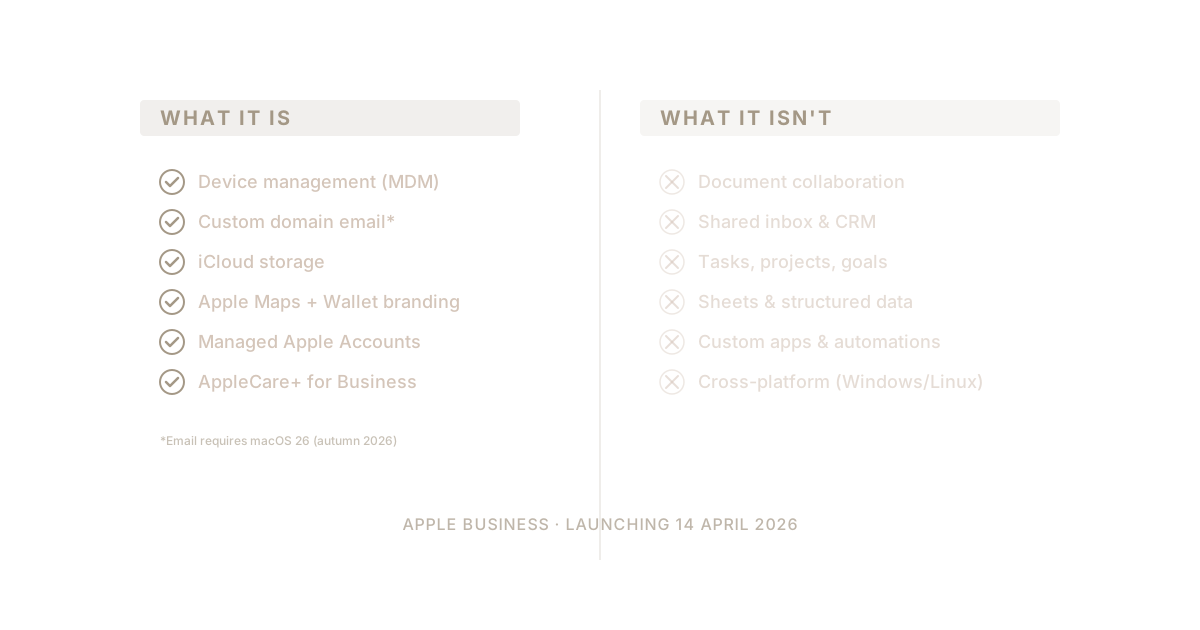
Put the two lists side by side. Here is what Apple Business covers and what it doesn't.
| What you need | Apple Business does this? |
|---|---|
| Device setup and management (MDM) | ✅ Yes |
| Professional email on your custom domain | ✅ Yes (launches 14 Apr) |
| iCloud file backup and sync | ✅ Yes |
| Apple Maps / Wallet / Tap to Pay branding | ✅ Yes |
| Employee groups and role-based app access | ✅ Yes |
| Managed Apple Accounts (work / personal split) | ✅ Yes |
| AppleCare+ for Business (hardware support) | ✅ Yes |
| Document collaboration (Docs / Sheets / Slides) | ❌ No |
| Shared inbox for support@ or sales@ | ❌ No |
| Task and project management (kanban, due dates) | ❌ No |
| Goal tracking / OKRs | ❌ No |
| CRM | ❌ No |
| Built-in AI that works across your data | ❌ No |
| Platform for building custom apps and automations | ❌ No |
Everything in the green rows Apple Business solves on 14 April, for free. Everything in the red rows you still have to solve yourself.
For a solo founder or a 2-3 person Mac business, Apple Business alone might be enough on day one. Email, devices, iCloud storage, and Maps presence — all free. The moment you want real collaboration, though, you start looking for all-in-one productivity for Mac beyond the built-in apps. That is a real product and a real gift — and combined with a privacy-first business tool stack for Mac teams, it is a legitimate place to start.
For a business of 5 to 50 people that needs any kind of structured collaboration — documents shared across a team, tasks assigned and tracked, a shared inbox for customer support, goals tied to the work that delivers them, a CRM that remembers your customers, or custom apps built on top of your own data — Apple Business is necessary but not sufficient. You still need a productivity layer on top.
That productivity layer used to mean Google Workspace or Microsoft 365. In 2026 it doesn't have to.
What to Do Next
If you are a Mac business owner reading this before 14 April, there are three realistic paths forward.
Path 1: Apple Business + Google Workspace. Use Apple Business for devices and Maps. Keep Google Workspace for email, docs, and identity. This is the default Apple is quietly endorsing through its Google Workspace integration support. It works — but you are still paying Google $7.20 per user per month forever, still handing your data to an advertising company, and still running documents in a browser that fights your Mac. That is exactly why a growing number of Mac users are leaving Google Workspace for good.
Path 2: Apple Business + Microsoft 365. Same shape, different duopoly partner. Better on compliance, worse on cost and complexity. Most Mac-first businesses reject this on aesthetic grounds alone.
Path 3: Apple Business + a dedicated productivity suite built for Mac businesses. Use Apple Business for the device, email, storage, and location layer. Use Waymaker for the productivity suite — documents, tasks, goals, sheets, shared inbox, CRM, AI, and the platform to build custom apps. No Google. No Microsoft. A complete Mac business stack where every layer was built by a company that treats Macs as the primary target, not an afterthought.
That third path is what we built Waymaker for. Read the full Apple + Waymaker Mac business stack guide →
The Bottom Line
Apple Business is real. It is generous. And it is a genuine upgrade for every Mac business that turns it on. If you run on Apple hardware, there is no reason not to enable it on 14 April — the MDM alone is worth the setup time, the free email is a bonus, and the Maps/Wallet branding is table stakes for any business with customers.
But Apple Business is not the whole stack. Apple built the device, email, and location layer. Apple did not build documents, tasks, goals, shared inboxes, CRM, AI, or the platform to run custom business apps. Those are still yours to solve — and for the first time, they don't have to come from Google or Microsoft.
The Mac business stack for 2026 is Apple Business on the bottom and Waymaker on top. Read the full stack breakdown →. If you want to skip the comparison and go straight to migration, the guide to replacing Google Workspace while keeping your email is the place to start.
Frequently asked questions
Q: When does Apple Business launch? Apple announced Apple Business on 25 March 2026, and it went live on 14 April as a free service in more than 200 countries.
Q: Does Apple Business include email on your own domain? Yes. Apple's preview page lists professional email using your own domain in the free tier — but the press release footnote requires iOS 26, iPadOS 26, or macOS 26, which has not shipped yet, so the email feature may be limited until that autumn 2026 OS release. There are better options for Mac businesses that need email today.
Q: Can Apple Business replace Google Workspace or Microsoft 365? Only partially. It replaces the email and device layers, but not documents, sheets, slides, shared drives, or collaboration — so a business that moves to Apple Business alone loses the connective tissue that makes those suites feel like a suite.
Q: Does Apple Business work with Windows or Chromebook devices? No. Apple Business only manages Apple devices. The moment you have one Windows laptop, Chromebook, or Linux machine, Apple Business cannot see it.
Q: Is Apple Business a productivity suite? No. It does not include document collaboration, task management, kanban boards, goal tracking, or documents in one place, shared inboxes, CRM, or a platform for building custom apps. It covers email, devices, and local reach — everything above that is still yours to solve.
Sources
Frequently asked questions
- What is the difference between Apple Business and Apple Business Connect?
- Apple Business Connect was the standalone tool for managing how a business appeared on Apple Maps — place cards, logos, actions like reserve or order. It is not a separate product any more: those capabilities folded into Apple Business, which also absorbed Apple Business Manager for device management. One platform, two former products.
- Is Apple Business Manager the same as Apple Business?
- Not quite. Apple Business Manager was the device and app management console. Apple Business is the wider platform it became part of, combining that device management with the Maps and brand capabilities from Business Connect. If you used Business Manager before, the functions you relied on are inside Apple Business now.
- When does Apple Business launch?
- Apple announced Apple Business on 25 March 2026, and it went live on 14 April as a free service in more than 200 countries.
- Does Apple Business include email on your own domain?
- Yes. Apple's preview page lists professional email using your own domain in the free tier — but the press release footnote requires iOS 26, iPadOS 26, or macOS 26, which has not shipped yet, so the email feature may be limited until that autumn 2026 OS release. There are better options for Mac businesses that need email today.
- Can Apple Business replace Google Workspace or Microsoft 365?
- Only partially. It replaces the email and device layers, but not documents, sheets, slides, shared drives, or collaboration — so a business that moves to Apple Business alone loses the connective tissue that makes those suites feel like a suite.
- Does Apple Business work with Windows or Chromebook devices?
- No. Apple Business only manages Apple devices. The moment you have one Windows laptop, Chromebook, or Linux machine, Apple Business cannot see it.
- Is Apple Business a productivity suite?
- No. It does not include document collaboration, task management, kanban boards, goal tracking, or documents in one place, shared inboxes, CRM, or a platform for building custom apps. It covers email, devices, and local reach — everything above that is still yours to solve.
About the Author

Stuart Leo
Stuart Leo founded Waymaker to solve a problem he kept seeing: businesses losing critical knowledge as they grow. He wrote Resolute to help leaders navigate change, lead with purpose, and build indestructible organizations. When he's not building software, he's enjoying the sand, surf, and open spaces of Australia.