It's 9 AM on Monday. Sarah, your marketing director, has identified a perfect opportunity: a competitor just stumbled, their service went down over the weekend, and customers are flooding social media with complaints. The window for a targeted email campaign is 48 hours, maybe less.
Sarah has the copy. She has the audience segments. She knows exactly what to say. But she can't send the campaign.
She's waiting for IT.
The email automation tool needs a new journey configured. That requires a support ticket. The ticket will be triaged, prioritized, assigned, scoped, and—if Sarah is lucky—completed by Friday. Long after the window has closed.
This scenario plays out thousands of times daily in organizations around the world. And it's costing more than anyone realizes.
The Anatomy of the IT Bottleneck
The modern IT bottleneck didn't emerge from malice. It emerged from legitimate concerns: security, compliance, standardization, cost control. Central IT became the gatekeeper because someone needed to prevent chaos.
But good intentions created unintended consequences.
How It Works
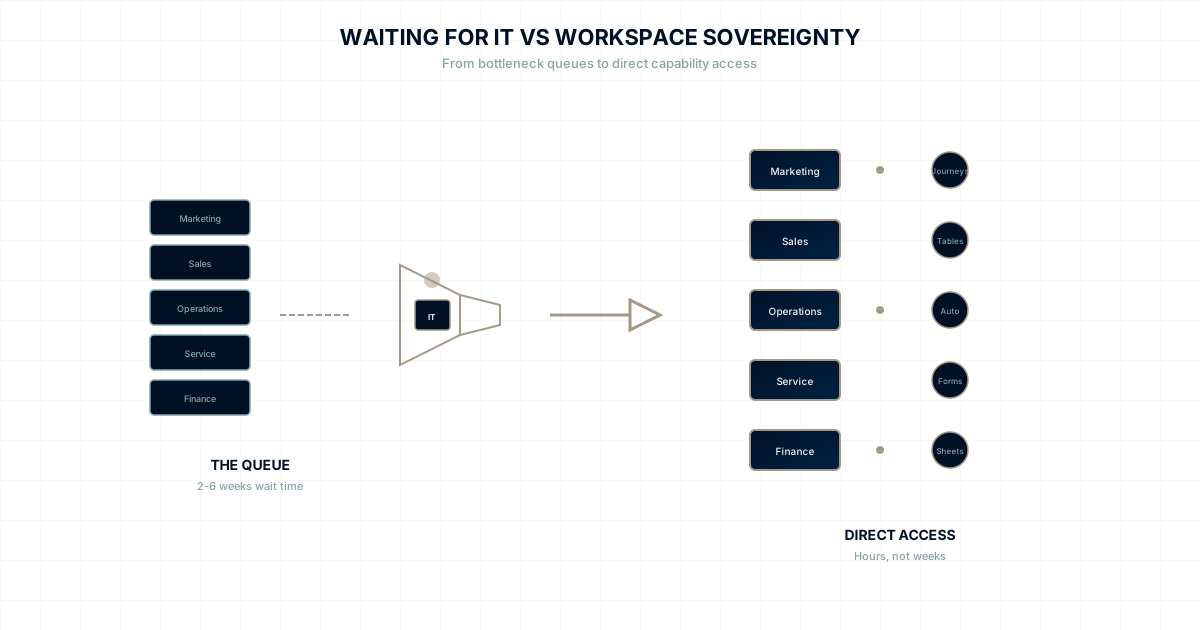
Team identifies need → Submits IT request → IT triages request →
Request enters queue → Request gets prioritized → Request gets assigned →
Work gets scoped → Work gets scheduled → Work gets completed →
Team receives capability → (Window often closed)
At every stage, delays accumulate:
- Triage: 1-3 days (depending on volume)
- Prioritization: Variable (depends on competing priorities)
- Assignment: 1-2 days (finding available resources)
- Scoping: 1-5 days (understanding requirements)
- Scheduling: Variable (fitting into sprints/roadmaps)
- Completion: 1-10 days (depending on complexity)
- Deployment: 1-2 days (testing, staging, production)
Total time from request to capability: 2-6 weeks for routine requests.
For Sarah's email campaign, the window closed four weeks ago.
The Numbers
According to Gartner research, the average enterprise IT organization processes 1,000-3,000 support tickets per month. Even with optimal efficiency, request backlogs are measured in weeks.
- Average ticket resolution time: 5-14 days
- Priority escalation rate: 20-30% (teams trying to jump the queue)
- Ticket reopening rate: 15-25% (incomplete solutions)
- Shadow IT adoption: 40-60% of employees use unapproved tools
That last statistic reveals the real impact: teams aren't just waiting. They're working around the system entirely.
The True Cost of Waiting
The IT bottleneck creates costs that rarely appear on any spreadsheet.
Direct Productivity Loss
When teams wait for tools, they don't wait idle. They:
- Use manual workarounds: Spreadsheets instead of databases, email threads instead of automations
- Delay projects: Pushing timelines while waiting for capabilities
- Context switch: Moving to other tasks and losing flow state
- Escalate: Spending time advocating for priority instead of doing work
Conservative estimates: 2-4 hours per week per employee spent navigating IT constraints.
For a 200-person company at $75/hour fully-loaded cost: $1.5-3M annually in productivity loss.
Opportunity Cost
Sarah's missed email campaign had potential value. That competitor's stumble represented:
- Market share available for capture
- Customer loyalty up for grabs
- Competitive positioning opportunity
The campaign Sarah couldn't send might have converted 50 new customers. At $10,000 lifetime value each: $500,000 opportunity cost from a single incident.
Multiply that across every team, every week, every missed window.
Shadow IT Risk
When teams can't get tools through official channels, they get creative:
- Marketing signs up for their own email platform
- Sales creates accounts on unapproved CRMs
- Operations builds spreadsheet databases
- Everyone uses personal Dropbox for file sharing
Shadow IT creates:
- Security vulnerabilities: Unapproved tools, unknown access patterns
- Compliance risks: Data in locations IT doesn't control
- Integration nightmares: Information siloed in rogue systems
- Support gaps: Issues IT can't help troubleshoot
A 2024 study found that 67% of security breaches involved shadow IT systems.
Cultural Damage
Perhaps the most insidious cost is cultural.
When organizations consistently make teams wait for permission, they communicate implicit messages:
- We don't trust you to choose your own tools
- Your judgment about what you need is suspect
- Central control matters more than your effectiveness
- Speed is less important than process
Over time, this creates learned helplessness. Teams stop asking for what they need. They lower expectations. They accept that waiting is normal.
The best employees—the ones with options—leave for organizations that trust them.
Why This Keeps Happening
The IT bottleneck persists because it solves real problems for someone:
For IT Leadership
Central control provides:
- Standardization across the organization
- Security oversight for all systems
- Vendor management consolidation
- Clear accountability for technical decisions
For Finance
Central control enables:
- Budget oversight for software spending
- Contract negotiation leverage
- Cost allocation visibility
- Reduction in tool sprawl
For Compliance
Central control ensures:
- Consistent security policies
- Audit trail for system access
- Data governance enforcement
- Regulatory requirement adherence
These are legitimate concerns. The problem isn't that control exists—it's that control creates a bottleneck that costs more than the problems it solves.
The Operations at the Edge Alternative
What if teams could have tool autonomy AND organizations could have oversight?
This is the core premise of Operations at the Edge: push capability to where work happens while maintaining unified data and governance.
Workspace Sovereignty in Practice
With workspace sovereignty:
Sarah's Monday morning looks different:
- 9:00 AM: Identifies campaign opportunity
- 9:15 AM: Opens her marketing workspace in Commander
- 9:30 AM: Creates email journey using Journeys tool
- 10:00 AM: Sets up audience segment using Tables
- 10:30 AM: Configures automation triggers
- 11:00 AM: Campaign live, catching the 48-hour window
No ticket. No queue. No waiting.
Sarah's workspace has everything she needs because marketing workspaces are equipped with marketing tools. She didn't need IT permission because the platform was designed for workspace sovereignty.
How Governance Still Works
"But wait," you're thinking. "What about security? Compliance? Cost control?"
Operations at the Edge doesn't eliminate governance—it restructures it:
Security:
- Single platform means single security perimeter
- Unified authentication and access controls
- All data in one governed location (not shadow IT)
- Consistent security policies across workspaces
Compliance:
- Audit trails for all workspace actions
- Data governance at the platform level
- Consistent policies enforced structurally
- No rogue systems to discover
Cost Control:
- Single platform subscription replaces 15+ tools
- No per-tool procurement process needed
- Usage visibility across organization
- No shadow IT spending leakage
The shift is from bottleneck governance (control access to each capability) to platform governance (provide a governed platform with full capability).
Making the Transition
Moving from central IT control to workspace sovereignty isn't instant. But it's achievable.
Phase 1: Recognize the Cost
Start by quantifying your current IT bottleneck:
- How many tool-related tickets per month?
- What's average time-to-resolution?
- How many projects cite IT dependencies as blockers?
- What shadow IT exists in your organization?
Make the cost visible. Invisible costs stay invisible.
Phase 2: Identify High-Pain Teams
Some teams suffer from the bottleneck more than others:
- Marketing (campaign timing, audience tools)
- Sales (pipeline customization, reporting)
- Operations (process automation, tracking)
- Customer Service (workflow optimization)
Start with the teams feeling the most pain.
Phase 3: Pilot Workspace Sovereignty
Implement workspace sovereignty for one high-pain team:
- Migrate to a platform that provides workspace autonomy
- Give the team authority over their tooling decisions
- Maintain platform-level governance and oversight
- Measure: time-to-capability, productivity, satisfaction
Phase 4: Expand Based on Results
If the pilot succeeds (it will), expand:
- Add workspaces for additional teams
- Migrate data from legacy tools
- Sunset shadow IT as teams get legitimate autonomy
- Shift IT from gatekeeper to platform enabler
The New Role of IT
Workspace sovereignty doesn't eliminate IT. It transforms IT from bottleneck to enabler:
Old IT Role: Gatekeeper
- Control access to tools
- Process capability requests
- Manage vendor relationships
- Enforce standardization through restriction
New IT Role: Platform Enabler
- Ensure platform security and compliance
- Provide training and best practices
- Enable workspace success
- Focus on strategic technology decisions
This is a better job. IT teams report higher satisfaction when they're enabling success rather than processing ticket queues.
The Invitation
Your teams are waiting for IT right now.
Somewhere in your organization, a marketing opportunity is expiring. A sales improvement is stalled. An operations efficiency is delayed. A customer service enhancement is blocked.
They're waiting for permission to do their jobs effectively.
Operations at the Edge offers an alternative: platforms designed for workspace sovereignty. Teams that can act when action matters. Organizations that move at the speed of need.
The people doing the work should have the tools to do the work.
WaymakerOS makes that possible.
Continue the Journey
- Operations at the Edge: Why WaymakerOS Exists: The full philosophy
- Workspace Sovereignty: What autonomous workspaces look like
- The HQ Bottleneck: How centralized software kills innovation
- Central Control vs. Operations at the Edge: Direct comparison
WaymakerOS. The way to make your business OS. Make the way.
Stop waiting. Start doing.
Experience workspace sovereignty with Commander.
About the Author

Stuart Leo
Stuart Leo founded Waymaker to solve a problem he kept seeing: businesses losing critical knowledge as they grow. He wrote Resolute to help leaders navigate change, lead with purpose, and build indestructible organizations. When he's not building software, he's enjoying the sand, surf, and open spaces of Australia.