Imagine walking into work and having access to every tool you need to do your job. Not because you submitted the right tickets. Not because IT approved your requests. Not because you're on the right plan tier.
Because your workspace was designed to give you sovereignty over your operations.
This is workspace sovereignty—and it's the inevitable future of business software.
What Workspace Sovereignty Means
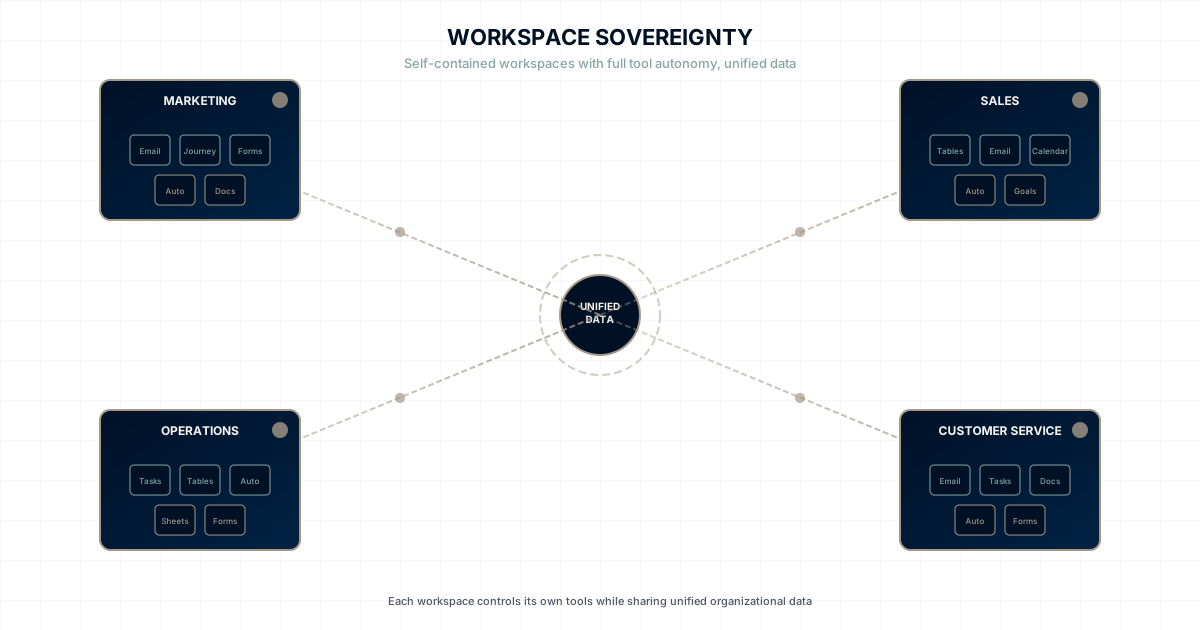
Workspace sovereignty is simple to define: each workspace operates as a self-contained unit with full authority over its tools, while sharing unified organizational data.
In practice, this means:
For a Marketing Workspace
The marketing team has native access to:
- Email Journeys: Build and deploy campaigns without IT involvement
- Forms: Create lead capture without development tickets
- Tables: Store and analyze campaign data independently
- Automations: Set up triggers and workflows on their own timeline
- Documents: Create content with full collaboration features
When marketing identifies an opportunity, they act immediately. No requests. No queues. No waiting.
For a Sales Workspace
The sales team has native access to:
- Tables: Custom pipeline management without CRM limitations
- Email: Outreach directly from the workspace
- Calendar: Scheduling integrated with contacts
- Automations: Follow-up sequences that trigger automatically
- Goals: OKRs that connect individual deals to team targets
When sales needs a new field, a new stage, or a new automation, they build it. That afternoon. Not next quarter.
For an Operations Workspace
The operations team has native access to:
- Taskboards: Project tracking without tool compromises
- Tables: Operational databases custom to their processes
- Automations: Workflow triggers across systems
- Sheets: Analysis tools for operational data
- Forms: Data collection from internal teams
When operations spots an efficiency opportunity, they implement it immediately.
The Unified Foundation
Here's what makes workspace sovereignty different from fragmentation: all workspaces share the same data layer.
When marketing creates a contact, sales sees it. When sales closes a deal, operations can trigger fulfillment workflows. When operations completes delivery, customer service has the full history.
Autonomy without isolation. Capability without silos.
Sovereignty + Syndication: The Business Web
But workspace sovereignty is just the foundation. The real breakthrough is when sovereign workspaces connect to each other.
We call this The Business Web: a federated network where workspaces publish and subscribe to each other's content.
How it works:
| Publisher | Subscriber | What Flows |
|---|---|---|
| Executive Workspace | Sales, Marketing, Ops | Business strategy with live updates |
| HR Workspace | All Departments | SOPs, policies, compliance docs |
| IT Workspace | Finance, Sales, Marketing | Shared apps (expense tracker, time sheets) |
| Data Team | Any Workspace | Analytics agents and insights |
The publish/subscribe model:
- Publishers own content — they edit, they control when updates flow
- Subscribers receive content — read-only, automatically synced
- Bi-directional flows — each workspace publishes what they own, subscribes to what they need
Example: Executive publishes "Q1 Business Plan." Sales subscribes to the Sales Strategy section. When Executive updates strategy, Sales sees it immediately—no emails, no "which version?" confusion. Sales publishes "Q1 Results." Executive subscribes. Everyone works from live, authoritative sources.
This is the World Wide Web model applied to your business: Like websites link to websites, your workspaces connect to workspaces. But it's all inside your organization's security perimeter.
Notion gives you pages. We give you a network.
Why Centralized Control Fails
The alternative to workspace sovereignty is what most organizations have today: centralized tool control.
How Centralized Control Works
In a centralized model:
- Central IT selects tools for the entire organization
- Central IT configures tools based on aggregated requirements
- Central IT provisions access through approval workflows
- Teams work within the constraints of what's been provisioned
This creates predictable problems.
The Compromise Problem
No single marketing tool serves all marketing teams equally. When IT selects one email platform for the whole company:
- Enterprise marketing gets 60% of what they need
- SMB marketing gets 40% of what they need
- Partner marketing gets 30% of what they need
- Everyone compromises
Multiply this across every tool category, and you get organizations where no team has exactly what they need.
The Speed Problem
Centralized control introduces latency at every decision point:
- Tool selection takes months
- Configuration takes weeks
- Access provisioning takes days
- Modifications take weeks more
Meanwhile, markets move, competitors act, and opportunities expire.
The Innovation Problem
When teams can't easily access new capabilities, they stop imagining new approaches.
"We should try X" becomes "We'd need to get IT to approve X, so let's not bother."
Innovation dies in approval queues.
The Shadow IT Problem
Frustrated teams work around central control:
- Marketing signs up for their own tools
- Sales uses personal software
- Operations builds spreadsheet systems
- Data fragments across rogue platforms
The cure creates worse disease than the symptom.
Workspace Sovereignty in Action
Let's see what workspace sovereignty looks like in a real scenario.
Scenario: New Product Launch
Your company is launching a new product. Multiple teams need to coordinate.
With Centralized Control:
Week 1: Marketing requests landing page capabilities → IT queue Week 2: Sales requests new pipeline stage → CRM modification queue Week 3: Operations requests fulfillment workflow → Automation queue Week 4: Customer service requests support documentation → Knowledge base queue Week 5-8: Various requests work through queues Week 9: Teams finally have tools, launch delayed by 2 months
With Workspace Sovereignty:
Day 1: Marketing creates landing page using their Forms and Documents Day 1: Sales adds pipeline stage in their Tables Day 2: Operations builds fulfillment automation in their workspace Day 2: Customer service creates support docs in their workspace Day 3: All systems connected through unified data layer Week 1: Launch on schedule
The difference isn't incremental. It's transformational.
Scenario: Competitive Response
A competitor announces a major price cut. You need to respond within 48 hours.
With Centralized Control:
Hour 0: Leadership decides on response strategy Hour 1: Marketing submits request for emergency campaign Hour 4: IT triages request, escalates to leadership Hour 8: Request approved as high priority Hour 24: Configuration work begins Hour 48: Window closed, partial response deployed Result: Lost market share during response delay
With Workspace Sovereignty:
Hour 0: Leadership decides on response strategy Hour 1: Marketing opens their workspace Hour 3: Campaign designed, built, tested Hour 4: Campaign live Hour 5: First responses arriving Result: Market position defended
Scenario: Process Improvement
Operations identifies that a manual handoff is causing delays. They want to automate it.
With Centralized Control:
Month 1: Operations documents the problem and proposed solution Month 2: IT reviews request, schedules scoping meeting Month 3: Solution designed and approved Month 4: Development work scheduled Month 5: Development complete, testing begins Month 6: Deployed to production Result: 6 months of unnecessary delays before fix
With Workspace Sovereignty:
Day 1: Operations identifies the problem Day 1: Operations builds automation in their workspace Day 2: Automation tested and refined Day 3: Problem solved Result: 6 months of efficiency captured
The Architecture of Sovereignty
Workspace sovereignty isn't just a policy—it's an architecture.
What Each Workspace Contains
A sovereign workspace includes:
Core Tools:
- Communication (Email, Messages, Calls)
- Documents (Docs, Sheets, Presentations)
- Planning (Taskboards, Goals)
- Data (Tables, Forms)
- Automation (Journeys, Automations)
Workspace Configuration:
- Custom fields and schemas
- Workspace-specific automations
- Role-based access within the workspace
- Workspace branding and preferences
Integration Points:
- Connection to unified data layer
- Visibility into cross-workspace data
- Triggers that span workspaces
- Shared contact and company records
What the Platform Provides
The platform ensures:
Unified Data:
- Single source of truth for contacts, companies, projects
- Cross-workspace visibility where appropriate
- Data consistency and integrity
Governance:
- Platform-level security and compliance
- Audit trails for all actions
- Access controls at organizational level
- Data governance policies
Infrastructure:
- Performance and reliability
- Updates and maintenance
- Security patches and monitoring
- Backup and disaster recovery
The Balance
Workspace sovereignty balances autonomy and alignment:
| Workspace Controls | Platform Controls |
|---|---|
| Tool configuration | Security policies |
| Workflow design | Data governance |
| Custom fields | Audit requirements |
| Automation rules | Compliance standards |
| Access within workspace | Organization-wide access |
This balance—autonomy where it matters, alignment where it's needed—is what makes workspace sovereignty work.
Making Sovereignty Real
Implementing workspace sovereignty requires more than just buying new software. It requires organizational commitment.
Leadership Commitment
Leaders must genuinely believe that:
- Teams know their operational needs better than IT
- Speed matters more than perfect standardization
- Trust creates better outcomes than control
- Autonomy and alignment can coexist
Without this belief, organizations will recreate centralized control even in sovereign-capable platforms.
IT Transformation
IT teams must shift from:
- Gatekeeping: Controlling access to capabilities
- To Enabling: Ensuring the platform empowers everyone
This is a better role for IT professionals. Enabling success is more satisfying than processing ticket queues.
Team Readiness
Teams must accept the responsibility that comes with sovereignty:
- Learning their workspace capabilities
- Making tool decisions thoughtfully
- Maintaining data quality
- Following platform governance
Sovereignty without responsibility is chaos.
Platform Selection
The platform must be designed for sovereignty:
- Comprehensive workspace tooling (not just a few features)
- Unified data architecture (not tool-by-tool silos)
- Governance capabilities (not ungovernable chaos)
- Ease of use (not requires IT to configure)
WaymakerOS was built from the ground up for workspace sovereignty.
The Future Is Sovereign—And Connected
Workspace sovereignty isn't a trend. It's the inevitable evolution of business software. But sovereignty alone isn't enough. The Business Web takes it further: sovereign workspaces that connect to each other.
The Generational Shift
Workers entering the workforce today have never experienced a world where they couldn't:
- Sign up for tools instantly
- Configure software to their preferences
- Solve problems with immediate solutions
- Connect and share seamlessly
Asking them to submit IT tickets and wait weeks feels prehistoric. Asking them to email PDFs instead of subscribing to live content feels archaic.
The Competitive Pressure
Organizations that move faster win. Period.
Companies with workspace sovereignty respond to markets in hours. Companies with The Business Web share knowledge across teams instantly. Companies with centralized control respond in weeks or months.
The math is simple. Sovereignty + Syndication wins.
The Technology Reality
Modern platforms can provide autonomy AND governance AND connectivity. The old tradeoffs are false.
Organizations choosing centralized control aren't choosing safety. They're choosing slowness—and isolation.
The Invitation
Workspace sovereignty and The Business Web are available today.
Your teams don't have to wait for IT. Your workspaces don't have to operate in isolation. Your organization doesn't have to sacrifice governance for speed.
The people doing the work can have the tools to do the work—and those tools can connect like the web.
WaymakerOS makes The Business Web real:
- Commander provides 20 integrated tools in every workspace
- Content syndication lets workspaces publish and subscribe to each other
- App embedding lets internal apps run across workspaces with context
- Agent services lets AI serve the entire organization
- Platform governance maintains security and compliance
Stop living in their network. Build your own.
Continue the Journey
- Why WaymakerOS Exists: The full story of The Business Web
- Operations at the Edge: The philosophy behind sovereignty and syndication
- Why Your Teams Are Waiting for IT: The cost of centralized control
- Central Control vs. Operations at the Edge: Direct comparison
- The HQ Bottleneck: How centralized software kills innovation
WaymakerOS. The way to make your business OS. Make the way.
Your business's private web.
Experience it yourself with Commander.
About the Author

Stuart Leo
Stuart Leo founded Waymaker to solve a problem he kept seeing: businesses losing critical knowledge as they grow. He wrote Resolute to help leaders navigate change, lead with purpose, and build indestructible organizations. When he's not building software, he's enjoying the sand, surf, and open spaces of Australia.