Every business needs software no one will build for them.
Small things — the reconciliation that pulls from three systems, the follow-up sequence that needs last month's context, the weekly report nobody can automate.
Big things — the client portal, the booking engine, the operations dashboard, the custom ERP that connects everything.
They share one property: too custom for off-the-shelf software. Until now, building them required developers most businesses can't afford.
This is the story of why WaymakerOS exists.
AI Changed Who Gets to Build
Non-technical operators are building real products with AI tools in days, sometimes hours. What would have taken a team of developers 18 months is now a nights-and-weekends project.
The cost of creating software is collapsing. Claude Code, Codex, Cursor — these tools mean the question is no longer "can we build this?" It's "should we?"
And increasingly, the answer is yes. Small teams are building because they finally can. Enterprises are building because they have internal complexity worth solving. Custom tools, internal apps, and workflow automations now justify themselves faster than buying another SaaS product.
But building isn't the hard part anymore. The hard part is where it lives, what data it connects to, and how it fits into the way your business actually operates.
Code built with AI still needs a foundation underneath it — a data layer, an identity system, business context, an API that connects it to your customers, your projects, your team. Without that, AI-built code sits in a repo, runs on a developer's laptop, or gets deployed to infrastructure that knows nothing about your business.
WaymakerOS is the way to make your business OS.
What WaymakerOS Is
The only platform where you design, build, and own the operating system your business actually runs on.
Commander is the foundation. 20 integrated tools for daily operations — email, calendar, documents, taskboards, goals, tables, forms, automations. Everything your team needs to run the business, in one place. This creates the data layer that everything builds on.
Host is the build layer. Design, build, and own custom apps, agents, and automations that connect to everything in Commander. Build with whatever AI coding tool you prefer. Deploy to Waymaker. Own the result under your domain, billed by what it uses.
One is the intelligence. AI that sits across both layers — it already knows your goals, your projects, your people, and your data. Not generic AI that starts from zero. Intelligence with real business context.
One unified API connects it all. ctx.tables, ctx.commander, ctx.ai — the reason your custom software actually works. It connects code to business context automatically, without integration projects.
The pitch is simple: The way to make your business OS.
Design. Make. Own.
Start Here: Commander
Commander is where most teams live day-to-day. It's what gets turned on first.
Not because it's the reason WaymakerOS exists — but because unified productivity is the foundation everything else builds on. When your email, calendar, documents, taskboards, goals, and data all live in one system, you have something AI-built software can actually connect to.
20 Tools, One Platform
Commander provides 20 integrated tools across three categories:
- Productivity — Email, Calendar, Calls, Messages, Meetings, Rush, Address Book, Documents, Sheets
- Planning — Taskboards, Goals & OKRs, Roles, My Workspace
- Performance — Tables, Forms, Journeys, Automations
These aren't 20 separate tools. They're 20 views into a single unified database. When you update a contact in the Address Book, that change reflects instantly in Email, Calendar, CRM records, and everywhere else. No sync delays. No reconciliation. One truth.
Flexibility by Design
You don't have to use every Commander tool on day one. If you want to stay on Google Workspace or Microsoft 365 for email and calendar, you can — WaymakerOS integrates with both and supports SSO with Google and Microsoft.
But if you want enterprise-grade email, calendar, and contacts that are natively connected to everything else in the platform, they're included in the base price. Your choice.
The important thing is this: the more data that lives in Commander, the more powerful everything you build becomes. When your customer database, project hierarchy, team structure, goals, and historical patterns all live in one place, AI can finally do what it promises.
AI That Knows Your Business
This is the uncomfortable truth about AI: it requires unified data to deliver real value. That's why most AI initiatives fail — they're bolted onto fragmented systems that can't provide the context AI needs.
Waymaker One is different. Because everything lives in one unified system, the platform can:
- Understand your goals: It knows your OKRs, projects, and priorities
- Know your people: It understands roles, responsibilities, and who's working on what
- See your performance: It has access to your metrics, dashboards, and trends
- Connect the dots: It relates a customer inquiry to open projects, pending tasks, and historical context
This isn't generic AI that needs you to explain your business every time. It's AI that already knows your business because it lives inside it.
AI enhances, never requires. Every feature works without AI assistance. You're never held hostage to AI credits. But when you do use One, you get intelligence that actually understands your context — because the context is unified, not scattered across 15 disconnected systems.
Build Here: Host
Commander gives you the foundation. Host gives you the build layer.
This is what makes WaymakerOS fundamentally different from every other productivity suite. The same platform where you do your daily work is the platform where you build custom software on top of it. "Buy the foundation, build what differentiates you."
What You Can Build
Waymaker Host is the developer platform with three capabilities:
Apps: Deploy frontend applications — React, Vue, Next.js, any framework. Every app is charged by what it uses in its Solution, and you choose where it's offered: in Commander workspaces (members open it with their Waymaker sign-in), on the web, or both.
Ambassadors: Serverless functions with automatic business context. Your code inherits goals, projects, and team structure through the Context API. Build AI agents, webhook handlers, scheduled tasks, and custom integrations.
Tables: Manage database schemas for your custom apps. PostgreSQL-powered, access rules enforced, accessible from any Ambassador or App.
Build with Any AI Tool
Here's the key: you build with whatever AI coding tool you prefer — Claude Code, Codex, Cursor, Gemini. WaymakerOS doesn't compete with these tools. It complements them.
They build the code. Waymaker gives it a home.
The code you write with AI connects to your real business data through the Context API. Your customer database. Your project hierarchy. Your team structure. Your historical patterns. All accessible without integration projects.
What This Looks Like in Practice
A tourism company uses Commander for operations — taskboards for trip planning, documents for itineraries, tables for bookings. Then they build a customer booking portal on Host. The portal inherits their booking data, team availability, and pricing rules automatically. No separate backend. No integration project. One platform, two audiences.
A property management firm runs their maintenance workflows in Commander — tables for properties, taskboards for work orders, automations for tenant notifications. They deploy a tenant self-service portal on Host that lets residents submit requests, track progress, and pay rent. The portal reads from the same data their ops team uses daily.
A consulting firm manages client engagements in Commander — goals for each client, projects for deliverables, documents for strategy work. They build a client-facing dashboard on Host where clients see progress against their goals in real time. No separate reporting tool. No exporting to slides.
The Build Flywheel
Custom apps — booking portals, client dashboards, tenant portals — are only part of the story. The bigger opportunity is the dozens of automations, agents, and internal tools that keep a business running.
The Pattern
Every custom build follows the same pattern: data comes in, logic matches and transforms, action goes out, a human reviews.
- An agent that matches payout statements to bookings and records payments — turning a 30-minute task into a 2-minute review
- A report automation that pulls data from three systems and emails it to property owners every Monday
- A webhook that detects a booking change and updates availability across every channel in seconds
- A follow-up automation that triggers when an invoice hits 30 days overdue, with the right context already attached
Commander is where the human reviews. Host is where the logic runs. Together, they turn manual work into custom software — built by AI, operated by the business.
Freedom That Compounds
Each app, agent, or automation you build gives you back hours.
After your first, a 30-minute weekly task becomes a 2-minute review. After five, you've reclaimed a full day every week. After ten, your business runs with a level of precision and consistency that manual work could never deliver — audit trails, error-free execution, 24/7 reliability.
The pattern is simple: identify what takes too long, build it with AI, deploy it on Waymaker. Each one runs on your real business data, forever.
The result: a productivity suite that gets more powerful with every thing you build on it.
You start with Commander for unified productivity. You discover you can build on top of it. Each automation, agent, or app you deploy frees up time, reduces errors, and gives you back the hours you were spending on work that should have been automated years ago.
Our Philosophy: Operations at the Edge
The idea behind WaymakerOS isn't new. It was born on a battlefield.
The Falklands Revelation
In 1982, the Falklands War exposed a fatal flaw that had been hiding in plain sight for decades. Soldiers in combat were hesitating — waiting for orders from headquarters even when acting independently could have saved lives.
During the Second World War, the British Army operated on centralized command. One conductor directing every instrument. Central command gathered intelligence, made decisions, and pushed orders down the chain.
This approach worked. Until the Falklands proved it didn't. Communication delays meant orders arrived too late. Conditions on the ground changed faster than headquarters could process. And critically, soldiers frequently hesitated, waiting for explicit orders, even in situations where acting independently could have avoided casualties.
The problem wasn't the soldiers. The problem was the system.
Mission Command
The British Military's response was a doctrine called Mission Command: push planning to the edge. Give commanders on the ground the authority and tools to make decisions. Trust the people closest to the action.
The transformation produced five outcomes:
- Leaders connected around aligned outcomes (not micromanaged tasks)
- Purpose and direction clarified (everyone understood the mission)
- Trust and authenticity increased (commanders felt empowered)
- Speed and volume of collaboration accelerated (decisions happened faster)
- Decision-making decentralized (capability moved to where it was needed)
This wasn't anarchy. It was distributed capability with unified purpose.
Years later, I adapted this military framework for business leadership, creating the 7 Questions of Leadership — the same principles of strategic clarity applied to organizational decision-making.
Business Software Has the Same Problem
After teaching the 7 Questions framework to business leaders for years, a pattern emerged. Organizations would complete strategic planning, develop clear vision, define their mission — and then return to the same fragmented reality.
The problem wasn't just their strategy. It was also their software. It was a skills and systems problem. Leaders had clarity about where they needed to go, but lacked the tools and capability to execute at the speed the strategy demanded. The software they relied on was fragmented, the skills to connect it all were scarce, and the gap between strategic intent and operational reality grew wider every quarter.
Marketing wants to set up email automation? Go through central IT. Sales needs a custom dashboard? Wait for HQ approval. Operations wants to track a new metric? Submit a ticket. Customer service needs a new workflow? Get in line.
Like soldiers in the Falklands, capable teams hesitate. They wait for IT to provision tools. They wait for HQ to approve workflows. They wait for someone else to give them permission to do their jobs effectively.
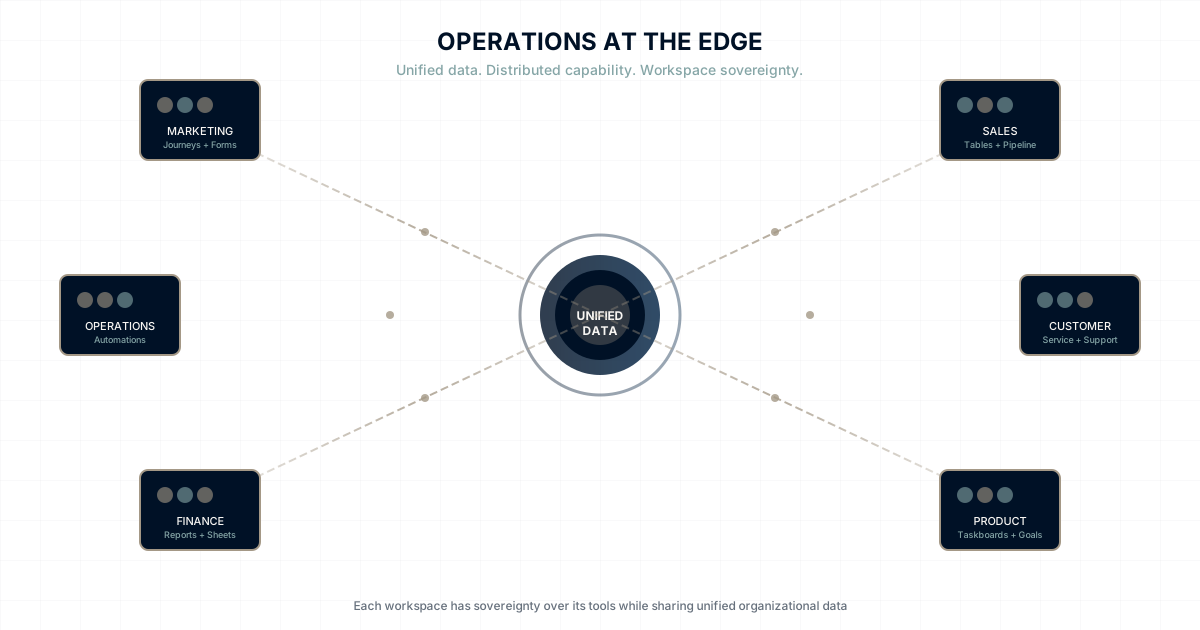
If Mission Command pushed planning to the edge, WaymakerOS pushes operations to the edge.
The people doing the work have the tools to do the work — AND the platform to build the tools they're missing.
How It Works: The Business Web
Under the hood, WaymakerOS creates something we call The Business Web — a federated network of workspaces, apps, and agents that teams own, publish, and subscribe to.
Think about what the World Wide Web did for information. Before the web, documents were isolated. After the web, any page could link to any other page. Information flowed. Knowledge compounded. Networks emerged.
WaymakerOS creates the same transformation for your business.
| World Wide Web | The Business Web |
|---|---|
| Websites | Workspaces |
| Hyperlinks | Content Subscriptions |
| Web Applications | Embedded Apps |
| APIs / Microservices | Agents as Services |
| Anyone can publish | Any workspace can publish |
| Anyone can link | Any workspace can subscribe |
Workspace Sovereignty
Each workspace is a self-contained operational unit. Marketing deploys its own email journeys, forms, and automations — without waiting for HQ. Sales builds its own pipeline tables and workflows. Operations creates its own tracking systems and reports.
But unlike shadow IT, everything lives within the organization's security perimeter. Teams get the speed they need. Leadership gets the oversight they require. Compliance gets the audit trail it demands.
Content Syndication
Workspaces publish and subscribe to each other. Executive publishes their business plan — Sales, Marketing, and Operations subscribe. When Executive updates the strategy, every department sees the change automatically. No more emailing PDFs. No more "which version is current?"
App Embedding
Internal apps built once can be embedded across workspaces. IT publishes an expense tracker. Finance, Sales, and Marketing each embed it. Same app, different workspace contexts — each instance runs with the subscriber's data and permissions.
Agents as Services
Teams publish AI agents as organizational services. Your data team publishes an Analytics Agent. Marketing asks for campaign insights. Sales asks for pipeline metrics. One agent serving the entire organization — like microservices, but for business intelligence.
Realistic Integration
No organization will only ever use WaymakerOS. That's why Connections and Incoming Webhooks are standard modules. Teams can connect to other apps or bring data in quickly from hundreds of other tools using incoming webhooks on Tables. In our app-chaotic world, these integration tools become essential fast.
The Math
Let's look at what fragmentation actually costs.
According to Zylo's 2025 SaaS Management Index, the average company spends $4,830 per employee on SaaS annually. Companies with 200-750 employees average 96 different SaaS applications. For a 500-employee mid-market company, that's approximately $2.4 million in SaaS alone — before the engineering team required to make it all work together.
And the software bill is only part of the story. To make disconnected systems work together, you need full-stack developers building custom integrations, data engineers maintaining pipelines, DevOps engineers managing infrastructure, and data analysts reconciling inconsistent reports. For a mid-market company, this integration team easily costs $1+ million annually — just to make disconnected tools pretend to work together.
The comparison for a 10-person team:
| Fragmented Stack | WaymakerOS | |
|---|---|---|
| Tools | ~$1,500/month ($150/user across 6-8 tools) | ~$190/month ($19/user) |
| Freelance dev / Zapier glue | ~$500-1,500/month | $0 |
| Internal apps | Not feasible (too expensive) | Included — charged by what they use |
| Custom client-facing apps | Separate hosting + backend ($200-500/month) | Included — charged by what they use |
| Total | ~$2,200-3,500/month | ~$190/month plus app usage |
That's a 90-95% reduction — real money for a small business. And it scales. A 50-person team paying $300/user across 10+ tools is spending $15,000/month before anyone even connects those systems together.
But the savings aren't just financial:
- No integration projects (saves months of engineering annually)
- No data reconciliation (saves hours weekly)
- No context switching between applications (saves 30+ minutes daily per employee)
- No "which system has the right data" debates
The real ROI is in clarity. When your entire organization works from a single source of truth, decisions get faster, mistakes get rarer, and people spend time on work that matters instead of work that connects other work.
Who WaymakerOS Is For
The Ambitious Solo Founder: You're one person doing the work of five. You don't have a team to manage integrations or reconcile data — you need tools that just work together. With WaymakerOS, one person can run email campaigns, track goals, manage projects, build customer portals, and keep everything in sync.
The Overwhelmed Business Leader: You're running 15+ tools and spending more time managing systems than managing strategy. You know something's broken, but adding another integration platform feels like treating symptoms instead of causes. You want clarity, not complexity.
The Growing Business (50-500 employees): Your startup tools got you here, but they're straining at scale. Inconsistent customer data, broken integrations, reports that don't match. You need infrastructure that grows with you — not against you.
The Technical Leader: You're tired of being an integration architect. You've built enough webhooks, managed enough API keys, and debugged enough data sync issues to know there has to be a better way. You want to build products, not plumbing.
The Invitation
If your team spends hours every week on processes that should take minutes...
If you know exactly what you need automated but can't justify a development project...
If you've outgrown spreadsheets but can't afford a development team...
If you believe your business deserves custom software, built with AI, running on your data...
Then WaymakerOS is for you.
Describe what takes too long. Build it with AI. Deploy it on Waymaker.
It runs forever.
Continue the Journey
Explore how Operations at the Edge transforms different aspects of business:
- Operations at the Edge: The philosophy behind distributed capability with unified data
- Workspace Sovereignty: What autonomous workspaces actually look like
- The Falklands Lesson for Business Software: The full story of Mission Command and its implications
- The Five Waves of Business Software: How 15 years of SaaS created fragmentation
- Why Your Teams Are Waiting for IT: The HQ bottleneck problem in detail
WaymakerOS. Make the way.
The way to make your business OS.
Start with Commander — email, calendar, taskboards, goals, and 16 more tools included.
About the Author

Stuart Leo
Stuart Leo founded Waymaker to solve a problem he kept seeing: businesses losing critical knowledge as they grow. He wrote Resolute to help leaders navigate change, lead with purpose, and build indestructible organizations. When he's not building software, he's enjoying the sand, surf, and open spaces of Australia.