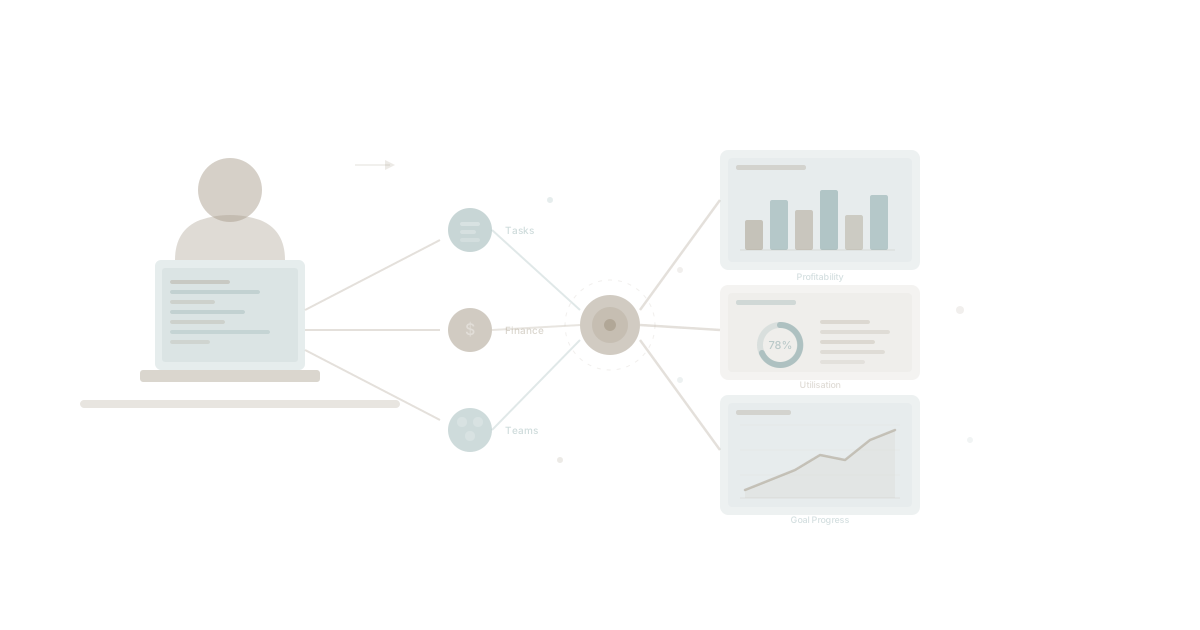
Somewhere in a mid-sized professional services firm, a finance manager named Sarah had a problem that will sound familiar to anyone who has ever tried to answer a simple question about their business.
Her CEO wanted a monthly report that showed three things together: project profitability, team utilisation, and progress against strategic goals. Not in three separate spreadsheets. Not in three different tools. Together, in one view, with the numbers that actually mattered.
Sarah tried every off-the-shelf reporting tool she could find. She got quotes from three custom development firms. The cheapest wanted $50,000 and six months. The most expensive wanted $120,000 and a year.
She built what she needed herself, in three weeks, without writing a single line of code by hand.
This is not a fantasy. This is what happens when AI changes who gets to build software.
The Report Nobody Could Build
Sarah's problem was not exotic. It was, in fact, painfully ordinary. She needed to combine data that lived in three different places:
Project data — which projects were profitable, which were bleeding money, and how actuals compared to estimates. Her firm tracked tasks, time, and deliverables in their project management system, but the financial data lived in spreadsheets that someone updated manually every Friday.
Team utilisation — who was overloaded, who had capacity, and how billable hours compared to total hours across the firm's 85 staff. This information existed in fragments across timesheets, project assignments, and a whiteboard in the operations director's office.
Goal progress — were the firm's quarterly objectives on track? Revenue targets, client acquisition numbers, delivery quality scores. These were tracked in yet another tool, updated sporadically, and never connected to the project or team data that would explain why targets were being hit or missed.
Every month, Sarah spent four days manually pulling numbers from five different systems, reconciling discrepancies, and building a PowerPoint deck that was outdated by the time she presented it.
The CEO would ask follow-up questions. Sarah would say, "I'll get back to you on that." She would spend two more days finding the answer.
This cycle repeated for eighteen months.
Why Off-the-Shelf Tools Failed
Sarah evaluated seven different reporting and business intelligence platforms. Every single one fell short for the same reason: they could connect to data sources, but they could not understand what the data meant in the context of her business.
Gartner's research on business intelligence adoption consistently shows that the majority of BI implementations fail to deliver expected value. The tools are powerful. The problem is the gap between raw data and business meaning.
A generic dashboard can show you a bar chart of hours logged per project. It cannot tell you that Project Atlas is unprofitable because the scope changed twice but the estimate was never updated, the senior architect was pulled onto an emergency for Project Beacon, and the client's approval cycle added three weeks of unbilled waiting time.
That kind of insight requires context — the organisational context that lives in your goals, your team structure, your project plans, and the relationships between them.
Sarah's firm was not lacking for data. They were drowning in it. What they lacked was a system that could bring it together with an understanding of what it all meant. This is the app sprawl problem at its most frustrating: not too many tools, but too many disconnected tools.
The Moment Everything Changed
Sarah first heard about Claude from her nephew, a university student who used it for research. She was sceptical. She was a finance professional, not a developer. She had never opened a code editor in her life.
Then she read about people with backgrounds much like hers building working systems with AI coding tools. No formal programming training. No development team. Just business professionals who understood what they needed, paired with an AI that could translate that understanding into working software.
That was the moment Sarah realised something fundamental had shifted. AI had not just made coding faster for developers. It had changed who gets to build.
The hard part of building software was never really the typing. It was the thinking — understanding the business problem, knowing what data matters, recognising how the pieces fit together. Sarah had spent fifteen years developing exactly that expertise. She knew her firm's financial model better than anyone. She understood how project profitability connected to team utilisation connected to strategic goal achievement.
She had always had the knowledge to design the perfect reporting system. She had never had the ability to build it. Until now.
What She Built
Sarah used Claude Code as her AI building partner and WaymakerOS Host as the platform where her application would live. The combination meant she could describe what she wanted in plain English, and the AI would generate the code. WaymakerOS provided something equally important: the data layer and the infrastructure to run it.
Here is what she built, step by step.
The Data Foundation
Instead of pulling from five disconnected systems, Sarah's reporting dashboard connects directly to Commander — the operational foundation of WaymakerOS. Commander already held her firm's:
- Tasks and projects — every deliverable, timeline, and status update
- Goals and key results — quarterly objectives with measurable targets
- Team structure — roles, assignments, and capacity data
- Documents and sheets — financial data, client contracts, and resource plans
The critical insight was that she did not need to build a data warehouse or set up complex integrations. The data already existed in a structured, connected form within Commander. Her reporting app just needed to read it and present it in the right way.
Project Profitability View
The first panel in Sarah's dashboard shows every active project with its estimated revenue, actual costs, and current profitability margin. Colour coding highlights projects that are trending below target. Clicking into any project reveals the specific cost drivers — which tasks took longer than estimated, where scope changed, and how resource allocation shifted over time.
This view replaced a spreadsheet that took two days to compile and was never accurate.
Team Utilisation View
The second panel displays utilisation rates across the firm — by team, by role, and by individual. It shows billable versus non-billable time, highlights capacity constraints, and flags team members who are consistently over or under-utilised.
But here is what made it genuinely valuable: because the data comes from Commander, utilisation is connected to project assignments and goal progress. Sarah can see not just that the design team is at 95% utilisation, but which goals that utilisation is driving and whether those goals are on track.
Goal Progress View
The third panel tracks the firm's quarterly objectives with actual progress data flowing in from projects and tasks. No more manual updates. No more "I think we're at about 60%." The numbers update as work happens.
When the CEO asks why the client acquisition target is behind, Sarah can trace it directly to the three proposals that stalled in the pipeline, linked to the team capacity constraints visible in the utilisation panel, connected to the two projects that overran their timelines in the profitability view.
Everything connects because everything lives on the same foundation.
The Build Process
Sarah did not learn to code. She learned to describe what she needed clearly and iteratively.
Her process followed a pattern that is becoming common among non-technical builders. She would describe a feature in plain English. Claude would generate the code. She would look at the result in her browser and say what needed to change. The AI would adjust.
The context engineering approach mattered enormously here. Because WaymakerOS provides structured organisational data through its API, Claude did not need Sarah to explain her data model from scratch. The platform's Model Context Protocol gave the AI direct understanding of the available data — tasks, goals, teams, documents — and how they related to each other.
Sarah spent the first week getting the data connections right and building the project profitability view. The second week was team utilisation. The third week was goal progress and the connecting logic that made the three views tell a coherent story.
She built in her IDE and scaled in WaymakerOS. The development happened locally with Claude Code. The deployment happened on Host, where the app connected to Commander's data layer automatically.
Three weeks. No developers. No $50,000 invoice. No six-month timeline.
What This Means for Everyone Else
Sarah's story is not unique. It is the leading edge of a pattern that 2026 is making unavoidable: the people who understand business problems best are now the people who can build solutions for them.
This does not mean developers are irrelevant. Complex systems, infrastructure, security, and scale still require deep technical expertise. But the vast majority of business software — the internal tools, the custom reports, the workflow automations, the dashboards that every organisation needs and no vendor will build — these are now within reach of anyone who can describe what they need.
The build versus buy decision has fundamentally changed. It is no longer a choice between expensive custom development and imperfect off-the-shelf tools. There is now a third path: build exactly what you need, on a platform that provides the foundation, using AI that translates your expertise into working software.
The Platform Matters More Than the Code
Here is the part that most people miss when they hear stories like Sarah's. The impressive part is not that AI wrote the code. The impressive part is that the code had somewhere meaningful to run and something meaningful to connect to.
Sarah's reporting dashboard works because WaymakerOS provides three things that no amount of AI code generation can replace:
-
A structured data layer — Commander holds the firm's operational data in a connected, queryable form. Tasks link to projects link to goals link to teams. Without this structure, Sarah would have spent those three weeks building data pipelines instead of building reports.
-
An application platform — Host gives the dashboard a place to live, accessible to everyone in the firm, secured by the organisation's existing authentication, and connected to real-time data. Without this, Sarah would have a script running on her laptop that nobody else could use.
-
Organisational context — The platform understands the firm's structure, its goals, and its workflows. When Claude Desktop connects to WaymakerOS, it does not just get data. It gets meaning. That context made the AI dramatically more effective as a building partner.
This is the insight that separates a novelty demo from a production business tool. AI coding assistants can generate code anywhere. But code without a platform is just a file on someone's computer. What Sarah needed — what every business builder needs — is code that connects to real data, runs in a real environment, and serves real users.
That is what a platform provides. That is the difference between introducing AI as a context layer and introducing AI as an actual capability.
The Numbers
Sarah's firm spent $0 on custom development. They spent zero months waiting. They got exactly the reporting system they needed, built by the person who understood the requirements better than any external developer ever could.
The monthly report that used to take four days now takes four minutes — the time it takes to open the dashboard and review the numbers that are already there.
The CEO stopped asking Sarah to "get back to me on that." The answers are in front of both of them, in real time, connected to the work that is actually happening across the firm.
And when the CEO asked for a new view last month — client lifetime value by industry vertical — Sarah built it in an afternoon.
Your Turn
Sarah is not special. She is a finance manager who understood her business, found the right tools, and built what she needed.
The question is not whether you have the technical skill. AI handles that now. The question is whether you have a platform that gives your creations somewhere to live, something to connect to, and the organisational context that makes them genuinely useful.
That is what WaymakerOS provides. The foundation you operate on. The build layer you create with. The intelligence that connects them.
The way to make your business OS. Design. Make. Own.
About the Author

Stuart Leo
Stuart Leo founded Waymaker to solve a problem he kept seeing: businesses losing critical knowledge as they grow. He wrote Resolute to help leaders navigate change, lead with purpose, and build indestructible organizations. When he's not building software, he's enjoying the sand, surf, and open spaces of Australia.