What if you didn't need 15 different apps to run your business?
What if email, calendar, documents, tasks, goals, video calls, team chat, and forms were all part of one platform—one login, one interface, one source of truth?
This isn't a hypothetical. It's the direction business software is heading. And the organizations that make this transition first will have a significant competitive advantage.
The average business spends $2M+ annually on fragmented software—not because each tool is expensive, but because the integration tax, context switching costs, and security overhead add up. Unified productivity isn't just about convenience. It's about reclaiming that lost money, time, and focus.
According to Forrester research, organizations that consolidate their productivity stack see 30-50% improvements in operational efficiency. Not from working harder—from eliminating friction.
What "Unified Productivity" Actually Means
Unified productivity isn't just bundling apps together. It's architectural integration from the ground up.
The Difference Between Bundled and Unified
Bundled (Google Workspace, Microsoft 365):
- Multiple apps that happen to be from one vendor
- Each app has its own data model, interface, permissions
- Integration is still required between apps
- Data lives in separate silos within the bundle
Unified (True platform approach):
- One data architecture that all tools share
- Consistent interface and patterns across all features
- Automatic context flow between capabilities
- Single permission model, single search, single AI layer
The distinction matters because bundled solutions give you fewer vendors without solving fragmentation. You still have email in one silo, documents in another, tasks in a third. They just happen to use the same login.
True unification means your email client knows about your tasks. Your task manager sees your calendar. Your documents understand your goals. Everything is connected by default.
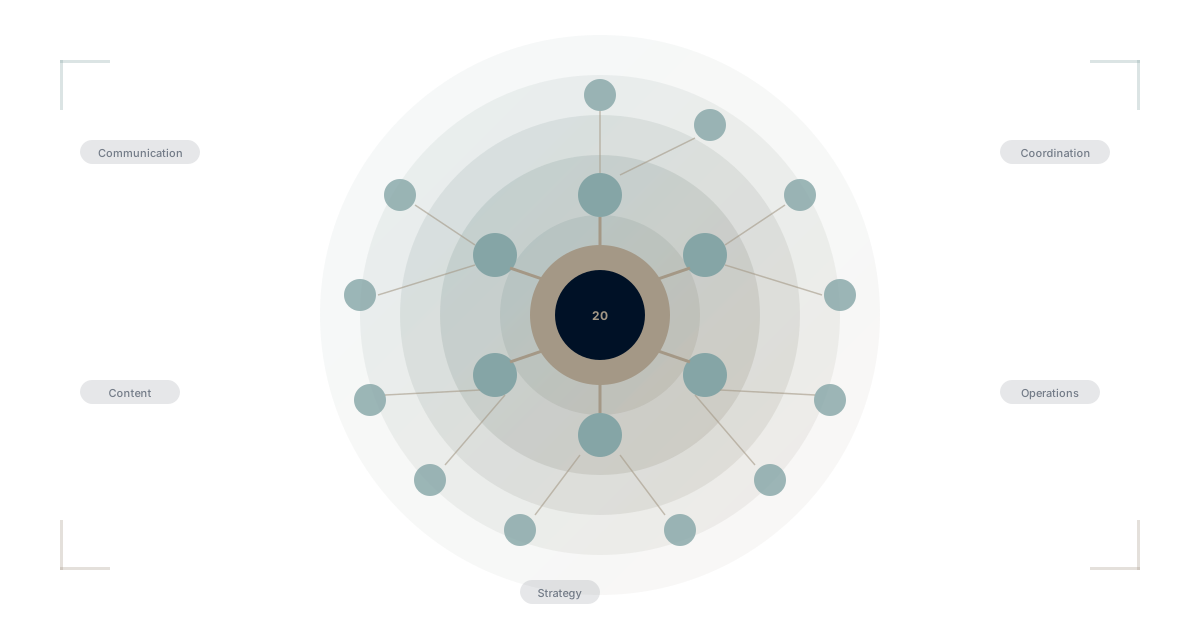
The 20 Tool Categories
A complete unified productivity platform replaces:
Communication:
- Email (integrated inbox with full calendar and task context)
- Messages (team chat and channels)
- Video Calls (scheduled and instant meetings)
- Rush (async video messaging)
Content:
- Documents (rich text collaboration)
- Sheets (spreadsheets and data analysis)
- Presentations (slides and visual communication)
Coordination:
- Calendar (scheduling integrated with tasks and email)
- Taskboards (Kanban, list, timeline views)
- Address Book (contacts across all communication)
Strategy:
- Goals & OKRs (objectives with measurable key results)
- Roles (clarity on who does what)
- My Workspace (personal command center)
Operations:
- Tables (structured databases)
- Forms (data collection and workflows)
- Journeys (customer experience and email marketing)
- Automations (workflow automation)
When these 18 capabilities share one data model, the integration tax disappears.
The Business Case for Consolidation
Direct Cost Savings
Let's break down what you're actually paying for a typical fragmented stack (25-person team):
| Category | Current Tools | Annual Cost |
|---|---|---|
| Productivity Suite | Google Workspace | $4,500 |
| Project Management | Asana Business | $7,500 |
| Team Chat | Slack Pro | $2,625 |
| Video Calls | Zoom Business | $4,800 |
| Documentation | Notion Team | $2,400 |
| Goals/OKRs | Lattice | $4,500 |
| Forms | Typeform | $1,200 |
| Email Marketing | Mailchimp | $3,600 |
| Total | 8 vendors | $31,125 |
With a unified platform at $19/user/month:
| Platform | Annual Cost | Savings |
|---|---|---|
| WaymakerOS Platform | $5,700 | $25,425 (82%) |
But direct savings are just the beginning.
Indirect Cost Savings
Integration elimination:
- No Zapier/Make subscriptions ($3,000-12,000/year)
- No custom integration maintenance ($10,000-50,000/year)
- No API monitoring and error handling
Productivity recovery:
- Eliminate 1,100+ daily app switches (RescueTime)
- Recover 40% of time lost to context switching
- Remove duplicate data entry across systems
Security consolidation:
- One vendor to audit instead of eight
- One permission model to manage
- One security posture to maintain
Vendor management:
- One contract instead of eight
- One renewal cycle
- One relationship to manage
For a 100-person company, total annual savings can exceed $500,000—with less complexity, not more.
What Each Tool Category Looks Like Unified
Email + Calendar + Tasks: The Communication Trinity
In fragmented systems, you have:
- Email in Gmail/Outlook
- Calendar in Google/Outlook Calendar
- Tasks in Asana/Monday/ClickUp
You're constantly: copying action items from emails to task tools, checking both calendar and task list for the day, losing context between what was discussed and what was assigned.
In a unified system:
- Action items in emails become tasks with one click
- Your calendar shows both scheduled events and task deadlines
- Searching email finds related tasks and documents automatically
- AI summarizes what needs attention across all three
Documents + Tasks + Goals: The Execution Chain
In fragmented systems:
- Strategic documents in Google Docs/Notion
- Goals in Lattice/15Five
- Tasks in Asana/Monday
You're constantly: manually linking strategy documents to goals, copying objectives from docs into goal tools, updating task progress without updating goal progress.
In a unified system:
- Goals live alongside the strategic documents that created them
- Tasks are automatically linked to the goals they support
- Progress flows from tasks → goals → strategic dashboards
- Everyone sees how their work connects to strategy
Forms + Tables + Automations: The Operations Layer
In fragmented systems:
- Forms in Typeform/Google Forms
- Data storage in Airtable/spreadsheets
- Automation in Zapier/Make
You're constantly: exporting form submissions to spreadsheets, building Zapier workflows to connect systems, debugging broken automations when APIs change.
In a unified system:
- Form submissions flow directly into Tables
- Automations trigger natively without external tools
- Data integrity is maintained automatically
- No API rate limits or sync delays
Comparing Unified Platforms
Not all "unified" platforms are created equal. Here's how the major options compare:
Google Workspace
What it includes: Gmail, Calendar, Drive, Docs, Sheets, Slides, Meet, Chat
What's missing:
- ❌ Task management (basic Tasks only)
- ❌ Project management
- ❌ Goals/OKRs
- ❌ CRM/Tables
- ❌ Forms (limited Google Forms)
- ❌ Email marketing
The reality: Google Workspace is a productivity suite, not a unified platform. You'll still need Asana, Slack, Notion, Lattice, and more.
Full comparison: WaymakerOS vs Google Workspace →
Microsoft 365
What it includes: Outlook, Calendar, OneDrive, Word, Excel, PowerPoint, Teams, SharePoint
What's missing:
- ❌ Intuitive task management (Planner is basic)
- ❌ Modern project management
- ❌ Goals/OKRs
- ❌ CRM/Tables (Dataverse is enterprise-only)
- ❌ Proper forms (Microsoft Forms is limited)
- ❌ Email marketing
The reality: Microsoft 365 is powerful but fragmented within itself. SharePoint vs OneDrive vs Teams confusion is legendary. You'll still need additional tools.
Full comparison: WaymakerOS vs Microsoft 365 →
Zoho One
What it includes: 45+ applications across sales, marketing, support, finance, HR, and operations
What's missing:
- ❌ Consistent UX (45 apps = 45 interfaces)
- ❌ True unification (apps are bundled, not unified)
- ❌ Modern AI integration
- ❌ Developer platform
The reality: Zoho One solves the vendor problem but not the fragmentation problem. You're still switching between 45 different applications with different interfaces.
WaymakerOS
What it includes: Email, Calendar, Documents, Sheets, Messages, Video Calls, Rush, Address Book, Taskboards, Goals & OKRs, Roles, Tables, Forms, Journeys, Automations, My Workspace
What's unified:
- ✅ One data model
- ✅ One interface pattern
- ✅ One search across everything
- ✅ One AI with full context
- ✅ One permission system
The approach: Built from the ground up as a unified platform, not a collection of acquired products.
The Migration Path
Moving from fragmented to unified doesn't happen overnight. Here's a pragmatic approach.
Phase 1: Assessment (Week 1-2)
Inventory your current stack:
- List all software subscriptions
- Identify overlap and redundancy
- Calculate true total cost (including integration and maintenance)
- Map data flows between systems
Identify migration candidates:
- Which tools cause the most friction?
- Where is data duplicated?
- What integrations break most often?
Phase 2: Parallel Operation (Week 3-6)
Start with low-risk categories:
- Documents and sheets (easy to migrate)
- Internal communication (can run parallel)
- New projects and initiatives (greenfield)
Maintain existing systems:
- Don't disrupt production workflows
- Run parallel for critical processes
- Build confidence gradually
Phase 3: Progressive Migration (Month 2-3)
Migrate by team or function:
- Start with early adopters
- Gather feedback and refine
- Create internal champions
Address integration dependencies:
- Identify systems that must stay connected
- Plan data migration carefully
- Test thoroughly before switching
Phase 4: Full Transition (Month 4+)
Sunset legacy systems:
- Export data from old tools
- Update processes and documentation
- Cancel subscriptions as you go
Optimize the new platform:
- Build automations native to the platform
- Establish best practices
- Train all users comprehensively
Common Concerns Addressed
"What about our existing data?"
Your historical data can come with you. In WaymakerOS, Word documents import into Documents, and Excel and CSV files import into Sheets. Projects and tasks are recreated in Taskboards rather than imported, which most teams use as the moment to leave stale work behind.
"What if the unified platform is missing a feature we need?"
Two considerations:
- Many "essential" features are actually compensating for fragmentation. When your tools share context, you need fewer workarounds.
- True platforms let you build what's missing. WaymakerOS includes Tables (databases), Forms, Automations, and a developer API. If a specialized feature doesn't exist, you can build it without leaving the platform.
"What about integrations with external systems?"
Unified platforms still connect to external systems—accounting software, specialized industry tools, third-party services. The difference is you're integrating one platform instead of fifteen.
"Isn't it risky to put everything in one vendor?"
Consider the alternative: putting everything in fifteen vendors who don't coordinate, don't share data models, and can each become a single point of failure.
With a unified platform:
- Data export is comprehensive (one system to export from)
- Compliance is simplified (one vendor to audit)
- Security is consolidated (one attack surface)
The "eggs in one basket" argument assumes the basket is the risk. In enterprise software, the complexity of managing multiple baskets is often the larger risk.
"What about our investment in existing tools?"
Sunk cost shouldn't drive future decisions. Calculate:
- What are you paying annually for current tools?
- What's the integration maintenance costing?
- What productivity is lost to fragmentation?
If the answer is "a lot," the investment to migrate pays back quickly.
The Strategic Advantage
Beyond cost savings and efficiency, unified productivity creates strategic capabilities:
AI That Actually Works
AI initiatives fail without unified data. When your AI can see across email, documents, tasks, goals, and customer data, it can actually help. When data is scattered across 15 systems, AI is limited to narrow contexts.
WaymakerOS's OneAI sees your complete organizational context—not just the slice visible in one application.
Real-Time Strategic Visibility
When tasks connect to goals connect to strategy, leaders can see actual progress. Not "green/yellow/red" status updates, but real completion data flowing from daily work to strategic outcomes.
Institutional Memory
When everything happens in one system, you have one source of truth for what happened, when, and why. New employees can search across all historical context. Knowledge doesn't leave when people do.
Faster Decision Making
When data isn't scattered, decisions don't require "let me check with three systems and get back to you." The answer is available immediately.
Getting Started
Step 1: Calculate Your True Cost
Use our app sprawl calculator to understand what fragmentation is actually costing your organization.
Step 2: Identify Your Biggest Pain Points
Where does fragmentation hurt most? Email disconnected from tasks? Goals disconnected from projects? Start there.
Step 3: Evaluate Unified Platforms
Look at what's actually included, not what's marketed. Does it truly unify, or just bundle?
Step 4: Plan a Phased Migration
Don't try to switch everything at once. Start with new initiatives, expand to willing teams, then migrate broadly.
Further Reading
What Unified Productivity Looks Like
- One Platform for Tasks, Docs, Goals, and Data
- How to Run a 20-Person Company on One Platform
- Stop Copy-Pasting Between Apps
- Kanban, Goals, and Documents in One Place
When Your Current Tools Hit Their Limits
- Why Your OKRs Fail When They Live in a Spreadsheet
- From Notion to an Actual OS: When Wikis Hit Their Limits
- The Business Owner's Guide to Replacing Google Workspace
- What a Chief of Staff Wishes Their CEO Knew About Business Software
Understand the Problem
- The App Sprawl Crisis
- Tool Sprawl: How 47 Apps Killed Our Productivity
- Context Switching Costs: The $450B Problem
Migration Guides
- Complete Google Workspace Migration Guide 2026
- Best Microsoft 365 Alternative for Small Business
- How to Consolidate Your SaaS Stack
Compare Platforms
Strategic Execution
- OKR Examples That Actually Work
- Strategic Planning Template 2026
- Commander: The Integrated Management Experience
The future of business software isn't more tools—it's better tools that work together. Unified productivity isn't a convenience feature. It's a strategic imperative for organizations that want AI that works, data they can trust, and teams that can focus on outcomes instead of tool management.
Part of our guide to all-in-one business platforms.
About the Author

Stuart Leo
Stuart Leo founded Waymaker to solve a problem he kept seeing: businesses losing critical knowledge as they grow. He wrote Resolute to help leaders navigate change, lead with purpose, and build indestructible organizations. When he's not building software, he's enjoying the sand, surf, and open spaces of Australia.