Every business is unique. That's why generic SaaS never fits perfectly.
Your health services company needs patient management that works your way. Your agency needs client workflows that match your methodology. Your manufacturer needs inventory systems that integrate with your supply chain.
The traditional answer was: buy off-the-shelf and adapt your processes, or build from scratch and maintain forever.
There's a third option: build custom apps on a platform that already knows your business.
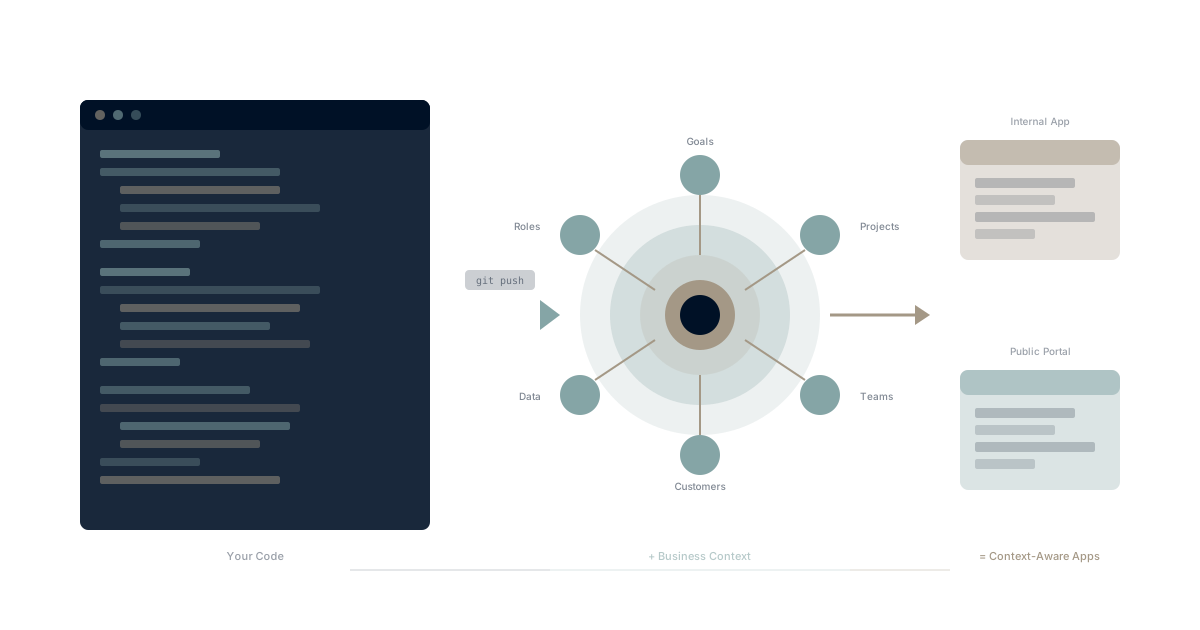
When your apps inherit organizational context automatically—your goals, your projects, your teams, your customers—you're not starting from zero. You're building on a foundation that understands who you are.
This is what WaymakerOS enables with its BUILD pillar: the ability to create context-aware applications deployed directly from your IDE.
Why Generic SaaS Falls Short
Every organization that's tried to implement major software has felt this pain:
The 80/20 Problem
Most SaaS products cover 80% of what you need. The last 20%? That's where your competitive advantage lives—and it's exactly what the software can't do.
- Your sales process isn't the same as everyone else's
- Your customer onboarding has unique steps
- Your project methodology doesn't match the tool's assumptions
- Your reporting needs cut across categories the tool didn't anticipate
You end up with workarounds, spreadsheets, and manual processes filling the gaps.
The Configuration Trap
Some platforms let you "configure" your way to what you need. But heavy configuration has costs:
- Maintenance burden: Every upgrade risks breaking your customizations
- Knowledge lock-in: Only certain people understand how things work
- Technical debt: Configurations layer on configurations until the system is fragile
- Vendor dependency: Your customizations only exist within that vendor's ecosystem
According to Gartner, configuration debt is often harder to manage than code debt.
The Build-From-Scratch Alternative
Building entirely custom software gives you flexibility but creates different problems:
- Authentication: Build or buy user management?
- Infrastructure: Where does it run?
- Data: How does it connect to your other systems?
- Context: How does it know about your organization?
- Maintenance: Who keeps it running forever?
Building from scratch means solving problems that have nothing to do with your actual business need.
The Platform Approach: Build on Context
The alternative is building on a platform that provides:
- Authentication handled: Users already exist, permissions already work
- Infrastructure included: Deploy and scale without managing servers
- Data connected: Access your existing organizational data automatically
- Context inherited: Your apps know about goals, projects, teams, customers
- Maintenance shared: The platform team handles upgrades and security
You focus on your unique business logic. The platform handles everything else.
WaymakerOS BUILD: How It Works
Your Repo, Your Agent, Your Business Context
Three connections do the work. All three are optional; turn on the ones you need.
   Your repo + AI agent              Commander                    Waymaker Host
 (Claude Code, Codex, Cursor)    (goals, docs, tasks)          (apps, Ambassadors)
            │                            │                             │
            ├── Waymaker MCP server ─────┤   the agent reads and       │
            │                            │   writes Commander, as you  │
            ├── repo-connected taskboard ┤   PRDs → roadmap layers,    │
            │                            │   briefs → cards (read-only)│
            └── git push ──────────────────────────────────────────────┘
- The Waymaker MCP server gives your AI agent your Commander tools and context, scoped to your permissions.
- A repo-connected taskboard reads the PRDs and briefs in your GitHub repo as a roadmap. Commander never writes to the repo; refresh the board to pull the latest.
- Waymaker Host deploys your app from the same repo.
Deploy From Your Repo
# Install the Waymaker CLI
npm install -g @waymakeros/cli

# Check you're signed in to your workspace
waymaker auth status

# Your code deploys to Waymaker Host from your GitHub repo
Build with the tools developers love:
- VS Code with full TypeScript support
- Cursor with AI-assisted development
- Windsurf with intelligent code completion
Deploy to production with git push.
Waymaker Host: Deploy Your Apps
Waymaker Host is the frontend cloud for deploying apps and agents within WaymakerOS:
Every app is charged by what it uses in its Solution, and you choose where each one is offered — one, the other, or both:
In Commander workspaces:
- Members open the app with their Waymaker sign-in
- Users don't need new credentials
- Suits tools your team uses every day
On the web:
- Customer-facing applications, public websites and portals
- Open to anyone, or to the app's own users through its own sign-in
Ambassadors: Serverless with Context
Ambassadors are serverless functions within Waymaker Host that automatically inherit business context:
// Traditional serverless function
export async function handler(request: Request) {
  // You need to manually:
  // - Authenticate the user
  // - Look up their organization
  // - Query for their goals, projects, teams
  // - Handle permissions
}

// Waymaker Ambassador
export async function handler(request: Request, context: WaymakerContext) {
  // Context already includes:
  // - Authenticated user
  // - Organization details
  // - Goals and OKRs
  // - Projects and tasks
  // - Team structure
  // - Customer data

  const { goals, projects, currentUser } = context;
  // Build your logic on top of organizational context
}
This is the difference between building from scratch and building on a foundation.
What You Can Build
Internal Tools
Employee Dashboards:
- Personal productivity views that pull from goals, tasks, calendar
- Team health dashboards aggregating across projects
- Executive scorecards with real strategic data
Process Automation:
- Custom onboarding workflows for your organization
- Approval systems that match your hierarchy
- Document generation with organizational context
Integration Bridges:
- Connect specialized industry tools to your unified data
- Custom sync logic for legacy systems
- Data transformation pipelines
Customer-Facing Apps
Client Portals:
- Project status views for customers
- Document sharing and approval workflows
- Communication history and context
Custom CRMs:
- Sales pipelines that match your methodology
- Customer data structures unique to your industry
- Automated workflows based on your process
Customer Tools:
- Self-service applications
- Resource centers and knowledge bases
- Interactive calculators and configurators
AI Agents
Context-Aware Assistants:
- AI that sees your goals, not just your chat history
- Agents that understand your organizational structure
- Assistants that know project context automatically
Workflow Automation:
- Intelligent routing based on organizational rules
- Smart notifications that understand priority
- Proactive suggestions based on strategic context
Industry Examples
Health Services: Patient Management
The need: Patient management that integrates with your care methodology, not generic healthcare software.
Built on WaymakerOS:
- Patient records in Tables
- Care workflows in Taskboards
- Appointment scheduling in Calendar
- Communication history in unified context
- Custom patient portal deployed via Host
What context provides:
- Care team assignments from Roles
- Patient goals from Goals system
- Document history from Documents
- Full communication timeline from Email/Messages
Creative Agency: Client Workflow
The need: Project intake, creative workflow, client communication that matches your agency's process.
Built on WaymakerOS:
- Custom intake Forms
- Project tracking in Taskboards
- Asset management in Documents
- Client communication in unified Email/Messages
- Client portal via Host
What context provides:
- Account team assignments from Roles
- Project goals from OKRs
- All client touchpoints in one timeline
- Automatic project status updates
Manufacturer: Inventory System
The need: Inventory tracking that integrates with your supply chain and production workflow.
Built on WaymakerOS:
- Inventory data in Tables
- Production tasks in Taskboards
- Supplier communication in unified context
- Reorder automation via Host Ambassadors
- Supplier portal via Host
What context provides:
- Production goals from OKRs
- Team assignments from Roles
- Supplier relationship history
- Cross-functional visibility
The Developer Experience
Familiar Tools
Build with technologies you already know:
- TypeScript for type-safe development
- React for UI components
- Git for version control
- VS Code for editing
Platform Access: CLI and MCP
Reach organizational data through the Waymaker CLI and the Waymaker MCP server, both scoped to your permissions:
# Install the Waymaker CLI
npm install -g @waymakeros/cli

# Read the goals and projects your app should know about
waymaker goals list
waymaker projects list

# Create the data layer your app runs on
waymaker tables create inventory --columns "sku:text,quantity:number,status:select[In stock,Low,Reorder]"

# Deploy the app from your connected repo
waymaker host apps create inventory-portal
waymaker host apps deploy <app-id>
Your AI agent uses the same surface through the Waymaker MCP server: it can read goals, create tasks and update documents in Commander, and work with Host apps and databases, all as you.
Build vs Buy: The Decision Framework
When to Use Existing Tools
Use off-the-shelf solutions when:
- Your needs are truly generic
- The tool covers 95%+ of requirements
- Customization needs are minimal
- Time-to-value matters more than perfect fit
When to Build on Platform
Build custom applications when:
- Your process is a competitive advantage
- Generic tools require extensive workarounds
- Integration with organizational context is essential
- You need unique workflows or data structures
When to Build from Scratch
Build entirely custom (rarely) when:
- Your needs are extremely specialized
- No platform can provide relevant context
- You have dedicated engineering capacity
- You're willing to maintain forever
For most organizations, building on a platform is the sweet spot: maximum flexibility with minimum infrastructure burden.
Getting Started with BUILD
Step 1: Understand Your Context
Before building, understand what context you have:
- What goals and OKRs exist?
- How are teams structured in Roles?
- What data lives in Tables?
- What workflows exist in Taskboards?
Your custom apps will be more powerful when they leverage existing context.
Step 2: Start Small
Begin with a focused use case:
- A single dashboard view
- One workflow automation
- A simple internal tool
Prove the pattern before scaling.
Step 3: Use the CLI and MCP Server
Install the Waymaker CLI:
npm install -g @waymakeros/cli
Then connect your AI agent to the Waymaker MCP server. Everything about both lives in the developer documentation.
Step 4: Deploy and Iterate
Deploy internally first:
- Test with real organizational data
- Gather feedback from actual users
- Iterate based on real usage
Then expand to production use.
Further Reading
AI and the Build Layer
- Claude Desktop Can Run Your Business — If You Give It the Right OS
- Your AI Needs an Operating System, Not a Filing Cabinet
- AI Agents That Work While You Sleep
- Custom Apps That Know Your Goals, Team, and Data
Build Without Code
- Build a Client Portal in a Day (Without Hiring a Developer)
- How a Finance Manager Built Custom Reporting Without Writing Code
- Why Generic SaaS Never Fits — And What to Build Instead
Industry Case Studies
Context Engineering
- What is Context Engineering and Why It Matters
- Context Engineering vs Prompt Engineering
- The Context Compass Framework
Platform Development
- Build in IDE, Scale in IME
- Build vs Buy: The Platform Decision
- AI Coding Context for Cursor, Windsurf, VS Code
Understand the Foundation
- Unified Productivity: The Platform Foundation
- What is the Integrated Management Experience?
- Commander: Where Apps Run
Generic SaaS will always fall short of your unique needs. Building from scratch will always be more work than it's worth.
Building on a platform that already knows your business—your goals, your teams, your projects, your customers—gives you the flexibility of custom development with the convenience of SaaS.
That's the BUILD pillar of WaymakerOS.
Part of our guide to building and hosting what no one will build for you.
About the Author

Stuart Leo
Stuart Leo founded Waymaker to solve a problem he kept seeing: businesses losing critical knowledge as they grow. He wrote Resolute to help leaders navigate change, lead with purpose, and build indestructible organizations. When he's not building software, he's enjoying the sand, surf, and open spaces of Australia.