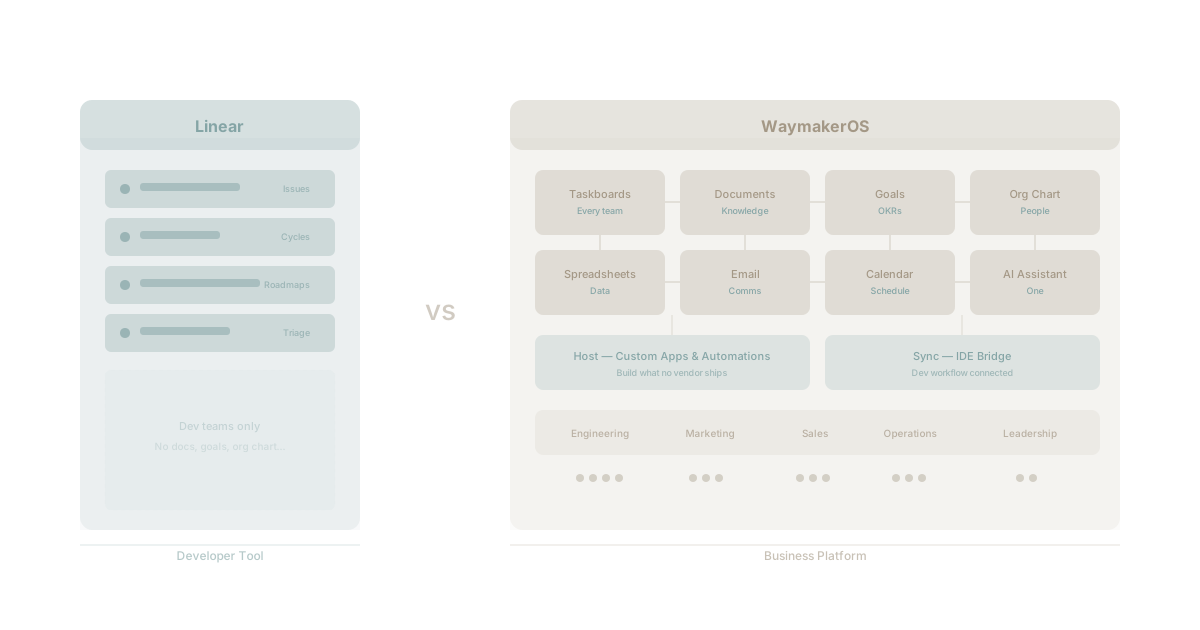
Linear is one of the best products in software. Fast, opinionated, beautifully designed. If you are an engineering team that needs issue tracking, cycle planning, and roadmaps, Linear is hard to beat. It earns its reputation every day.
But Linear is a developer tool. It was built for engineering teams and it stays in that lane with conviction. That focus is what makes it exceptional. It is also what makes it insufficient the moment your business needs extend beyond the dev team.
WaymakerOS is a business platform. It was built for every team in the organisation. The comparison is not about which is better. It is about which problem you are solving: shipping code or running a business.
What Linear Does Brilliantly
Linear deserves genuine praise. According to Linear's own philosophy, they build software for professional software teams. That clarity of purpose shows in every interaction.
Speed That Sets the Standard
Linear's interface responds in under 50 milliseconds. Every action feels instant. Page transitions, search results, issue creation. The entire experience is built around eliminating wait time. Most project management tools feel sluggish by comparison. Linear feels like a native application, not a web app pretending to be one.
Keyboard-First Design
Power users never touch the mouse. Linear's keyboard shortcut system covers every action: creating issues, changing status, assigning work, navigating between views. For developers who live in terminals and code editors, this design philosophy feels natural. It matches how engineers already work.
Opinionated Workflow
Linear does not try to be everything to everyone. Issues have a clear lifecycle. Cycles enforce rhythm. Roadmaps provide visibility. Triage keeps the inbox clean. These opinions reduce configuration time and eliminate the "blank canvas" problem that plagues more flexible tools. You do not spend weeks setting up Linear. You start working.
Developer Integrations
GitHub and GitLab integration is seamless. Pull requests link to issues automatically. Branch names generate from issue identifiers. Deployment status flows back into the issue tracker. For development workflow, the toolchain integration is best-in-class.
Beautiful Design
Linear looks and feels premium. The dark interface, the typography, the animations, the attention to micro-interactions. Using Linear feels good in a way that most enterprise software does not. Design is not superficial here. It reduces cognitive load and makes complex information scannable.
Where Linear Stops
None of what follows is criticism. Linear stops where it stops because the team chose focus over breadth. But your business does not stop where Linear stops.
No Documents
Linear has no document management. Architecture decisions, meeting notes, project briefs, process documentation, knowledge bases. None of these live in Linear. Your team needs Notion, Confluence, Google Docs, or something else alongside it.
No Goals or OKRs
Linear tracks what you are building. It does not track why. There is no goal hierarchy, no OKR framework, no way to connect a sprint to a quarterly objective to an annual target. Strategic alignment lives somewhere else. Research from Harvard Business Review consistently shows that teams who understand the strategic context behind their work outperform those who do not by measurable margins.
No Organisation Chart
Who reports to whom. Which teams exist. How departments are structured. What roles people hold. Linear does not model your organisation. For a dev tool, that makes sense. For running a business, that information is foundational.
No Spreadsheets or Data Views
Linear's views are purpose-built for issues: boards, lists, timelines. There are no general-purpose spreadsheets, no pivot tables, no custom data views for tracking budgets, inventories, client lists, or the thousand other things businesses track in spreadsheets.
No Email
Linear integrates with Slack and other tools, but it has no email capability. Customer communication, vendor coordination, internal announcements. These all require separate tools.
No Non-Dev Team Support
Marketing cannot plan content calendars in Linear. Sales cannot manage pipeline. HR cannot track hiring. Finance cannot manage budgets. Operations cannot model processes. Linear is not built for these teams and does not pretend to be. But these teams exist in every business and they need tools too.
The Silo Problem Linear Creates
This is not a Linear problem specifically. It is a category problem. When you choose best-of-breed tools for each team, you create silos by design.
How It Plays Out
The engineering team adopts Linear. Marketing adopts Asana or Monday. Sales uses a CRM. HR uses BambooHR or similar. Finance lives in spreadsheets. Strategy lives in slide decks.
Each team has a good tool. No team has visibility into what the others are doing. The CEO asks for a status update and gets five different reports in five different formats from five different systems.
Gartner's research on work management identifies tool fragmentation as a top-three barrier to organisational agility. It is not that individual tools are bad. It is that the gaps between them are where alignment breaks down.
The Hidden Costs
Every tool boundary creates a translation layer. Information that moves from Linear to Slack to Notion to a slide deck loses fidelity at each step. Decisions get made without full context because full context is scattered across systems. Teams duplicate work because they cannot see what others have already done. If this sounds familiar, you are experiencing the real cost of app sprawl.
The Integration Tax
You can integrate these tools. Zapier, webhooks, API connections. But the integration tax adds up fast, and integrations are fragile. They break silently. They move data but not context. Knowing that an issue was closed does not tell marketing whether the feature is ready to announce. Knowing that a deal was signed does not tell engineering what was promised.
WaymakerOS: Built for the Whole Business
WaymakerOS takes a different approach. Instead of building the best tool for one team, it builds a platform that serves every team. This is the difference between a unified productivity platform and a collection of point solutions.
Commander: The Foundation
Commander is the productivity suite at the centre of WaymakerOS. It includes 20 integrated tools that share a single data layer:
| Capability | What It Covers |
|---|---|
| Taskboards | Project and task management for every team |
| Documents | Rich documents with AI assistance |
| Spreadsheets | General-purpose data views and tracking |
| Goals | OKR and goal hierarchy with progress tracking |
| Org Chart | Organisation structure and role management |
| Integrated communication | |
| Calendar | Scheduling across teams |
| AI Assistant | Contextual AI that knows your organisation |
Every tool shares the same data. A goal connects to a project connects to a task connects to a document. There are no integration boundaries to cross. This is what happens when you move beyond traditional project management.
Host: The Build Layer
Here is where WaymakerOS diverges from every other platform. When your business needs something Commander does not provide out of the box, you build it. Host gives you custom apps, serverless functions, and database tables, all connected to the same platform.
A logistics company needs route optimisation. A recruitment firm needs candidate scoring. A manufacturing business needs quality control dashboards. These are not features any platform will ship because they are unique to each business. With Host, you build them on the platform you already use.
One: The Intelligence Layer
One is the AI that connects everything. Built on Claude from Anthropic, One understands your organisation's context: your goals, your projects, your documents, your people. It is AI that actually remembers your business context across every interaction.
Ask One "What is the status of Project Aurora?" and it draws from tasks, documents, goals, and team updates to give you a complete answer. No AI built on top of a single-team tool can do this because it does not have access to the full picture.
Linear + WaymakerOS Together
This is not an either-or decision. Dev teams that love Linear can keep using it while the rest of the organisation works in Commander, and there is a clear picture of what Waymaker adds to a Linear user's workflow.
How It Works
Engineers build in their repo and scale in the platform. The PRDs and briefs they write next to the code — what is being built, and why — are read by a Commander taskboard connected to the repo. Commander only reads; git stays the source of truth. Non-technical teams see the roadmap without needing access to Linear or GitHub.
Linear tracks what engineering is building. WaymakerOS tracks why it matters, who it affects, and how it connects to everything else.
The Practical Workflow
Engineering uses Linear for daily issue tracking and sprint execution. A taskboard connected to their repo provides the bridge.
Marketing uses Commander for content calendars, campaign tracking, and launch coordination. They see engineering progress without needing access to Linear.
Sales uses Commander for pipeline management and deal tracking. They know which features are shipping and when, without asking engineering.
Operations uses Commander for process management and performance tracking. Cross-functional visibility is built in.
Leadership uses Commander's goal framework to connect all of it. Sprint velocity in Linear becomes strategic progress in Commander.
The Comparison Table
| Capability | Linear | WaymakerOS |
|---|---|---|
| Issue tracking | Exceptional | Strong |
| Keyboard shortcuts | Best in class | Good |
| Developer workflow | Purpose-built | Via the MCP server and a repo-connected taskboard |
| Speed/performance | Industry-leading | Fast |
| Documents | None | Full-featured |
| Goals/OKRs | None | Built-in |
| Org chart | None | Built-in |
| Spreadsheets | None | Built-in |
| None | Built-in | |
| Non-dev teams | Not supported | Native support |
| Custom apps | None | Host platform |
| AI assistant | Limited | Contextual AI |
| Starting price | $8/user/mo | $19/user/mo |
The price difference reflects the scope difference. Linear costs less because it does less. WaymakerOS costs more because it replaces the six other tools you would need alongside Linear.
When to Choose What
Choose Linear If
Your organisation is primarily an engineering team. You do not need cross-functional alignment tools. Other teams already have their own solutions and you are not trying to unify. You value the absolute best developer experience for issue tracking and are willing to accept the tool boundaries that come with it.
Choose WaymakerOS If
Your business has multiple teams that need to work in alignment. You are tired of the integration tax and the context loss that comes with tool fragmentation. You want one platform that grows with your business, including custom applications that no vendor will ever build for you. You want AI that understands your whole organisation, not just your issue tracker.
Choose Both If
Your engineering team loves Linear and will not give it up (and should not have to). But the rest of your organisation needs a platform, not a collection of tools. A repo-connected taskboard bridges the gap. Engineering keeps Linear. Everyone else uses Commander. The platform connects them through shared context and context engineering principles.
The Bigger Picture
The question is not "Is Linear good?" Linear is excellent. The question is "Can a developer tool run a business?" It cannot. It was never designed to.
The comparison between traditional tools and integrated platforms comes down to scope. Tools solve team-level problems. Platforms solve organisation-level problems. As your business grows, the gap between these two scopes becomes the gap between alignment and chaos.
Linear solved engineering project management with conviction and taste. WaymakerOS is solving the harder problem: making every team in the organisation visible, aligned, and productive on a single platform they can build on. That is why WaymakerOS exists.
The way to make your business OS. Design. Make. Own.
Frequently asked questions
Q: Is Linear better than WaymakerOS?
Neither is better. Linear is exceptional at engineering issue tracking, cycle planning, and roadmaps. WaymakerOS is a business platform built for every team in the organisation. The right choice depends on whether you are shipping code or running a business.
Q: What can Linear not do for the rest of the business?
Linear has no document management, no goals or OKR hierarchy, no org chart, no spreadsheets, no email, and no support for marketing, sales, HR, finance, or operations. It stays focused on engineering by design.
Q: Can I keep Linear and still use WaymakerOS?
Yes. Engineering keeps Linear for issues. Connect a Commander taskboard to the GitHub repo, and the PRDs and briefs engineering writes there become a roadmap everyone else can read in Commander. See what Waymaker adds to a Linear user's workflow.
Q: Why does using Linear alongside other team tools create silos?
When each team picks a best-of-breed tool, the gaps between those tools are where alignment breaks down and information loses fidelity at every boundary. This is the integration tax of connecting separate apps.
Q: Why does WaymakerOS cost more than Linear?
The price difference reflects the scope difference. Linear costs less because it does less. WaymakerOS replaces the other tools you would otherwise need alongside Linear, which is part of why WaymakerOS exists.
This comparison reflects publicly available information about Linear and WaymakerOS as of March 2026. Linear is a trademark of Linear Orbit, Inc. For the latest ClickUp, Asana, Monday, and WaymakerOS comparison, see our comprehensive guide.
Frequently asked questions
- Is Linear better than WaymakerOS?
- Neither is better. Linear is exceptional at engineering issue tracking, cycle planning, and roadmaps. WaymakerOS is a business platform built for every team in the organisation. The right choice depends on whether you are shipping code or running a business.
- What can Linear not do for the rest of the business?
- Linear has no document management, no goals or OKR hierarchy, no org chart, no spreadsheets, no email, and no support for marketing, sales, HR, finance, or operations. It stays focused on engineering by design.
- Can I keep Linear and still use WaymakerOS?
- Yes. Engineering keeps Linear for issues. Connect a Commander taskboard to the GitHub repo, and the PRDs and briefs engineering writes there become a roadmap everyone else can read in Commander. See what Waymaker adds to a Linear user's workflow.
- Why does using Linear alongside other team tools create silos?
- When each team picks a best-of-breed tool, the gaps between those tools are where alignment breaks down and information loses fidelity at every boundary. This is the integration tax of connecting separate apps.
- Why does WaymakerOS cost more than Linear?
- The price difference reflects the scope difference. Linear costs less because it does less. WaymakerOS replaces the other tools you would otherwise need alongside Linear, which is part of why WaymakerOS exists.
About the Author

Waymaker Editorial
Stuart Leo founded Waymaker to solve a problem he kept seeing: businesses losing critical knowledge as they grow. He wrote Resolute to help leaders navigate change, lead with purpose, and build indestructible organizations. When he's not building software, he's enjoying the sand, surf, and open spaces of Australia.